A small percentage of articles get most of the results. Maybe you’ve noticed.
The top performing content, in every industry vertical, generates huge amounts of visibility and engagement, rankings and traffic. They’re the big winners. These articles stand out, both for your audience and in your analytics.
The digital marketer’s job is to find and analyze these high-performers. How are they different? What makes them special? How could we create more of these?
But the conclusions are usually the same. Regardless of the topic, the high performers often share common traits. They align with certain content standards. These web content best practices are the set of elements and attributes that correlate with the performance of a content strategy.
Here we share two things to help you do better content marketing.
- AI audit prompt to quickly audit your content against those content best practices
- The digital content best practices as a detailed list with practical suggestions
We’ll start with the prompt.
An AI content audit prompt
Just paste this into your favorite AI along with a link to any article. It will evaluate the article using the content best practices below. This audit focuses on the actual content and its effectiveness in meeting user needs.
You are a content marketing strategist. Your task is to evaluate the quality of the article linked to below. Assess how well it follows best practices for engaging, persuasive and comprehensive content. Use the criteria below to score the article.
Create a table with the following categories as rows: Strong intro or opening hook, visuals at every scroll depth, use of evidence and examples, formatting (headers, bullets, bold/italic, short paras), internal links to related content, expert quotes or contributor input, personal angle or opinion, topical completeness (no major gaps), relevance to target audience (intent, tone, expertise level)
For each category row, add three columns:
- The visual score (color code each category 🟥 = 1–2 (Weak), 🟧 = 3 (Moderate) 🟩 = 4–5 (Strong)
- A short comment explaining the score
- Suggestions for improvement.
Next find missed opportunities: List anything clearly missing or weak. Suggest specific ways to fix it: what’s missing, what to add, example fix (copy/layout)
Finally, wrap up with a quick summary: Overall strength: high / moderate / low, best feature, biggest opportunity to improve, recommended action: republish as-is / update / rewrite / remove
[insert link to article]
Getting any ideas? Are the suggestions useful? If you don’t agree with the AI, talk to it. Have a conversation. Once it understands you a bit better, ask it to revise the prompt so you can use it later. Building (and testing) reusable prompts is a key stage in AI proficiency.
Now on to the web marketing best practices.
The 22 web content best practices
This list goes far beyond the items in the audit prompt above. These standards are based on our experience publishing and promoting 600+ articles, surveying 10,000+ bloggers, and working with 1000+ clients on content production. We’ve combined it all into one, big web content checklist.
Before you push the publish button, go through this list. Include as many elements as possible. If you leave something out, do so deliberately.
We’ve broken this up into three separate lists: visitor psychology, additional media and SEO. Of course, there is overlap.
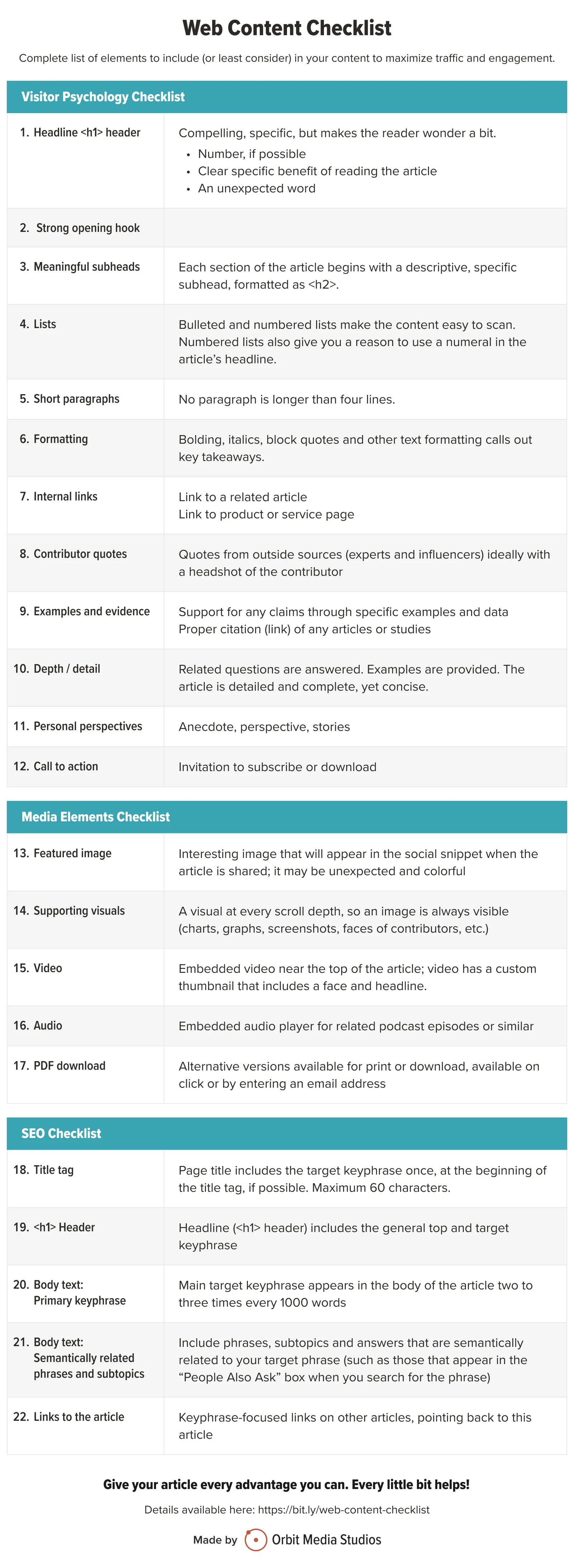
Here’s a printable PDF in case you’d like to check things off a paper list as you write your next post.
Let’s take a closer look at each item…
Visitor psychology content checklist
We’ll start with the reader. After all, the point is to connect with people, be a useful resource to them, be memorable and grow your brand. There’s a true story in the life of every visitor to every webpage.
Let’s work hard to make this article work for them. We want to capture their attention, hold it as long as possible by being as helpful as possible. To improve engagement, we need to make content easy to read and use direct, simple language. We also need to use every trick in the book to align with their psychology.
1. Compelling <h1> headline
A headline is a promise. A great headline is a strong promise, giving the reader specific benefits to slow down, click and dive into the article.
Some of the top performing headlines and actually like two little headlines smushed together. They name the topic, then name the benefit of clicking. After the keyword, add a dash, colon or parentheses, then then add a second headline with the benefit of clicking.
Here are examples of double headlines that separate the first from the second with punctuation. Each leverages another technique to catch readers’ attention.
- Use a number
7 Easy Hamster Tricks That’ll Impress Your Friends - Promise a specific benefit
How to Get Your Hamster to Stay Still for Photos - Create urgency
Teach These 3 Tricks Before Your Hamster Loses Interest - Trigger curiosity or emotion
My Hamster Did This Trick After Just One Day of Training? - Ask a question
What’s the Best Age to Start Training a Hamster? Training Advice from a Pet Rodent Expert
Keep in mind that these are just <h1> headers. They won’t necessarily be used as title tags or email subject lines. Everywhere you use a “headline” you should adapt it for its purpose. This headline guide has a chart that explains.
2. Strong opening hook
If the header did its job, they’ll read the first sentence.
If the first sentence does its job, they’ll read the second paragraph.
Open with a bang.
If the article begins with a lot of long, mushy throat-clearing language (“In these times of change…”) they’ll lose interest quick. They’ll lose focus. Their brain will have to work harder to stay engaged.
If the article begins with a simple, direct statement, you’ll have them hooked. Bonus points if it’s surprising, very short or sounds like something a friend would say out loud.
True story: I’m currently reading Charlotte’s Web with my 7-year old daughter, Ada. The book is a masterpiece of tension and structure. And it has that famous first line: “Where is Papa going with that axe?”
3. Meaningful subheads
Subheads keep the scan reader flowing. So break up your article into sections and give each section a mini-headline. And just like the headers, they should be specific, compelling and trigger curiosity. Their job is to promote the section and slow the scroll.
These subheads should be formatted using <h2> or <h3> tags, not just bolding.
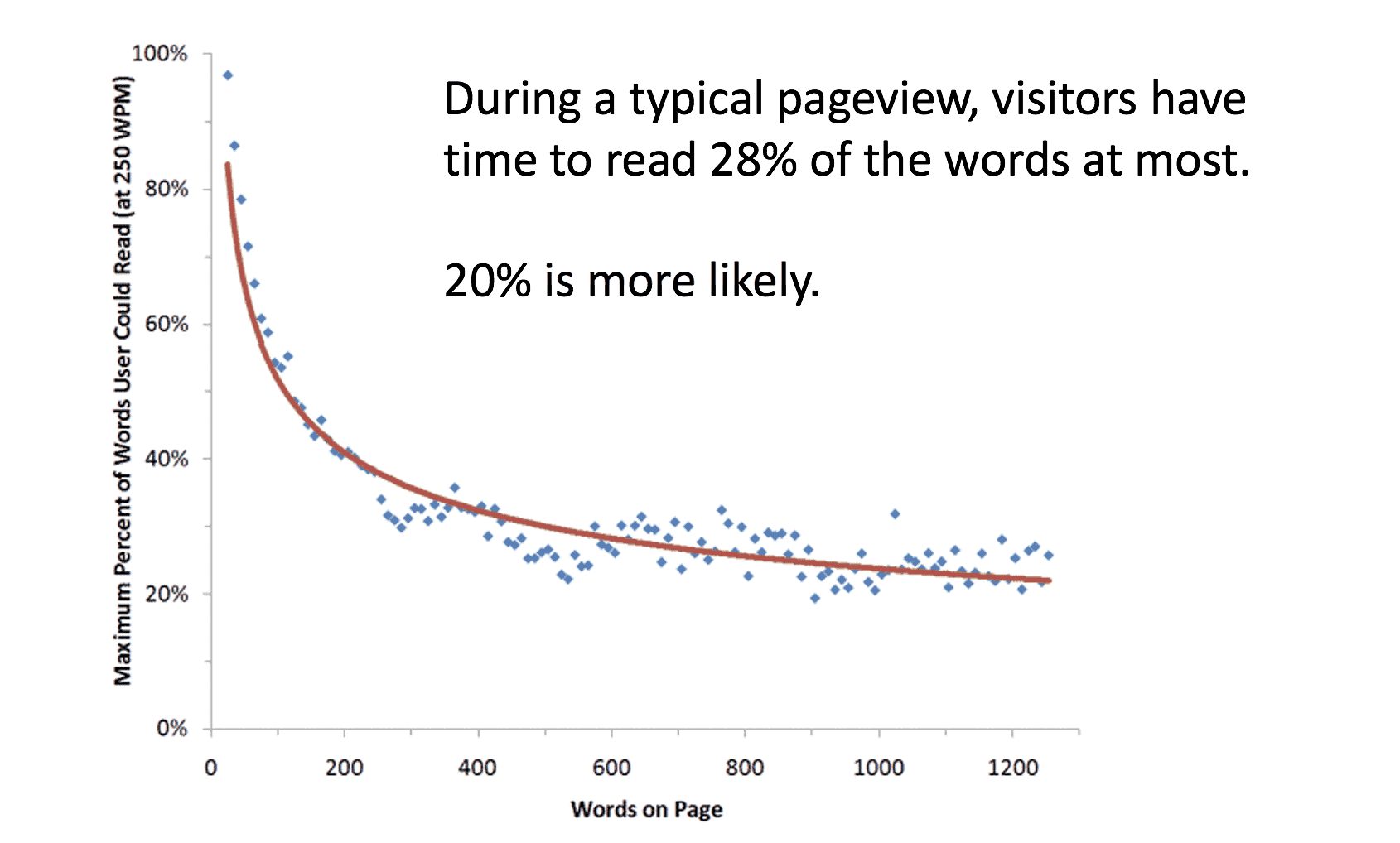
We have to acknowledge that website visitors mostly aren’t reading. According to one study, visitors read 28% of words at most. They are scanners, not readers. But they’ll slow down when they see something interesting or something they’re looking for. Subheads help define content blocks, making the article easy to navigate.
4. Bullet and numbered lists
A list-based article gives you a natural reason to use a number in your headline, telling busy readers that the article will be easy to scan. If it looks like a list, it’s an easier click.
But little lists can appear throughout the article. As in…
- Use bullet lists. If there are three or more distinct ideas in a section, make them bullet points.
- Use numbered lists. If it’s the format for the entire article, use the number in the headline.
- Avoid list formatting when telling stories with a narrative flow
5. Short paragraphs
This isn’t college and your article isn’t assigned reading. So don’t make it look like a textbook. The back button is right there in the corner and they know it.
No paragraph should be longer than four lines maximum. Occasionally, drop in a very short paragraph of one sentence or even one word to add emphasis.
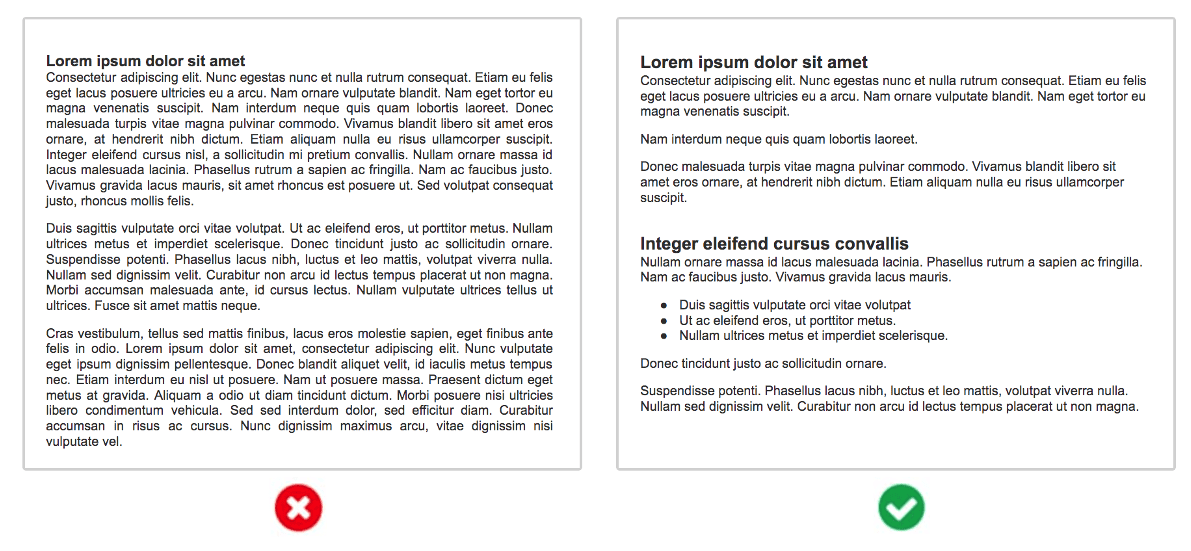
Designers have always known the power of whitespace. But somehow, the writers didn’t get the memo.
6. Lots of formatting
Subheads, lists and short paragraphs go a long way, but they aren’t the only way to make content more scannable. Formatting is one of the important elements of effective web content, helping users and search engines quickly identify key information.
- Bolding, italics
Excellent ways to add emphasis and make content more easily scanned, but don’t overdo it. - Block quotes
Your website should have options to call out key messages, just as newspapers and magazines have done for years. - Line breaks and horizontal rules
Shows the visitor you’re starting a new section. - Tables
Keep them simple or they won’t look good on mobile. Unless you work with brilliant developers who know how to build responsive tables.
7. Internal links
Your goal is to eventually convert your reader into a lead or a customer. That means guiding them deeper into the site, and that means internal links.
If you don’t make those connections between the cheese and the trap, you catch fewer mice. Here are four types of links to create every time you publish:
- Link from the new article to a relevant older article. This could improve engagement rates.
- Link from every article to a product or service page. This could help with lead generation.
- Link from each article to the article of an authority or expert with supportive content (see below)
There is also an SEO benefit here. Links between pages help pass ranking potential between pages on your site, although these links have far lower impact on rankings than links from other websites. Internal links are also an easy opportunity to use target keywords in anchor text.
Resource: 3 Internal Linking Strategies for SEO
8. Contributor quotes
If optimizing for search means adding keywords, then optimizing for social means adding people. There are three main benefits to publishing collaborative content.
- Improve the quality of the article
The outside points of view adds both insight and credibility. - Improve the social reach
The contributors may share the piece, improving the social reach. An ally in creation is an ally in promotion. This is sometimes called “ego bait.” - Grow your professional network
Every article is a networking opportunity. Most people love to contribute to things. To them, you are a press hit.
Bonus: You can even use content as a way to open doors with influencers and potential clients. This is called zero-waste marketing because it creates value even before the piece is published.
Adding sources is easy. While writing, just reach out to an expert or influencer and ask them if they’d like to contribute a few sentences. If they do, add their picture and link to their website. Once it’s live, let them know.
It takes forethought, but it’s actually the least time consuming part of the content creation process.
 Source: How to Write a Blog Post for SEO (Step-by-step video)
 |
Jodi Harris, Content Marketing Institute“Expert quotes are content marketing gold. They instantly elevate your content’s credibility and authenticity while opening doors to valuable industry connections. For the reader, these insights are trusted validation; for you as the creator, each outreach builds your professional network and enhances your visibility among thought leaders. It’s a strategic win-win that requires minimal effort and maximum impact for everyone involved.” |
9. Examples and evidence
Great writers add evidence to support their claims. They add examples to improve clarity. Ideally, every point in your article is supported with data and examples.
There are at least five types of evidence that you can make your content more compelling.
- Research studies and statistics
- Charts and graphs with supportive data
- Stories and case studies
- Supportive resources
- Relevant (positive or negative) examples
If you cite research from others, make sure to let them know, if only by mentioning (and tagging) them when you share the article. They might notice and then share from their own channels. More mentions, more potential social reach.
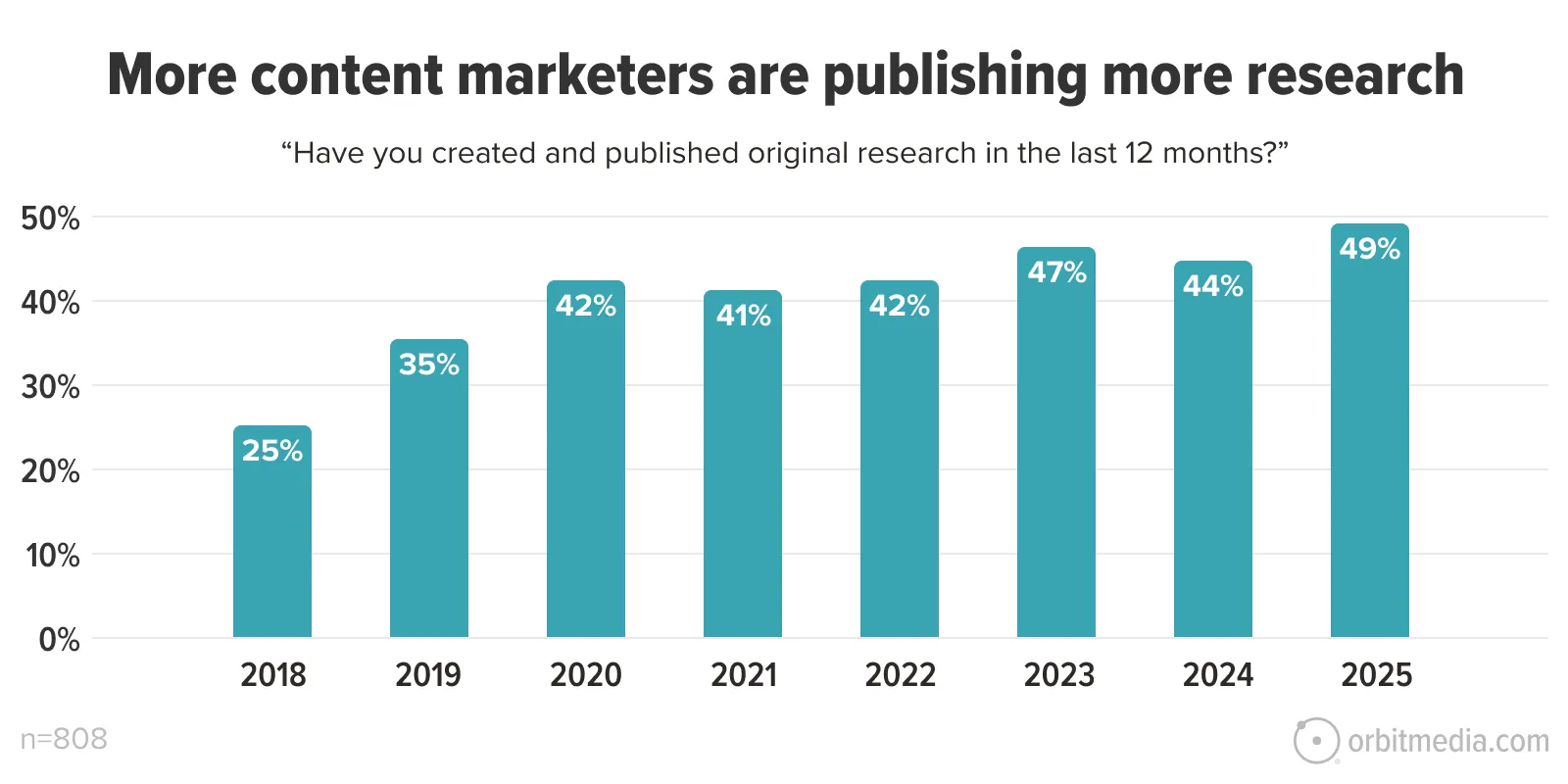
Better yet, make the article itself a research piece. When you conduct your own original research, you make your content stand out. Research makes your brand the primary source for new data.
Sound ambitious? Maybe not. It’s actually becoming common, according to our own research on blogging.
10. Depth and detail
Great articles are complete. They answer all of the top related questions. They don’t skip steps. They don’t stop short. They cover the topic completely.
But there is no ideal length for blog posts. So don’t start with a target word count. Yes, there is an average length for blog posts: around 1300 words. That’s long. After growing for a decade, the research shows that it’s starting to go down. (source)
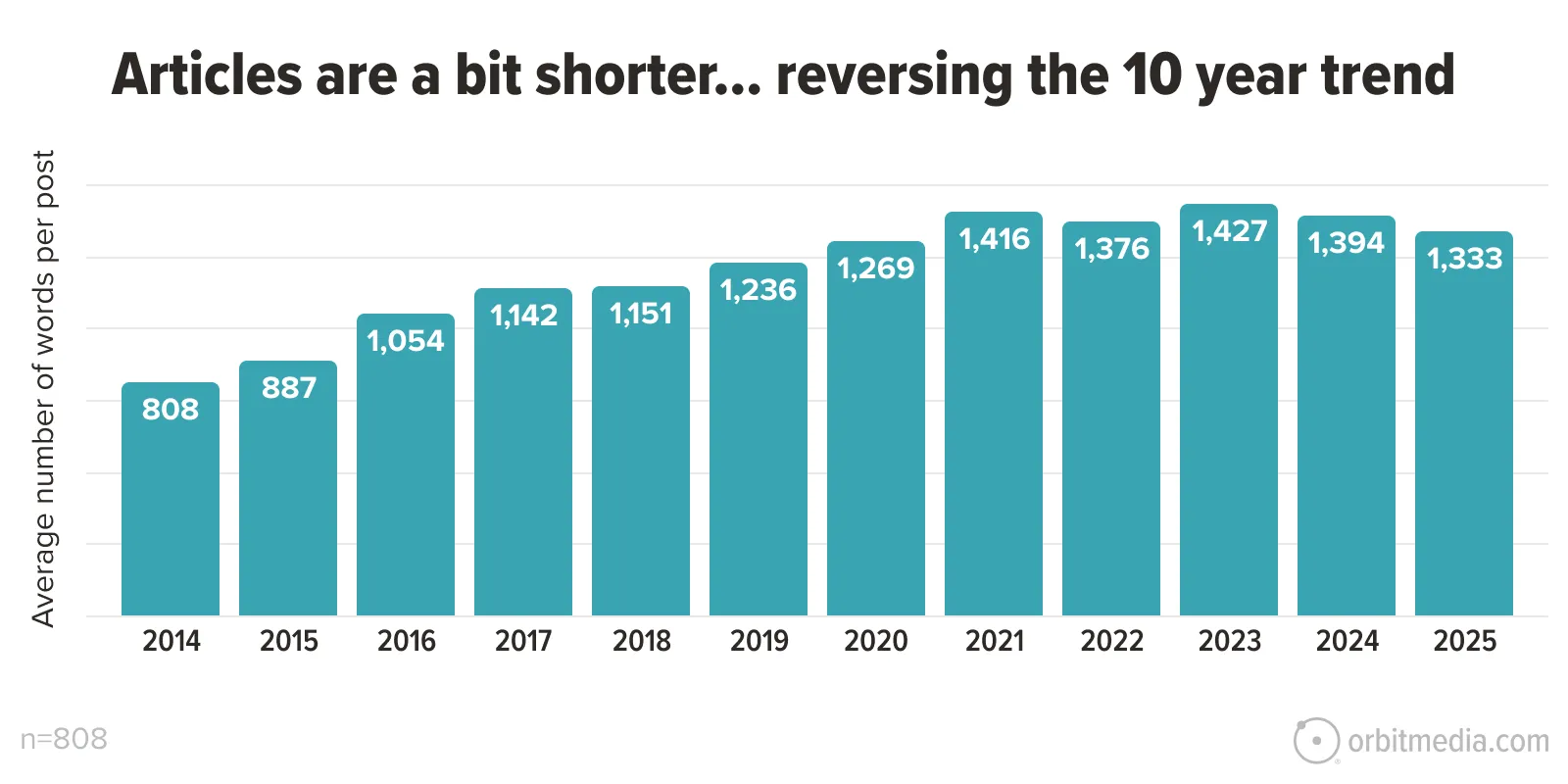
But length is not a search ranking factor. That’s why we’re in the “human psychology” section, not the “SEO” section. Using semantic SEO writing techniques may lead to higher word counts, but word count is never the point.
Yes, there are many studies that show a correlation between length and high-rankings, but writers who add length for SEO are likely adding fluff.
Do it for your readers, not for Google.
Detailed articles are engaging. They hold readers’ attention. You can check for yourself using your own data. Create a scatter plot chart using word count and time on page for your top articles.
We did and here’s what it looked like for us.
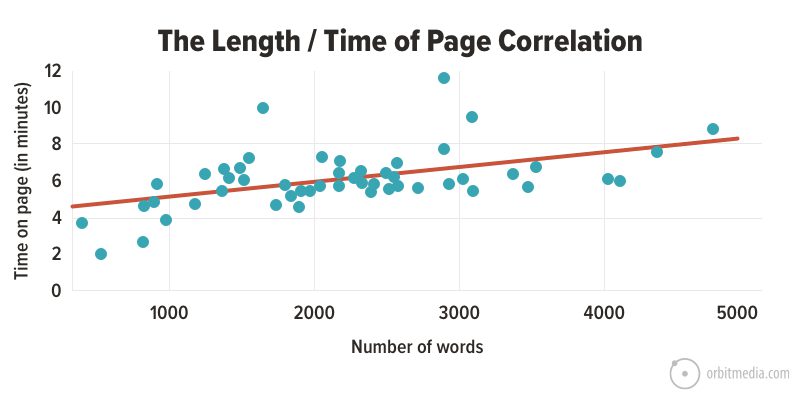
So how long should your article be? It depends entirely on the topic. Every blog post should be as long as necessary to cover the topic completely, and not a word longer.
11. A personal point of view
Writers have always had to meet multiple goals simultaneously. We are good at balancing conflicting priorities. Be detailed but concise. Write for humans and for search. Write original, novel ideas every month forever.
Now we have a new success criteria: don’t sound like an AI.
Luckily, there’s a simple trick for differentiating your content from AI tools: add yourself. Add a personal point of view. Add an anecdote. Tell a quick story. Better yet, take a stand. Be a thought leader.
A few minutes ago, in content best practices number two, I told you about the book I’m reading with my daughter. AI doesn’t do that. That is a human-only experience and a human-only anecdote. Add one of those to every article, if possible.
12. Calls to action
You gave your reader a detailed, high-quality, carefully constructed article. Maybe they’d like more. Every great post has a CTA. It’s the popup window. It’s in the right rail. It’s “in-line” within the body of the article. It’s the header of the blog. It’s the sticky footer at the bottom of the page.
“Subscribe.”
That’s the typical call to action for blog posts. Not very compelling, is it?
You can do better than that. High performing email signup CTAs include three things: prominence, promise and proof. These are the three p’s of high converting email signup forms. This diagram shows the difference.
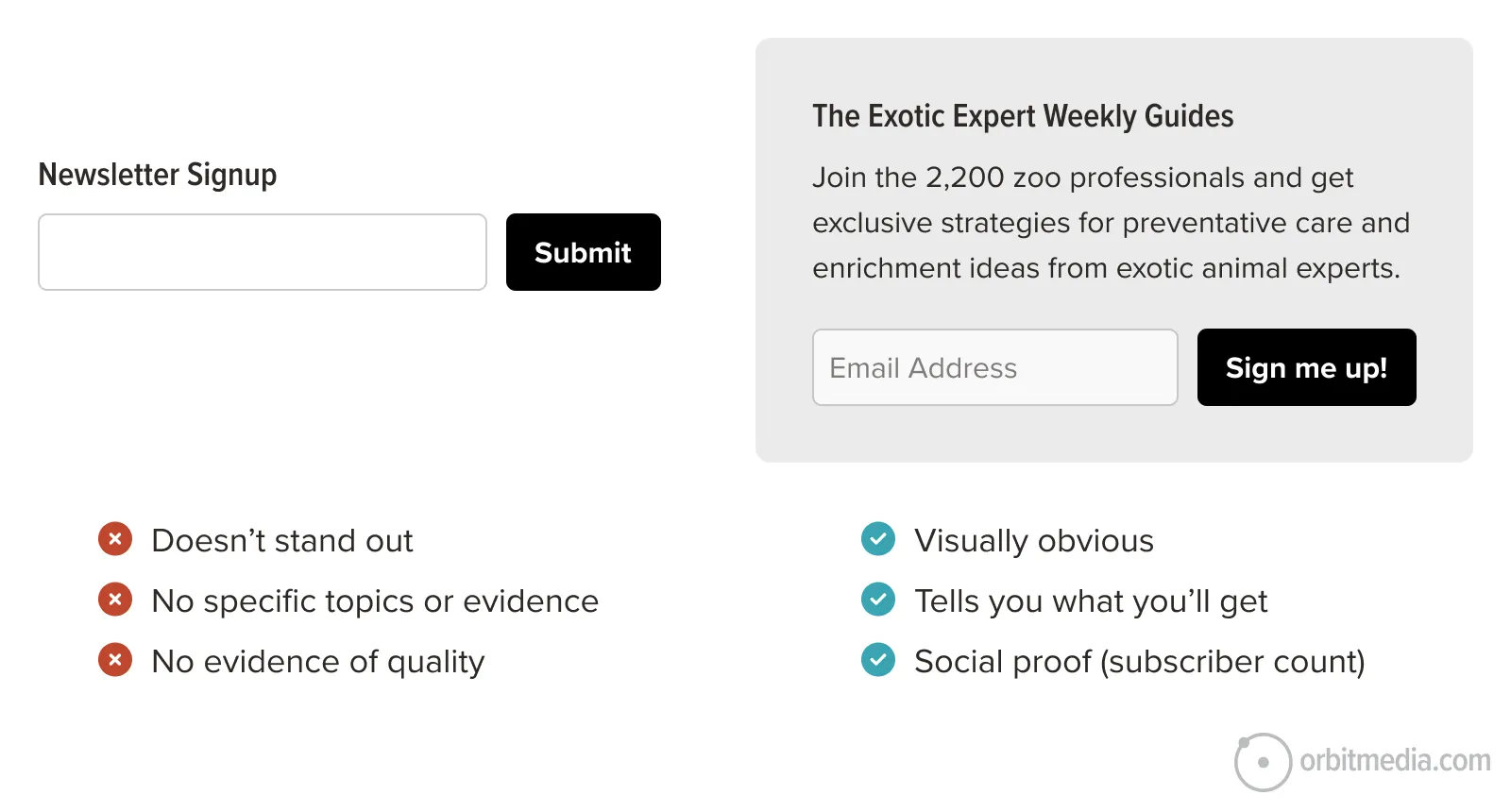 If the article is published on LinkedIn or Medium, you can also ask the reader to leave a comment. End the post with a question. Or ask the reader to share other ideas that would complement the article. Or even invite the reader to disagree with you.
Media and visuals checklist
Here are ways to improve quality by adding more compelling media. Of course, you won’t add all of these to every article. But we recommend upgrading your content with these whenever possible. The more, the better.
Remember, some of your visitors came from social media sources. And the UX of a social stream is extremely compelling. Your typical social stream is the product of years of research and testing. It’s designed to capture and hold your attention, keep you scrolling.

The more your article feels like a social media stream, the more likely it is to keep the visitor engaged. Like social streams, your article should include multiple points of view and personal perspectives. We covered those elements above.
Also just like a social stream, it should also be very visual. Filled with visual elements. We’ll cover images and videos now.
13. Compelling featured Image
A compelling image makes your article more likely to be clicked and shared on social media. Content without strong visuals has a disadvantage. It’s easy to ignore. Images also make your message more memorable, thanks to the pictorial superiority effect.
The featured image often appears in social previews, pulled from the page’s Open Graph settings. Most platforms display this image in a 16:9 rectangle, which means landscape style: twice as wide as it is tall.
Here are the best practices for the featured image:
- Use a 16:9 aspect ratio (e.g. 1200×630 pixels or larger)
- Keep the main subject centered vertically
- Don’t put any text near the edges
If your CMS allows, you can manually set this social sharing image . This encourages the social network to use this image when your post appears in streams.
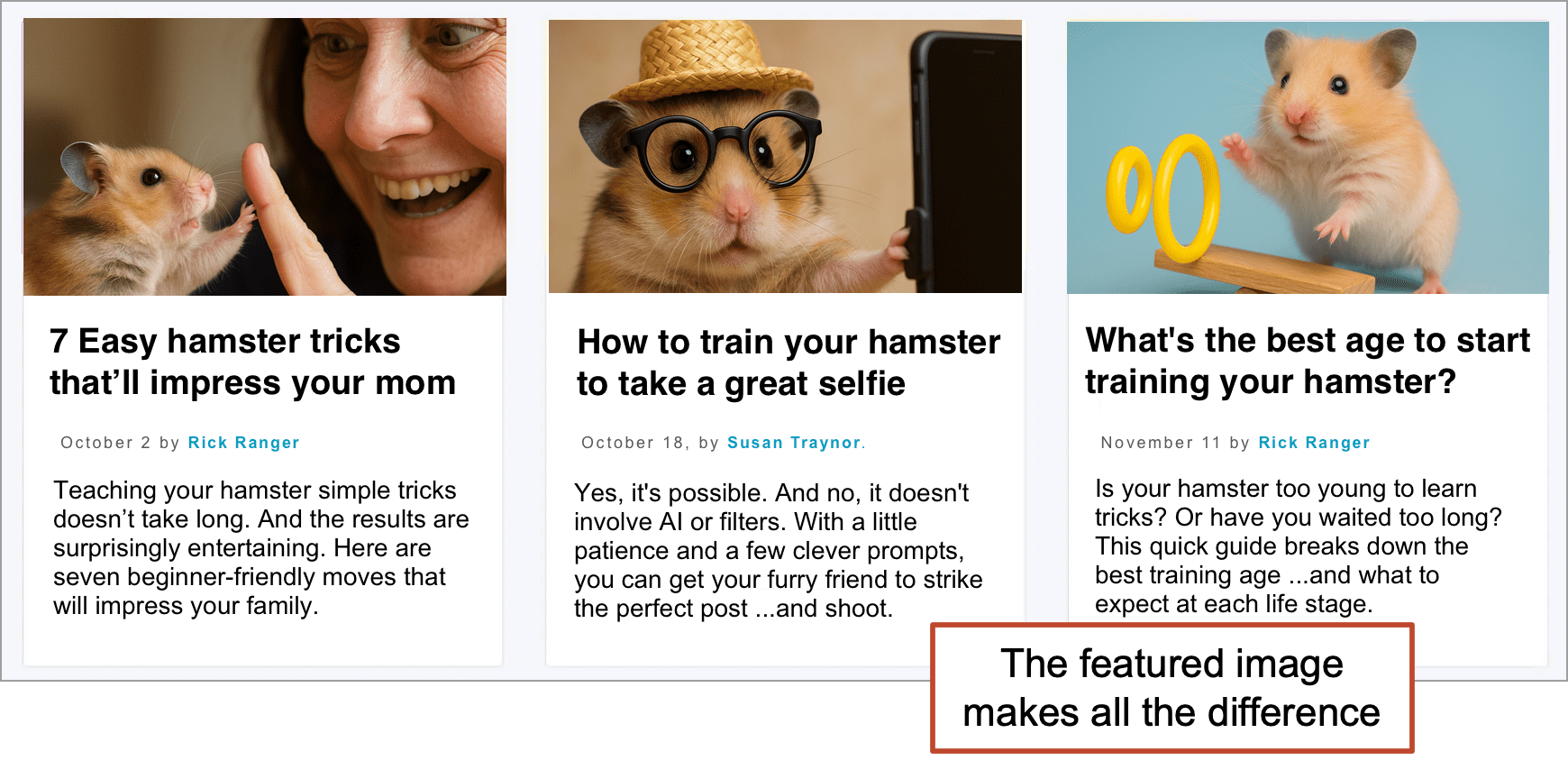
Even if social media didn’t matter, the feature image usually appears on the blog main page and on any other page (often the homepage) where the content is featured.
14. Visuals at every scroll depth
Add an image every 500 pixels or so (every three or four paragraphs) to add visual interest at every scroll depth, just like a social media stream. In other words, at no point in your article will there be a screen of all text with no images.
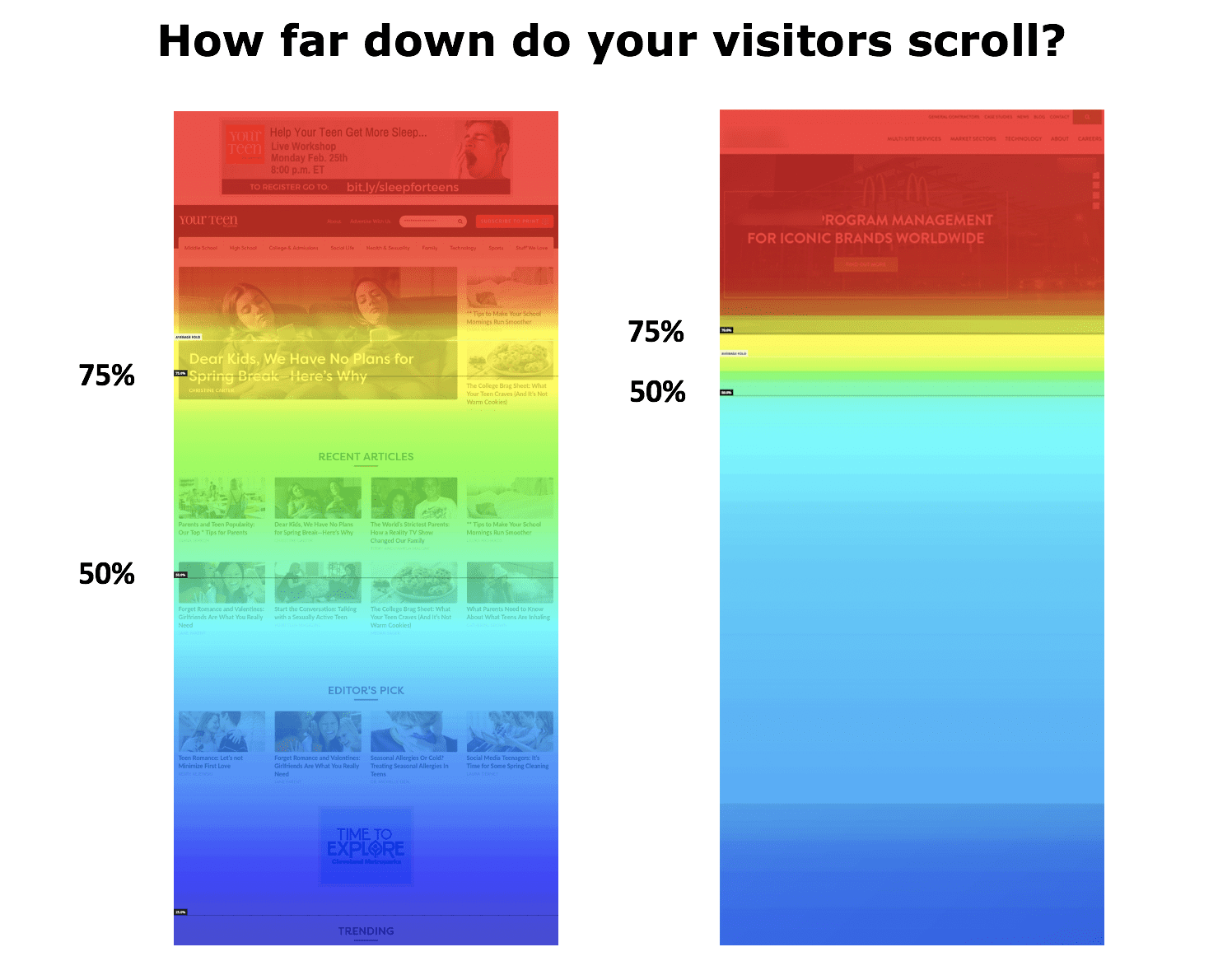
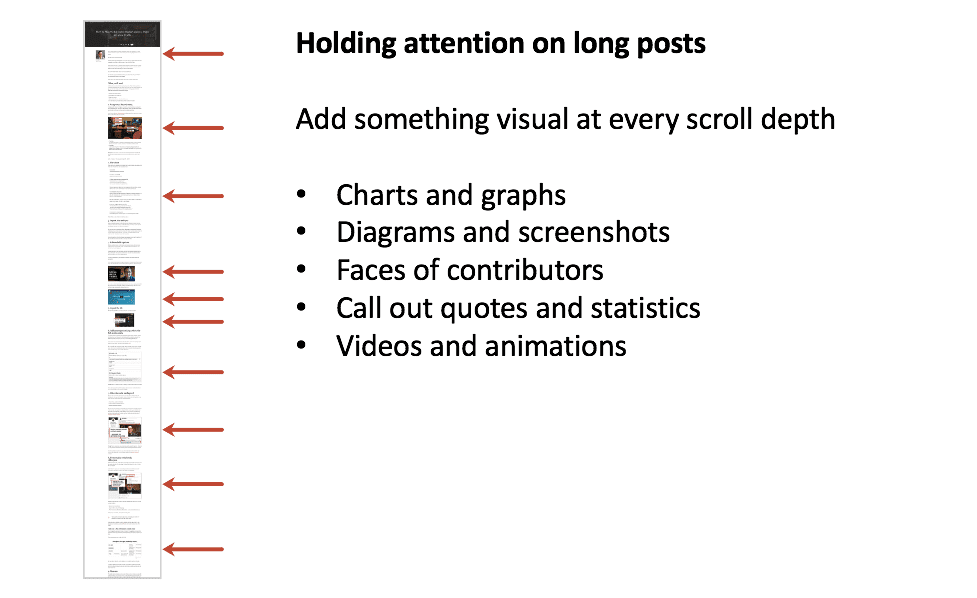 The impact is measurable. A tool like Hotjar has scroll heatmaps that show how far down your visitors flow. The impact of multiple images is often dramatic.
Not everyone can see those images. Some visitors are visually impaired and use screen readers. Keep accessibility standards in mind and add ALT text for each image. Accessible websites tend to perform better in search results. Search engines like sites that provide good user experience. Make your content accessible and user friendly.
15. Embed a video
The combination of movement and sound make video a super compelling format for content. Adding video to the top of your posts is a powerful content strategy and a great way to get visitors to stick around. It’s part of every successful digital strategy I know of.
New features in web technology, such as HTML5’s <video> element, make it easier than ever to embed and display video content nicely across devices.
We track the impact of video on website engagement using event tracking in Google Analytics. There is a huge difference in behavior between visitors who watch and visitors who do not. This is what it looks like in GA4:
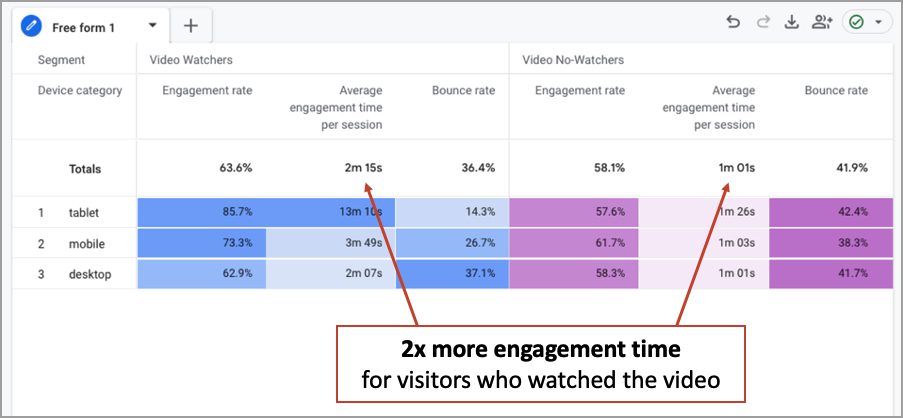
To maximize the percentage of visitors who watch the video (let’s call that the “view rate”) use a custom thumbnail with two key elements:
- Face: Use a picture of a person that is big enough that the viewer can see the whites of the eyes.
- Headline: The text (or at least some of it) should be visible at thumbnail size. Probably this means adapting the headline for this use case.
The video at the top of this article is a good example of a thumbnail with both of those elements.
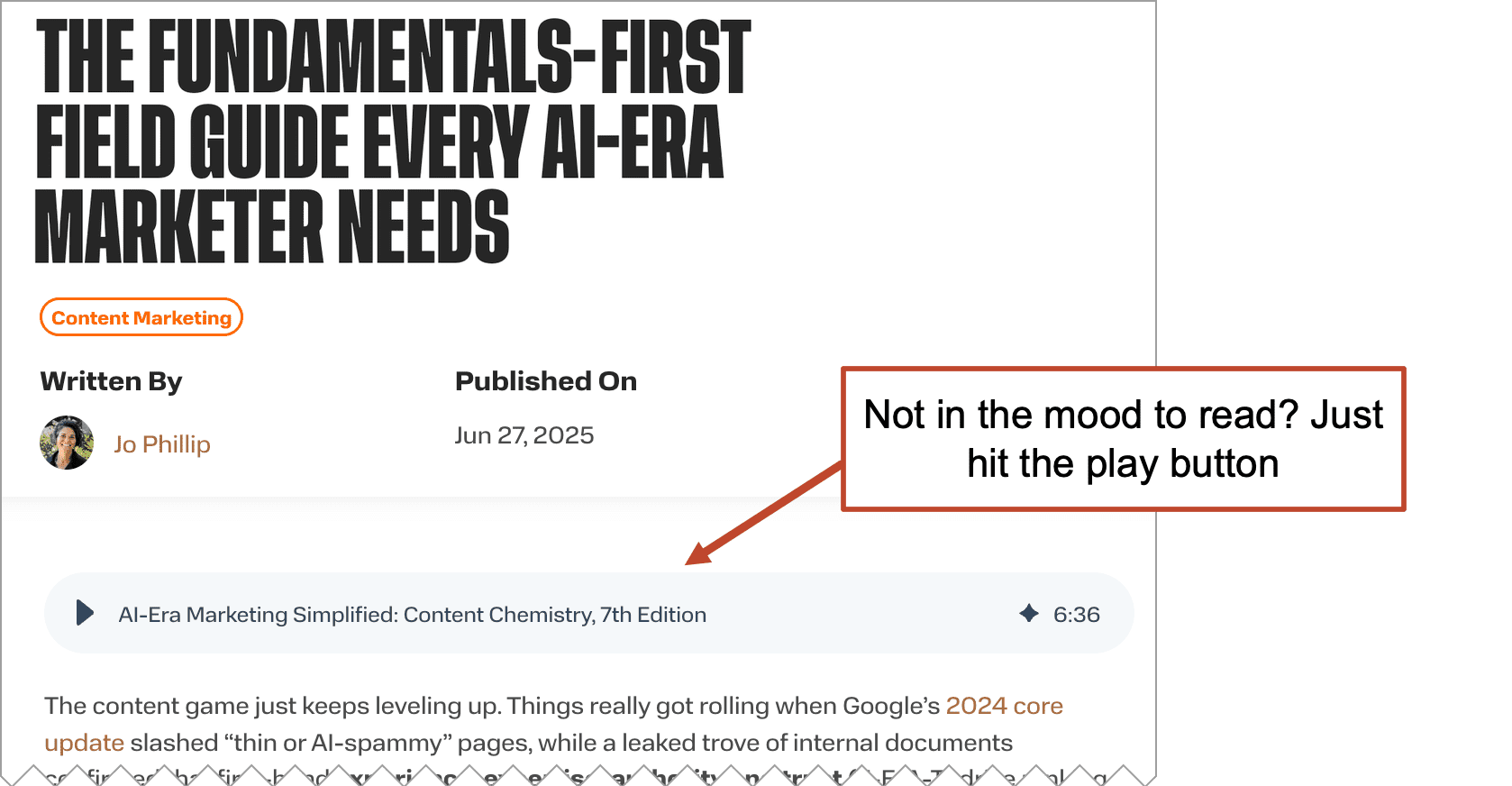
16. Embed an audio version
Similar to video, audio is a big media upgrade to any post. It’s also easier ever using AI.
Paste the text of the article into a tool such as Descript, pick a voice style, then download the file as an MP3, or just publish it directly to the article using their “Web link” feature. It’s an iFrame.
If you use the WordPress content management system, you can upload the file to the media library and then add it to the article as an “Audio block.”
Here’s a good example from the Weidert blog.
17. PDF download
The PDF is really a print simulation. It’s definitely not digital content best practices to make this the only version of an article.
But when the PDF is an alternate version of an article, added as a convenience for visitors who may want to download or print, then it’s added value.
The PDF is also a common format for the “lead magnet” or “content upgrade,” available to visitors who enter an email address. Of course, this kind of “gated content” is the cornerstone of marketing automation.
Links to PDFs can include an icon and an indication of the file size, similar to this:
 |
Download a PDF version of this Website Content Checklist (1 MB) |
Search Engine Optimization (SEO) checklist
We built it to work well for the reader. It answers their questions. It goes deep into the details, but it’s scannable and visual. It’s supported by data and expert perspectives. It will work for any visitor from
But now we’ll take the extra step to make it also work for the search engine.
SEO is a subdiscipline of library science. It’s all about information retrieval.
We’re simply going to help search engines help people discover the article when they look for it. A bit of keyword research helps you identify what users are searching for, so you can then create content that aligns with their intent and improves your chance of ranking.
The following elements all help indicate the relevance of the article. They are key places to use target phrases and increase the likelihood that the content will rank. Just make sure that you’re targeting a keyphrase that you have a fighting chance of ranking for.
18. Title tag
It’s in the tab above the address bar for every page you’ve ever visited.
Title tags are the single most important element for on-page SEO. Not only are they a powerful indication of relevance, but typically the title is the link on a search results page. The ideal length is 60 characters maximum or the rest will be truncated. Be brief.
Use the target keyphrase once in the title. If possible, use it near the beginning of the title. The prominence of the keyphrase (in other words, how close to the beginning it appears) is important.
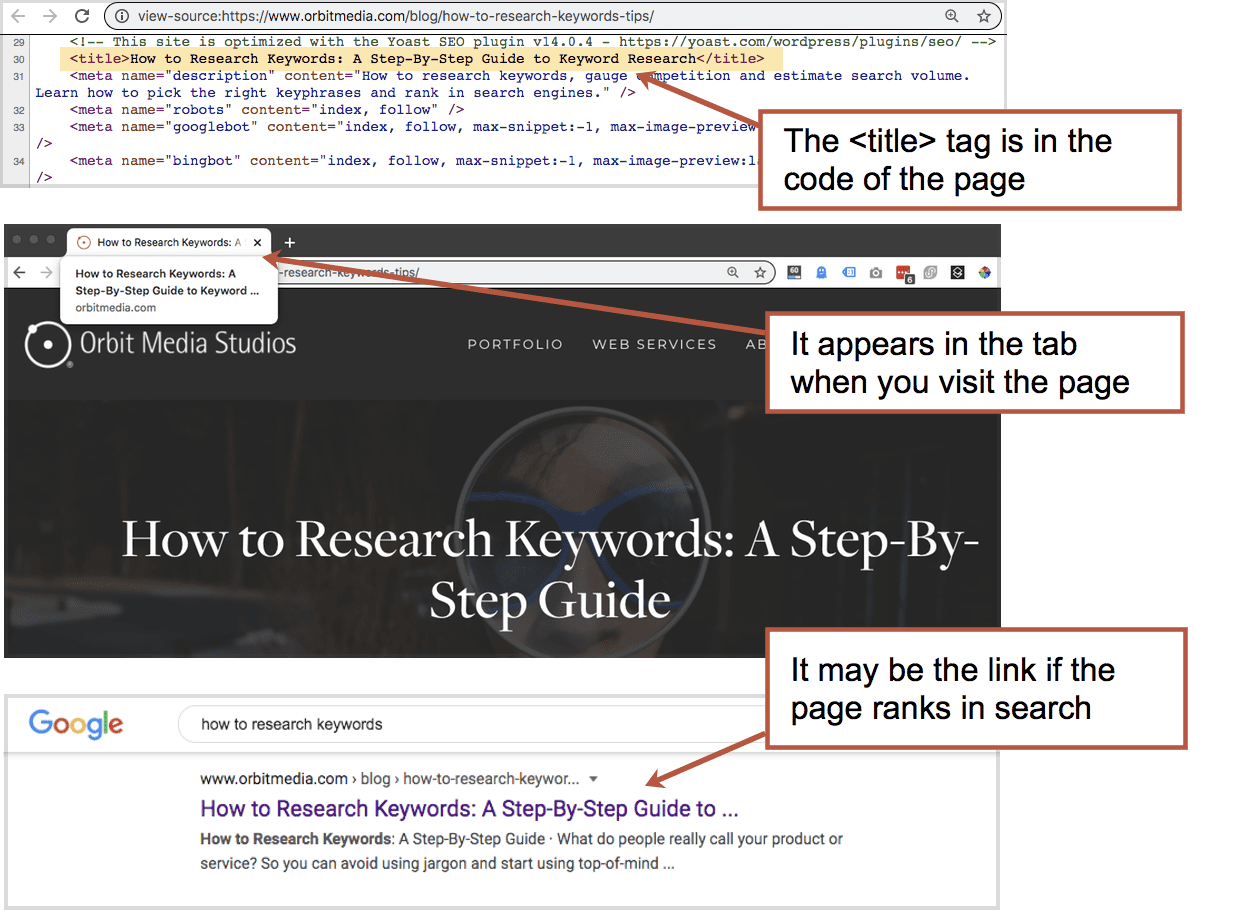
The title should begin with the topic. If you want to add your company name, put it after. SEOs have a saying: “brand last.” Start with your keyphrase, end with your business name. This aligns with the ethos of content marketing, which is to help people first. Promoting your brand comes second.
What about the meta description?
Earlier versions of this article included a recommendation for a nice, specific meta description that summarizes the article. Here’s the original recommendation, which is a longtime SEO best practice.
“Your meta description should be a single sentence, plain English summary of the content of the page. Use your target keyphrase at least once, but not more than twice. Limit it to 155 characters to be sure that it will fit within the snippet without getting truncated.”
But like Meta Keywords, Meta Descriptions have declined in importance. Google may use meta descriptions in search snippets, but often it does not. It uses a page excerpt or it just writes a description for you.
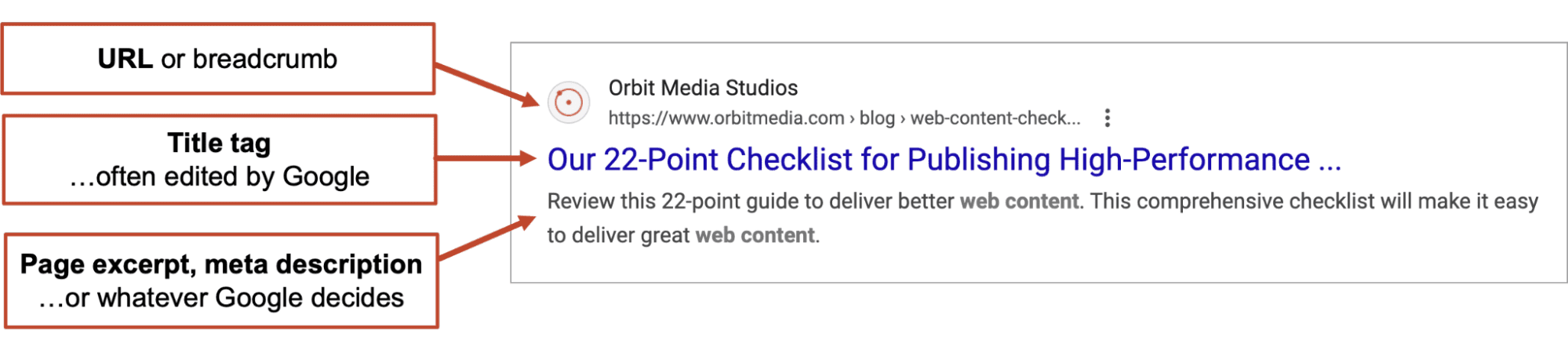
Today, it’s likely that writing that meta description is not going to impact your rankings or traffic. Tests by SearchPilot (source) and analysis of 100+ tests on SEO testing (source) found no correlation between keyphrase-focused meta descriptions and rankings.
Some tests showed that leaving it blank may improve your rankings, possibly because Google’s AI writes very good snippets without any help from marketers.
19. Keyphrase in the <h1> Header
The header on the page should be formatted using the <h1> header tag. Use the target keyphrase once, indicating relevance to search engines and stating the general topic to headers. Beyond this, the headline should be written for readers, as we explained above.
20. Primary target keyphrase in the body text
Your target keyphrase should appear in the article. As you write, you’ll find yourself using the phrase naturally at least a few times.
There is no rule for the number of times you should use a phrase (it would be strange if there was) but if you’d like a general guideline, I’d say use the phrase 2-3 times every 1000 words. Something like that. You can drive traffic without keyword stuffing.
21. Semantically related words and phrases
Here’s where SEO copywriting gets more fun.
Beyond using your target keyphrase, work in the words that are semantically related to that phrase. This is how you can target the topic, not just the keyphrase.
Indicating relevance for the more general topic is great for search rankings. It’s how search engines understand web content. A great page on your topic would certainly include the closely related words and phrases, right?
For example, this article is a “website content checklist.” That’s the primary keyphrase and I’m using it, I’m sure (I’m not actually counting how many times). But a great content checklist should really touch on all the adjacent subtopics, relevant questions and related words.
So I’ll take a minute to see what Google shows as related words, topics and questions. These are the relevant keywords. Incorporate those into this article.
Where do I find those?
- I just search for the phrase and see what Google suggests.
I write those words and phrases down and work those into my article. - I search for the phrase and look for a “People also ask” box.
I write those questions down and make sure to answer some of them in my content.
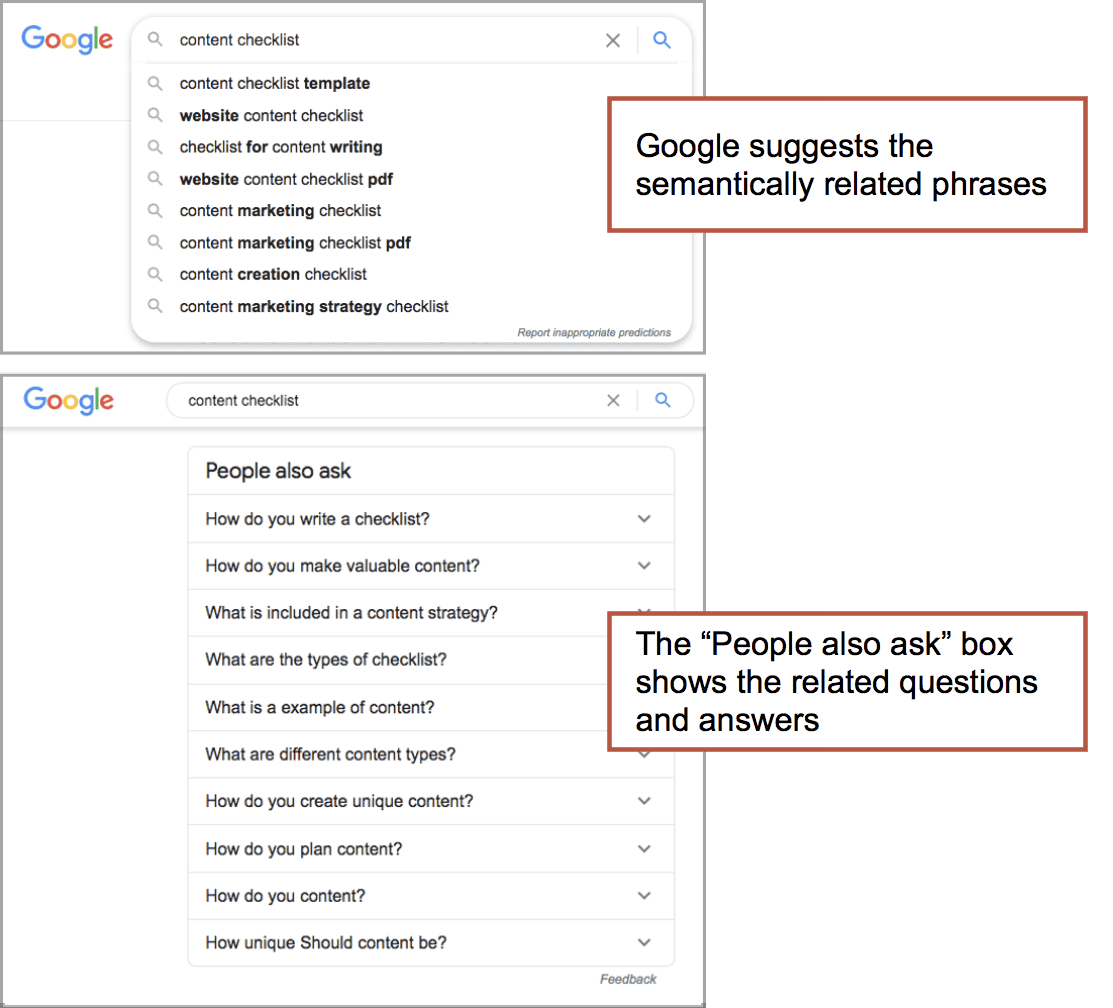
This is the key to semantic SEO. It’s also helpful for appearing in AI responses. LLMs are trained on huge sets of language. They are not matching keywords and content.
During this process, you’ll find yourself writing a more detailed, helpful article. You’re more likely to address the target audience’s pain points. Yes, SEO can make you a better writer.
22. Links to the article from other articles
We’ll finish with a simple best practice that most content marketers miss. It’s not part of the article itself. It’s about the connection between the new article and existing content. The final step is to create links to the new content once it’s live.
You aren’t done publishing a new article until you’ve linked to it from an old article.
These links have two specific digital marketing benefits:
- SEO: Internal links equity to the new content, especially when its from a relevant page that has high Page Authority) This is similar to the way that backlinks from other sites can drive better search engine visibility.
- Internal traffic: Internal links help users navigate to the new content, especially when the article with the link consistently attracts visitors.
“Copy is never written. Copy is assembled”
These are the words of copywriting legend Eugene Schwartz. They’ve never been more true than today, in the era of AI-generated content marketing and the intense competition for attention and awareness.
A great piece of digital content is assembled from many little elements, words, images, tags, media and formatting. Each adds to the results in its own small way. Its all part of editorial standards and content marketing strategy. The final piece should meet target audience’s needs by providing relevant and valuable information. And it checks all the little boxes along the way.