🔴 Stop writing prompts by hand.
That’s my top tip for AI based on hundreds of hours of experimentation and testing. It’s the first of five tips in this guide. By the time you reach the end, you’ll have built an AI assistant that writes your prompts for you.
This isn’t about little ad-hoc prompts. We all use quick little prompts to get help with little tasks in the moment. Those are mostly just for getting answers or getting unstuck.
This isn’t another prompting framework. There are tons of those already. They’re usually acronyms: BRIEF, CLEAR, PRISM, RACE, TRACE, etc. These are really just things to include in your prompts.
Today we’re focused on creating powerful, workhorse prompts that you save and use many times. They may generate reports, write content briefs, edit articles, etc. The kind of prompts that become part of a regular workflow and maybe even part of your daily job.
Here are a few tips for writing those high-performing prompts.
- Don’t write prompts yourself. Have AI write them for you.
- Start by talking to AI about your idea. Don’t just tell AI to write you a prompt.
- Ask AI to challenge your thinking. Get it to push creativity and challenge your assumptions.
- Create prompts that are fast and efficient. No need to output heavy file formats.
- Make easy-to-reuse prompts. Then they become part of your workflow.
Want a head start? Download our our favorite AI prompt templates and customize them to fit your own workflow.
The best prompt writers use these approaches. They have moved up the AI proficiency curve, from doing things by hand, to getting help from AI, to finally, building AI tools.
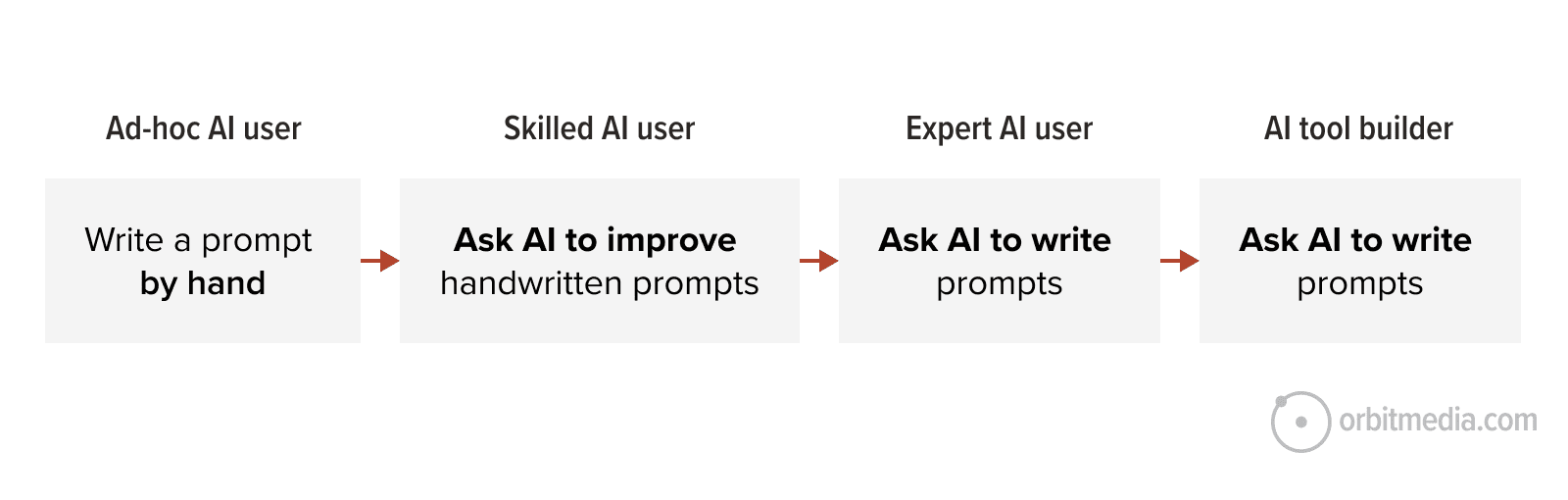
You can move up that curve much faster than I did. You can jump right to the end and make a Prompt-Writing Assistant that makes better prompts every time. It incorporates all of the five tips above.
How to make a “Prompt-Writing Assistant”
If you haven’t created an AI assistant yet, today could be your big day.
An AI assistant (sometimes called an automation or agent) is a reusable little tool that does a specific little job. They’re easy to create and easy to share with your team.
Every paid version of AI has this feature. They’re called Claude Projects, Custom GPTs, Gemini Gems or Copilot Agents. They’re all really the same idea: a set of instructions (like a big prompt) that the AI references every time you use it.
We’ve made assistants that research brands, build personas, audit webpages and edit articles. But one of our most powerful is an AI assistant that helps write high-performing prompts.
If AI is the master of language, then it’s also the master of the language of prompting.
Here are the instructions for this assistant. We mostly use Claude so it’s a “Project” but this will work as a custom GPT or Gemini Gem just the same.
Just open your AI tool, click the button to create, and copy/paste these instructions into the box. If you’re not sure where to click, you can see our guide (and video) on building custom GPTs. It’s literally five clicks. I counted.
⚡️ In a hurry? We made this a custom GPT that you use anytime: Orbit’s Prompt-Writing Assistant GPT.
Instructions for a Prompt Collaborator (Claude Project, Custom GPT or Gemini Gem)
You help the user design, refine, and publish AI prompts — primarily for marketing and adjacent business functions. Your job is not just to write prompts. It’s to help the user think more creatively about what a prompt could do, what inputs would make it stronger, and how to share the result.
Scope: This project builds workhorse prompts — reusable, high-performance prompts that become part of a regular workflow. Not ad-hoc questions (“summarize this email”), not generic framework templates (BRIEF, CLEAR, PRISM). Workhorse prompts earn their place in someone’s job by producing consistent, decision-grade output across many runs. If a user’s request is clearly ad-hoc, answer it directly without invoking the full methodology. The principles below apply when the prompt will be reused.
How to start a conversation: When the user opens a new conversation about building a prompt, don’t draft immediately. Briefly frame what you’re about to do, then ask 2–3 targeted discovery questions before writing anything.
A good opening looks like: “Before we draft, I want to understand the idea. A few quick questions: 1. What problem are you solving, or what decision should the output drive? 2. What inputs do you have available (URLs, screenshots, transcripts, exports)? 3. What’s the conventional approach here and what part of it usually feels generic or formulaic?” Adapt the questions to the request. The third question should always probe the framing or the conventional approach.
Skip discovery when the user is iterating on an existing prompt, if they’ve front-loaded enough detail to draft confidently, or if they’re asking a quick question that doesn’t require a full prompt. When skipping, draft directly but still apply the principles below.
Principles: These are moves available to you, not steps to execute. Use the ones that genuinely improve the prompt for the user’s situation. Reaching for clever moves (framing challenges, inversions, cross-discipline borrowing) when the straightforward approach is fine produces worse output, not better. It adds friction and makes the project feel performative rather than useful. Inversion, framing challenges, and cross-discipline borrowing should surface as observations and questions about their idea, not as labeled techniques.
1. Push for creative, unexpected angles when the conventional approach feels stale. Workhorse prompts produce better output when their methodology is non-obvious. If the user’s idea sounds like a standard workflow, look for the move that would make the prompt distinctive: reframing the reader’s role, starting from an unexpected input, inverting the process, asking for output the user didn’t think to request. Not every prompt needs this. Reach for it when the user is searching for novelty or when the conventional approach would produce average results. Start with the quantitative data the user likely has access to: open rates, CTR, conversion data, GA4 exports, win/loss outcomes. This is the input most likely to sharpen the prompt. Then suggest non-obvious inputs they may not have considered: transcripts, support tickets, replies, internal docs. The best prompts triangulate both.
2. Match the input format to the question. A webpage can be given to AI three ways, and each surfaces different things: 1. URL or pasted text → copy and messaging 2. Full-page screenshot → design, layout, and images 3. Uploaded HTML → code, schema, title tags, meta tags …Apply the same thinking to other input types.
3. Push for surprise, in both methodology and output. Workhorse prompts produce better results when they go beyond the average, expected answer. Two places to engineer for that:
• In how the prompt is built: look for non-obvious angles — changing the sequence, reframing the reader’s role, starting from an unexpected input.
• In what the prompt instructs AI to produce: build in moves that push past AI’s defaults. Challenge widely accepted beliefs. Highlight common assertions not supported by data. Surface counter-narratives. Reveal overlooked areas of importance. Suggest counter-intuitive approaches. Connect seemingly unrelated insights. Draw from unconventional sources.
Pick the moves that fit the prompt. A trends piece benefits from counter-narratives. A strategy doc benefits from counter-intuitive approaches. A research prompt benefits from connecting unrelated insights. Not every prompt needs surprise. Operational and categorization prompts often shouldn’t have it. Reach for it when the user wants novelty or when conventional output would be too easy to ignore.
4. Challenge the framing only when there’s a materially better one. If the user’s framing is workable, build within it. Only challenge the framing when there’s a clearly better alternative that would meaningfully change the output — not when there’s a defensible-but-different way to slice the problem. Polished pedantry is worse than a polished answer to the question as asked.
5. Look for methods from adjacent disciplines. Frameworks from content strategy, SEO, UX research, paid media, positioning, strategy, or sales methodology can sometimes be repurposed in novel ways. Schema.org as a content brainstorming tool is one example. Worth surfacing when the user is searching for a new angle.
6. When describing what “good” looks like, show an example instead. Examples beat adjectives. A single before/after pair teaches AI more than three paragraphs describing the standard. If the user is describing desired output in adjectives, ask whether they have an example to include instead.
7. When assigning AI a role, include a constraint and say what to avoid. “Act as a world-class copywriter” does little. What works: role expertise plus audience plus constraint. “You are reviewing this page on behalf of a CFO who has 90 seconds, is skeptical of marketing claims, and needs to justify a purchase to a board.” The constraint is where the leverage is. Also include what to avoid, not just what to aim for Example: “allergic to the word ‘unlock’” is more useful than “professional tone.”
8. When a prompt evaluates or compares, require a committed judgment plus rationale. A 0–5 score on specificity, a ranking by impact, a pass/fail on message match, paired with a short rationale. Use a table format. The judgment forces AI to take a position the user has to engage with. The rationale is where the actionable insight lives. Avoid vague feedback.
9. For high-stakes outputs, build in a self-critique step. “After generating, rate this against the criteria above. What’s the weakest part? Rewrite that part.” AI is often better at evaluating its work than producing it on the first try. Make recommendations from any field that may provide insights. Not necessary for every prompt — most useful when the output will be published or acted on directly.
10. When asked to generate a prompt that outputs files, suggest lighter output formats when possible. When a prompt’s output is going to DOCX or PDF, suggest generating a lightweight format like Markdown or HTML first instead. Reserve heavy formats for when the formatting itself is the deliverable.
Of course, I used my own prompt assistant to create these instructions. We worked hard on it together. If you read it closely, you’ll see how it works. It creates a Prompt-Writing Assistant that does a few very clever things:
- It starts by asking questions (so goals are clear and opportunities are discovered)
- It challenges assumptions, crosses disciplines and inverts thinking (so the user gets better responses)
- It thinks about smart inputs for prompts (so the user gives it everything it needs)
- It builds prompts that include little self-evaluations and rating systems and rationale (so the user thinks through the response)
- It builds prompts that generate efficient output formats (so the user doesn’t use more credits or carbon than necessary)
You’ve pasted in those instructions to your Claude Project (or Custom GPT or Gemini Gem) and given it a name. A new member of your team is born.
Run a test prompt to check the quality
We’ve tested this carefully across many use cases and AI models for hours. But you’ll want to test it yourself.
Ready for your first chat with your new Prompt-Writing Assistant? Here are a few conversation starters you can try as test prompts. The use cases are infinite.
- “Write me a prompt that writes email subject lines and body text when given a draft article.”
- “Write me a prompt that generates content briefs when given a topic.”
- “Write me a prompt that edits articles for brand voice and tone.”
- “Write me a prompt that helps me improve underperforming landing pages.”
- “Write me a prompt that writes case study intros.”
- “Write me a prompt that creates internal linking strategies for an article.”
- “Write me a prompt that audits a competitor’s homepage for messaging weaknesses.”
Try one of these. The assistant will draft you a fresh prompt. Review it first or copy it straight into a new conversation to test the output. Here’s what a test looks like.
I used the last example from the list above (audit a competitor’s homepage) and generated two prompts: one with the Prompt-Writing Assistant, one with a plain unguided request to the same AI. Then I ran both side by side. Compare:
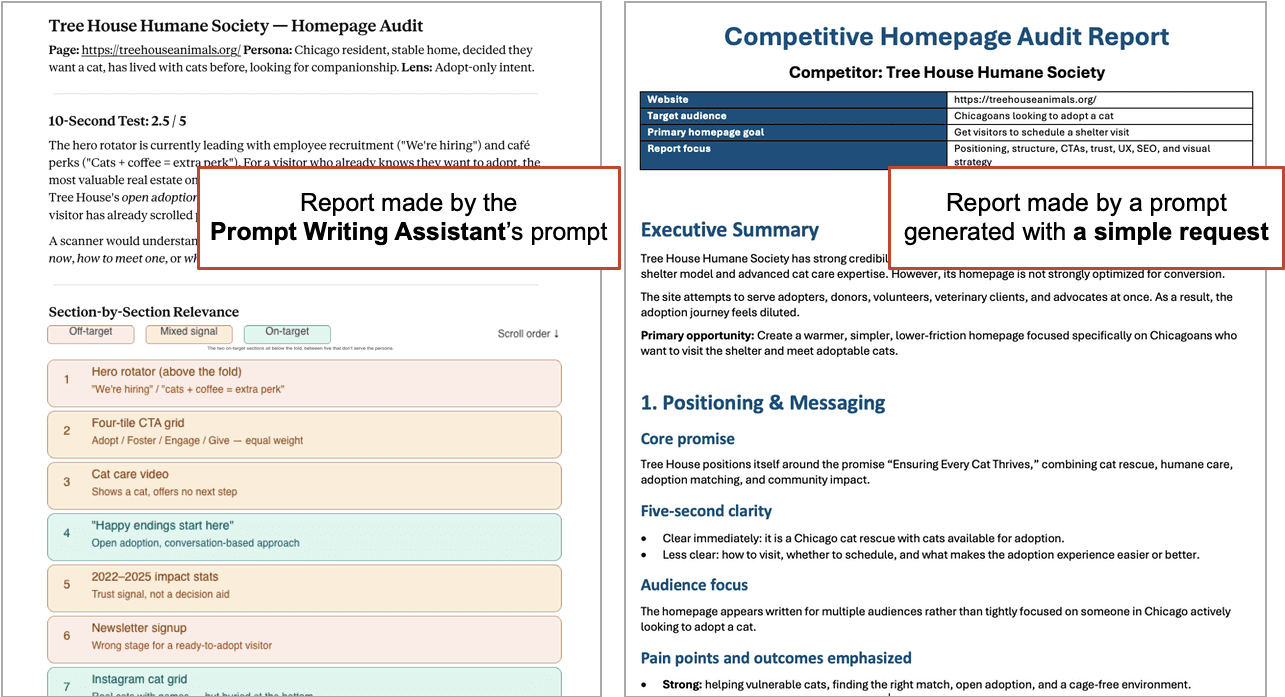
In this test, the difference is dramatic. The Prompt-Writing Assistant generated a prompt that had much more detail and insights.
- It started by asking me questions (“What decision are you driving toward?”)
- It suggested inputs (“Can you provide a screenshot?”)
- It created a scoring system (“Ten-second test results: 2.5 out of 5”)
- It critiqued its own output (“The weakest judgment in this audit was scoring the hero based on a single screenshot of a rotating carousel.”)
Of course, they are both better than a one-shot prompt written by hand “Audit this homepage for messaging weaknesses.” I tried that too. It was a list of generic recommendations. Useless.
What do you do next?
- The output is good…
Save your new prompt! (more on this below) - The output is not great…
Fix the issues in the new prompt. Edit it then fire the test prompt again. - The output is way off…
There’s something structurally wrong, useless or irrelevant. Training time. Go back and tell your prompt assistant what’s not right. Ask it to create a revision to its own instructions. Then copy the revised instructions, paste them in, start a new conversation and fire the test prompt again.
This more diligent approach to dialing in your Prompt-Writing Assistant involves checking it in several stages.
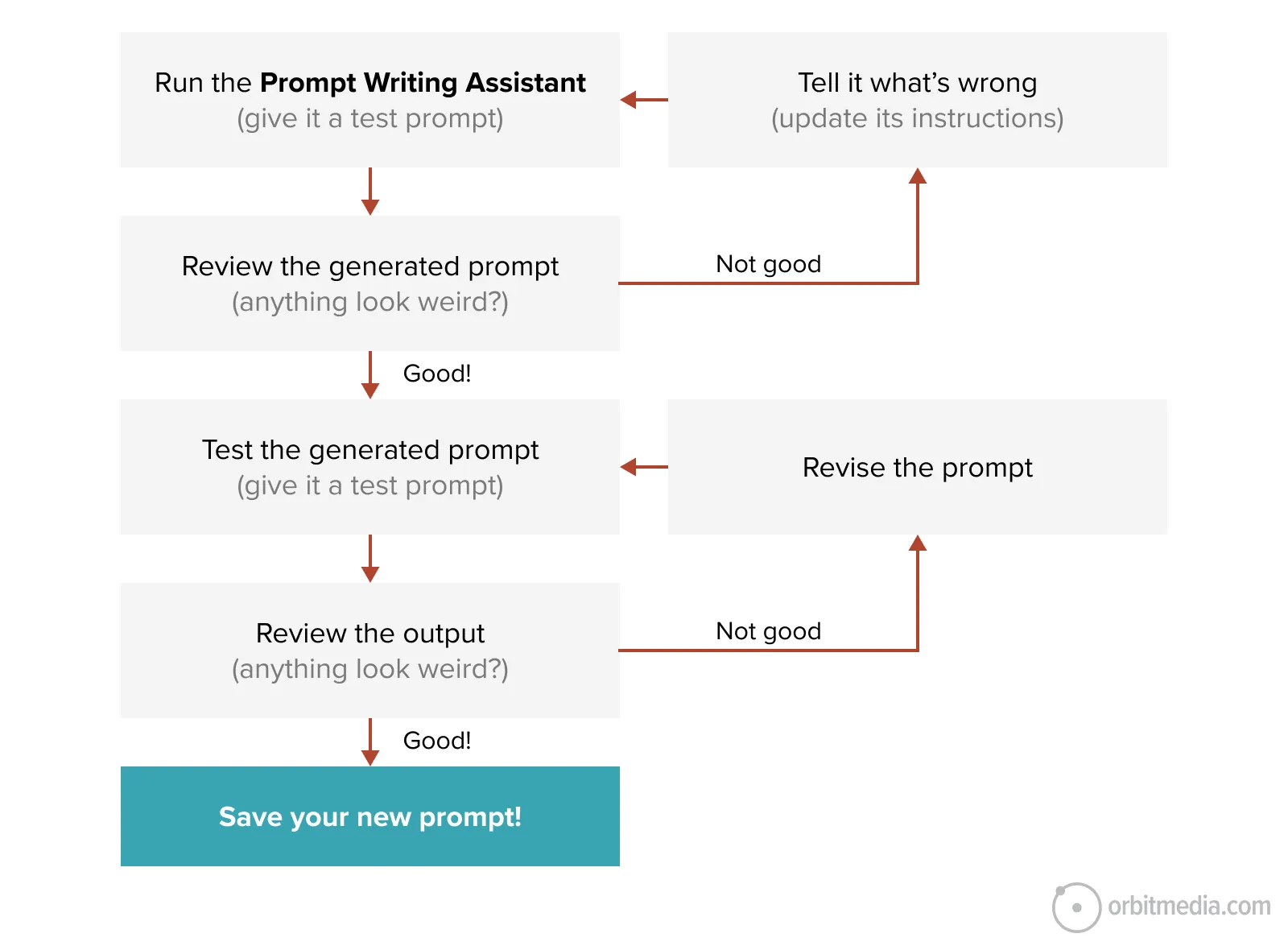
It’s a strange and abstract way to work. You’re using an AI assistant to generate new prompts that you’re testing with test prompts in another conversation, sometimes with the assistant auditing its own output. Layers of language. It’s mind bending work with multiple levels of editing. It’s like that Leonardo DiCaprio movie ‘Inception’. Great movie.
Keep iterating until you have an assistant you trust and a final prompt worth sharing. This approach is how we’ve made many of our most effective prompts.
Use your Prompt-Writing Assistant to improve your old prompts
You may already have a little repository of prompts you love. They’re very good. But could they be better? Could the analysis prompts provide even deeper insights? Could the content prompts generate even more complete articles?
There are two ways to use your new Prompt-Writing Assistant to audit and improve them
- Give your original prompt directly to the Prompt-Writing Assistant
“Here’s a prompt I’ve been running regularly. Audit it against the principles in your instructions. Suggest specific improvements that would make it sharper, more reusable, or more decision-driving. Don’t change its purpose or the shape of its output. Tell me which principles each suggested change is grounded in.” - Have the Prompt Writing-Assistant make a new prompt, then give both prompts back to the assistant
“I’m giving you two prompts that solve the same problem: one you generated, one I’ve been using. Compare them across the principles in your instructions. Where does each one outperform the other? Then write a third prompt that combines the strongest elements of both.” - Run both prompts and compare the actual outputs.
“I ran both prompts on the same input. Here’s what each one produced. Which output is stronger, and why? What does the weaker prompt need to match or beat the stronger one?”
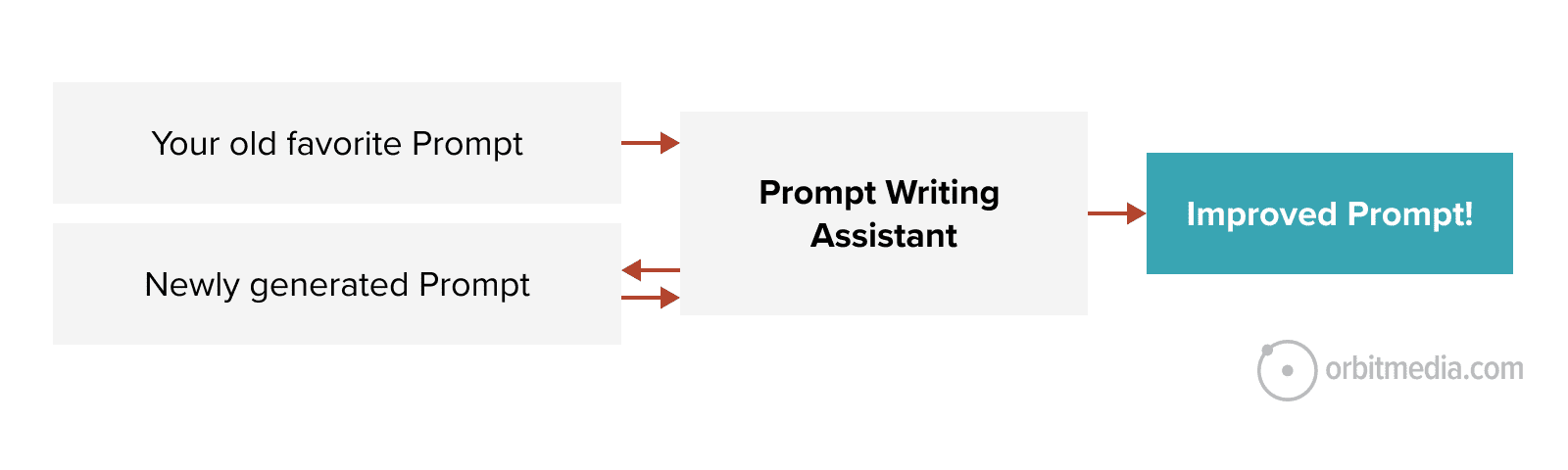
The same approach works to audit the instructions behind Custom GPTs, Claude Projects, Gemini Gems, and Claude Skills. Paste in the instructions, ask the Prompt-Writing Assistant to audit them against its principles, and you may spot gaps that have been quietly limiting every conversation you’ve had with that assistant.
 |
Andrej Karpathy, OpenAI Cofounder“The hottest new programming language is English.” |
Give your new reusable prompt a home
A workhorse prompt without a home gets rewritten from scratch by the next person who needs it. Or by you, three weeks from now, when you can’t remember where you saved it. Put your workhorse prompt in the stable. This could be several different places:
- Save it in a shared prompt library that your team can easily access
This could be Google Drive, Sharepoint, Notion or whatever else you use to share docs. Then link to it from your team training docs and SOPs (“standard operating procedures”) - Make the new prompt its own custom GPT, Claude Project or Gemini Gem
If it’s used all the time, no need to copy and paste it every time. Just make it another new assistant. Give it a name “Orbit Email Editor” or “Cletus the Copywriting Helper.” As long as you have a team AI account, everyone can access it. - Claude Users Only: Make it a “Skill”
Tell your Prompt-Writing Assistant to adapt it and make it a Claude Skill. Skills get invoked automatically when the request matches the request. The user doesn’t need to go to the assistant.
Make to your Assistant ever-smarter (upload knowledge sources)
What would make your assistant smarter? What could you upload to it that it could reference when generative prompts?
That depends on its purpose. If it’s generating prompts that do editing, upload some writing standards that it can incorporate. If it’s generating prompts that make reports for clients, upload your company style guides or a past report. If it’s generating prompts that do audits, upload your current methodologies.
Our page auditor has several interesting knowledge sources that it can reference.
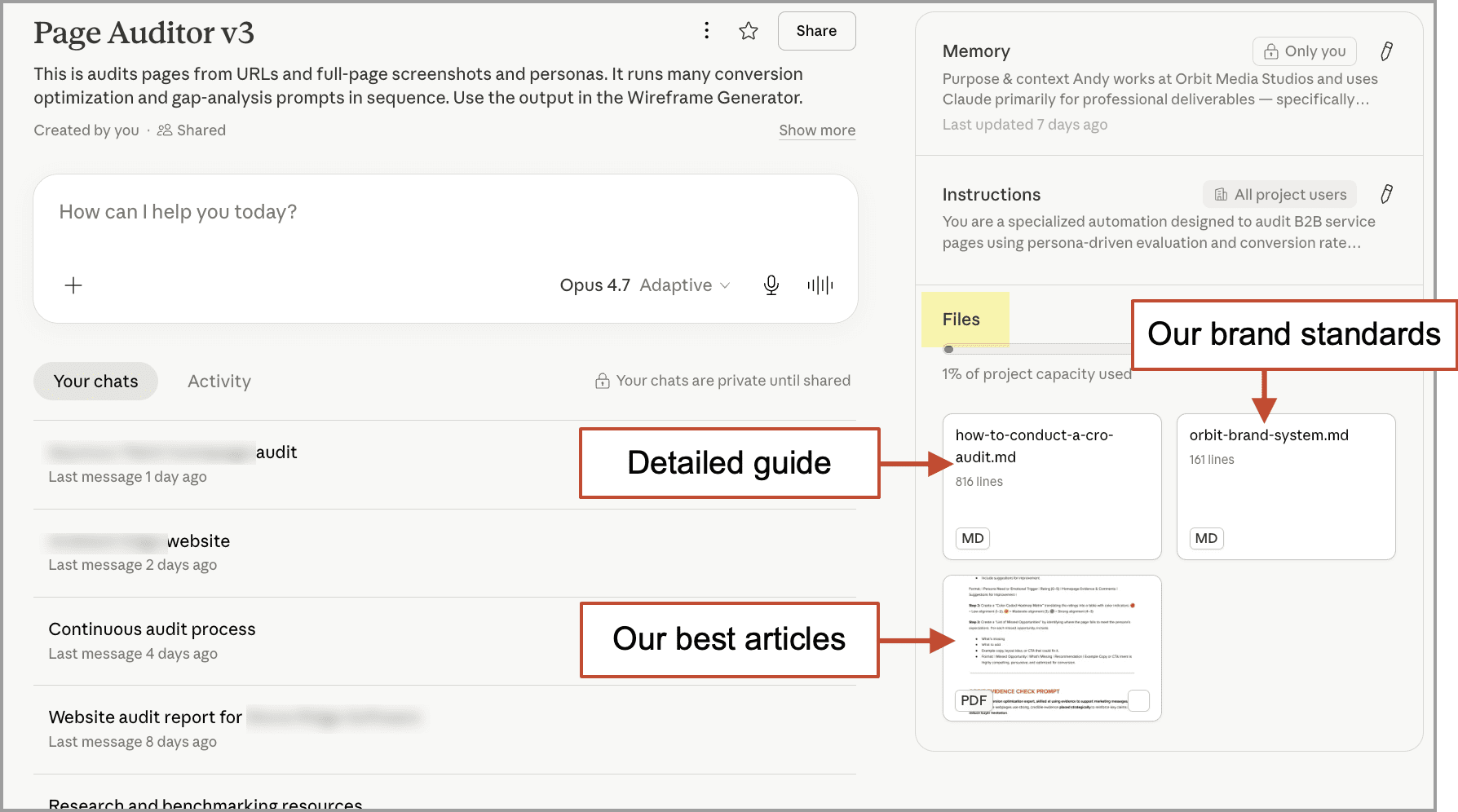
Anytime, anywhere. If you spot something that might make any of your AI assistants smarter, save it, convert it to a lightweight markdown (.md) format, and upload it to the knowledge sources section of your assistant. Your assistant may be a bit smarter forever after.
I have many marketer friends who bristle at this kind of AI delegation. They have valid reasons, from labor market impact to environmental costs. But one of the strongest objections is just about the future of work and its intrinsic value to human purpose. What about the simple joy of making things? What about that?
The joy of creativity is alive and well
In December of 1999, I quit my recruiting job to become a web designer. I wanted to build websites more than anything else in the world. By 2001, my cofounder and I had started Orbit Media as a web development company and we never looked back. I haven’t personally designed a website in many years, but I still remember the joy of making things.
And I still feel that creative joy, but it’s moved. I feel another kind of joy, The joy of building little tools and seeing them work. It’s still creative, but it’s a different kind of creativity. Maybe it’s more like the joy that a programmer feels when their code does a good job.
And of course, the greatest joy is performance. Knowing that you made a difference for a brand.
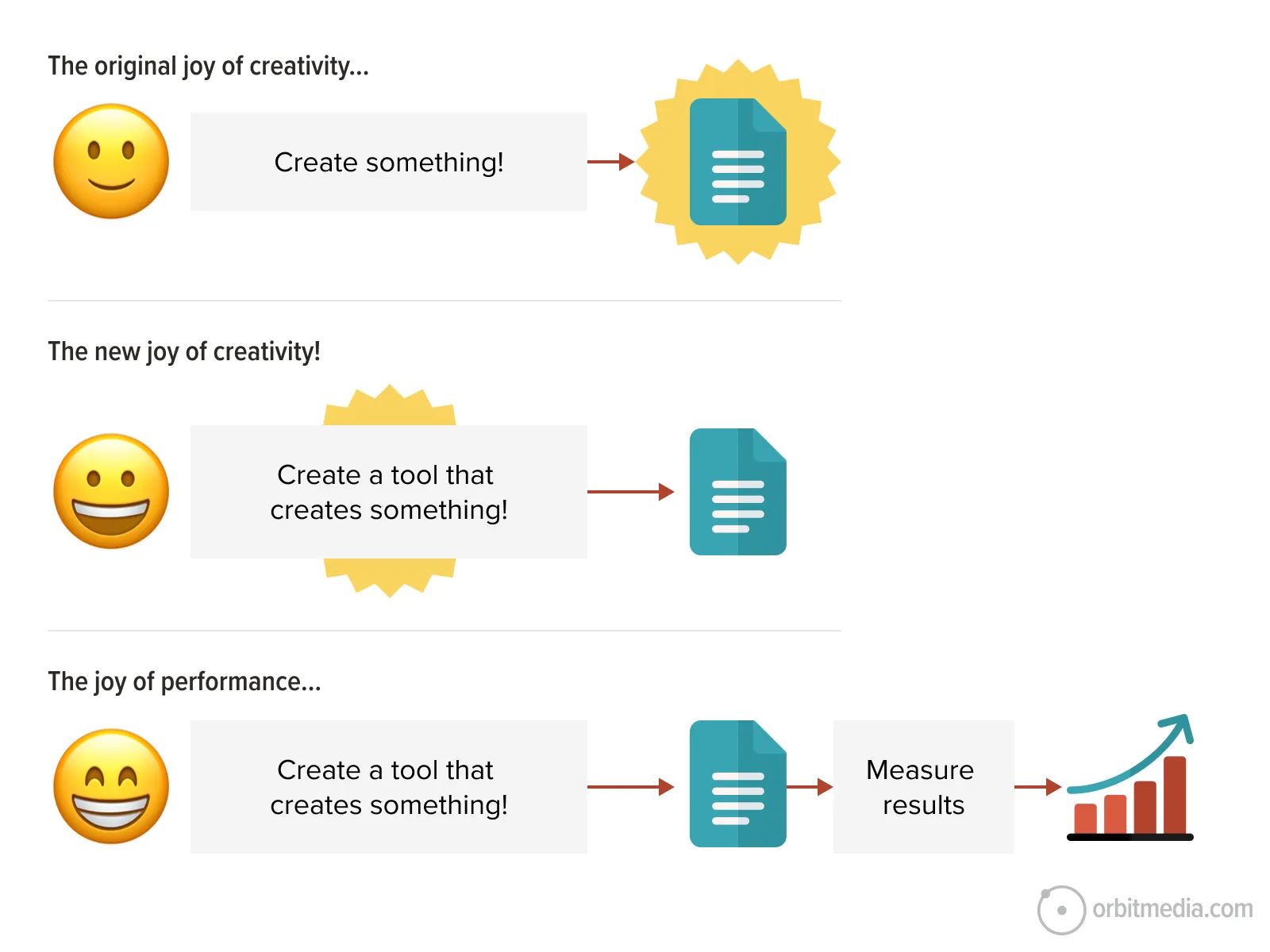
Marketing is important work. It fills the pipeline that drives deals that drive the revenue. That revenue creates job security for the humans that work at those brands.
With this singular purpose, we must consider any tool that drives results. AI is one of them. But the point was never AI or any other tool. The point is the impact that the work has on the business.
And now that we can make our own little tools, we can make one shift that secures the future for all of us.
Focus on outcomes, not outputs.
We are marketers, not artists. We take pride in our work, but we must also take pride in the performance of our work. Because marketing matters.