Every AI prompt has two prices.
One shows up on your invoice. The other gets paid in carbon, electricity and water. Both are driven by token usage and what you upload to and export from the AI. And the file formats you choose can change the bill by 10x.
Why do some files require more processing?
There are three factors that combine to determine how hard the AI has to work with any file.
- Does the AI need to use a tool to open the file or generate the output?
- How much structural noise (tags, formatting, styles) does the file format require?
- Is anything being processed as an image instead of text?
Some file types that have lots of formatting and visuals. These require much more processing power. Here’s a simple way to remember this:
- If you need software to open it, it’s expensive (DOCX, PPTX, XLSX, PDF)
- If you can open it in Notepad, it’s efficient (TXT, MD, CSV, JSON, HTML)
If you need some desktop software to open the file, then the AI needs libraries and tools to parse the file. These libraries and tools add tokens and carbon cost. It may be obvious. You can sit back and watch the AI work harder (and slower) on these files.
Imagine you’re working on a big report and getting help from AI…
You can generate all kinds of file formats using AI. Which do you choose?
To get a sense for which file formats are the most popular with marketers, we put a little poll on LinkedIn. We had about 500 responses to the question “When you ask AI to make a big deliverable, what format do you ask for?” The top answer was DOCX by a wide margin.
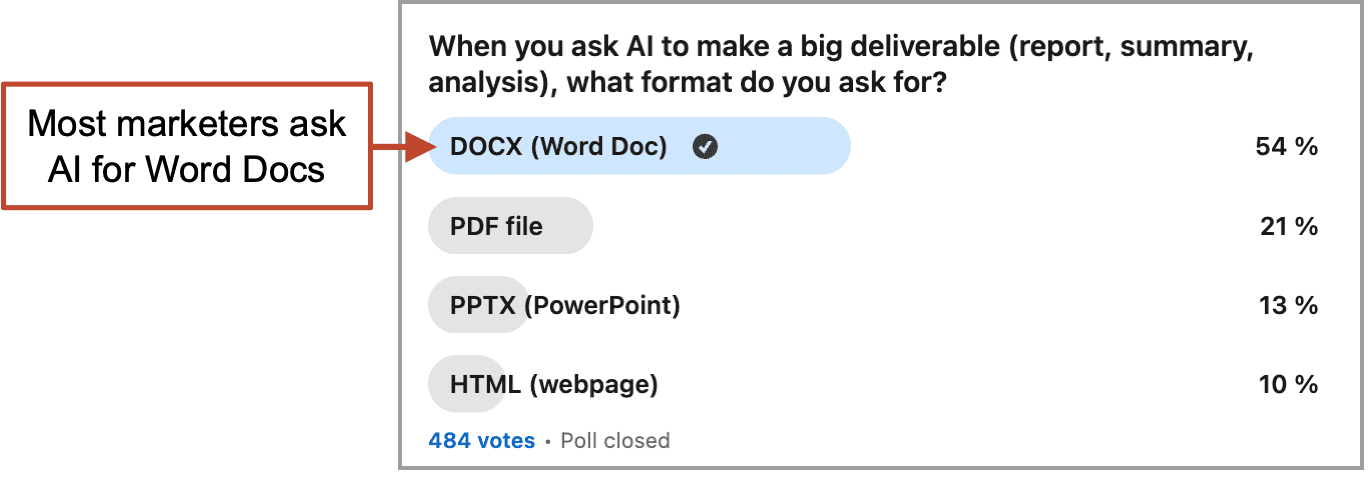 But those are all very different types of files, each requiring very different levels of effort from the AI to generate. They have different costs in terms of tokens (processing power), electricity (carbon output) and credit usage (money).
Which file formats have the highest costs?
To measure that difference, I took a recent article and gave it to Claude in six different file formats, then analyzed the token count using the “v1/messages/count_tokens” API endpoint. I measured in both directions:
- Input Measurement (added to prompts): I asked the AI to “summarize” the piece as provided in the six formats, including a nicely designed PowerPoint version of the article that I’ve used in presentations.
- Output Measurement (generated for downloading): I then reversed the process and asked AI to “generate” the content in those same file formats.
Here is the relative cost in tokens, which translates directly into energy consumption, environmental impact and financial cost. You can see that mileage varies.
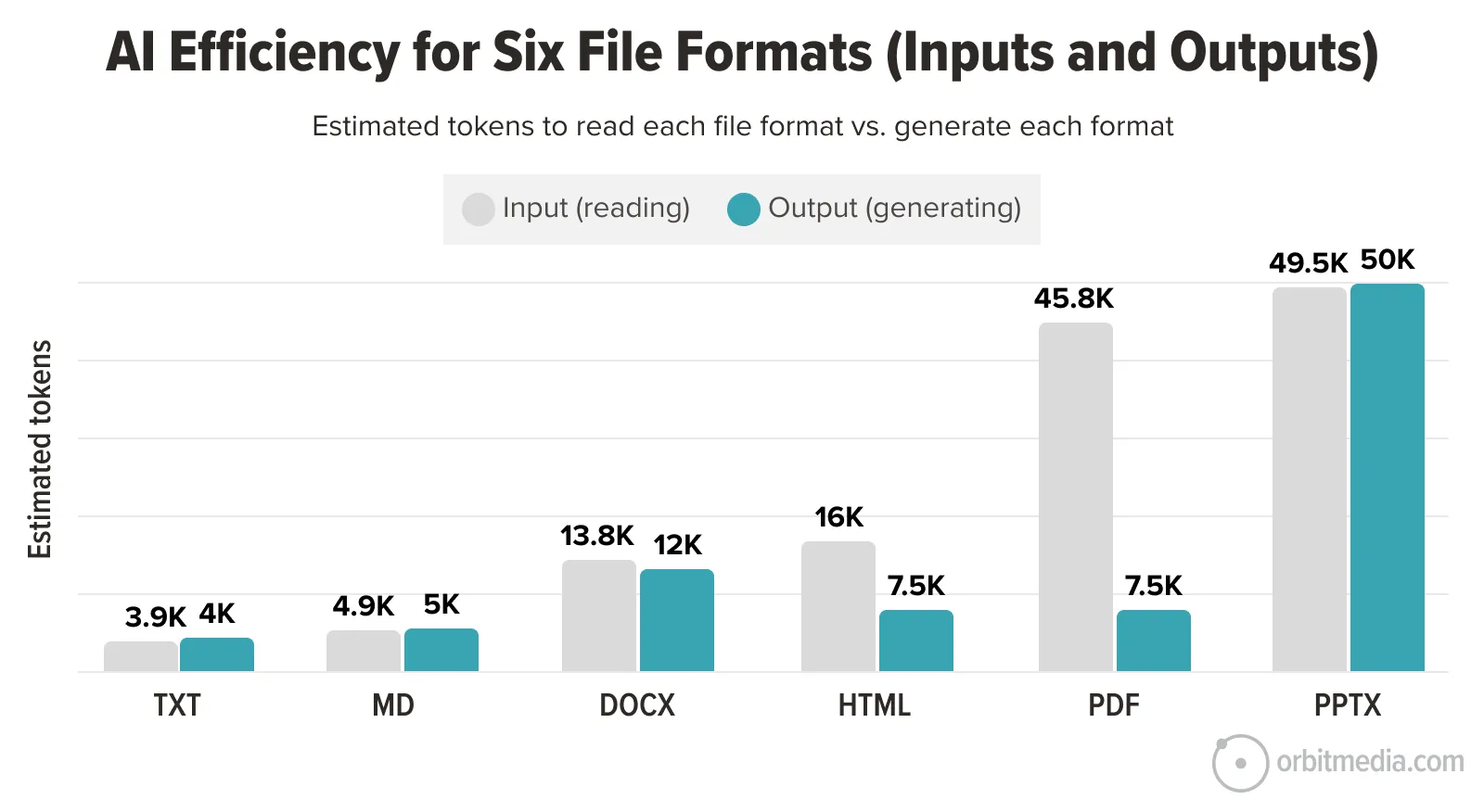
The difference is huge. HTML and PDF are expensive to read but cheap to write. DOCX is expensive in both directions. PPTX is by far the heaviest, slowest and most expensive in the bunch.
Let’s look closer and consider more file formats. This table explains how AI sees the files and handles the processing, in and out.
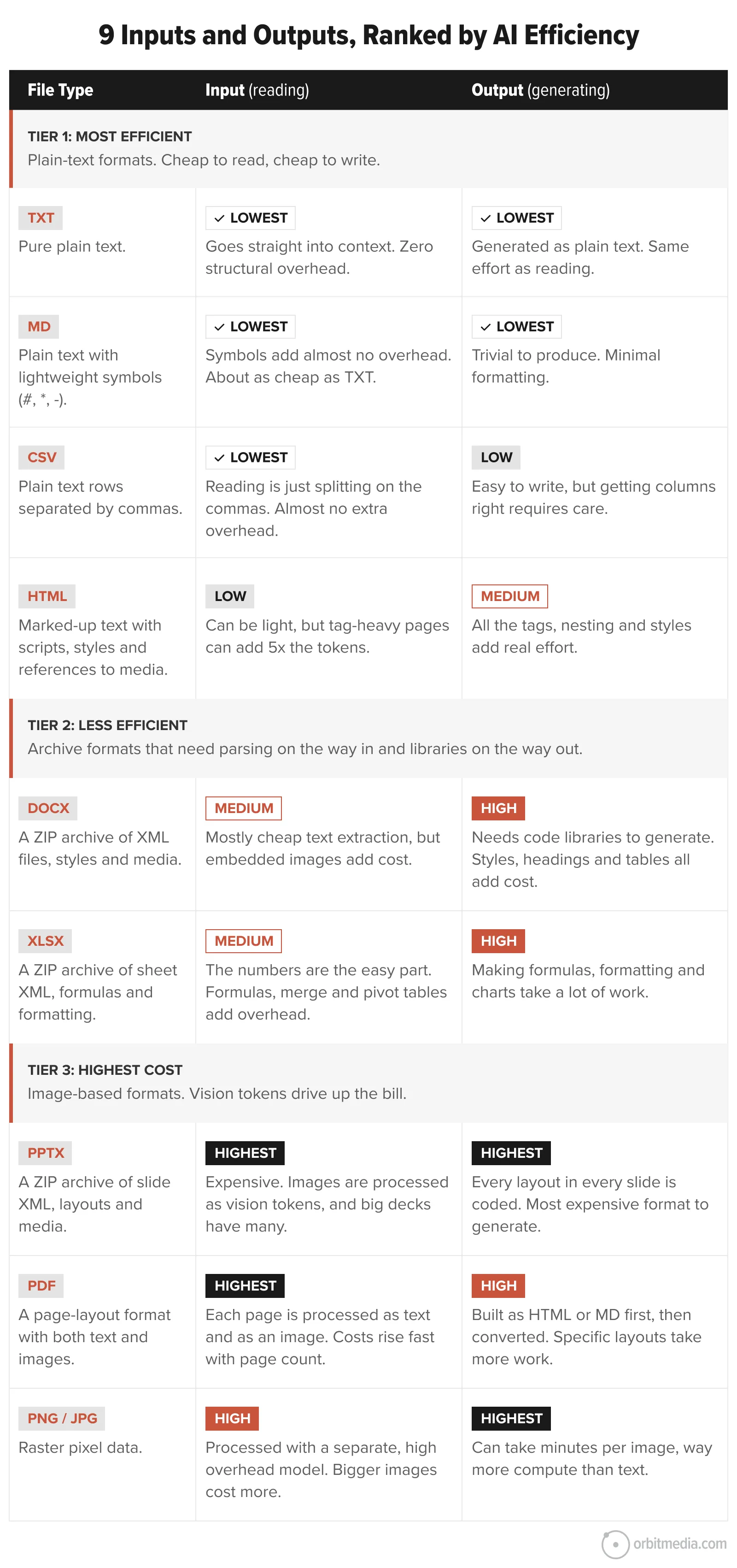
Let’s look closer at the rankings, share tips and consider lighter-weight alternatives to the heavy, popular options.
The formats, use cases and alternatives
1. Text Files (TXT)
The smallest, lightest file possible. But contains no formatting. Good for large amounts of text where formatting isn’t important, such as podcast transcripts.
Lighter alternative: None.
2. Markdown Files (MD)
Markdown is the language AI agents speak best. It’s also readable by humans and not much heavier than a TXT file. Formatting and tables are added through characters, not tags. It’s the fast, efficient champion of AI inputs. It’s also great as a draft that you can edit within the AI, getting all of the content ready before publishing to a heavier format.
Lighter alternative: None.
3. Comma Separated Files (CSV)
Lightweight, structured and easy for AI to parse. Great for simple tables, lists, exports, keyword research, analytics data and CRM records. No formatting, formulas or multiple sheets. Just rows and columns.
Lighter alternative: If it’s just a short list or simple table, paste it directly into the prompt.
4. Web Pages (HTML)
HTML was our least common answer in the LinkedIn Poll above, but they have many advantages. They’re not too heavy to generate and easy to share (everyone has a browser) Maybe the ideal for reports. Then can even include interactivity, but this adds a lot of weight.
HTML files don’t play nice with Google Docs. You can’t paste HTML into a Google Doc and if you upload them to Google Drive, they don’t render the HTML when you open them.
Lighter alternative: If you don’t need print-ready formatting, MD carries the same content at a fraction of the cost.
5. Word Docs (DOCX)
This is the most common file format for outputs, according to our little LinkedIn Poll above. No surprise. It’s still a standard for word processing. But it’s a heavy file format with lots of tags and formatting. It wasn’t built for AI.
Like all archive formats, these need parsing on the way in and libraries on the way out.
- Instead of importing a DOCX file to AI, convert it into an MD file and then upload (use Google Docs or save to TCT then change the file extension)
- Instead of exporting a DOCX file from AI, make an MD file then paste it into a fresh DOCX file (fast, easy, but may require a little manual styling)
Lighter alternative: MD for drafts, HTML for polished-looking documents.
6. Excel Files (XLSX)
Useful when you need multiple sheets, formulas, filters, formatting or charts. But all of that structure adds weight. For AI inputs, XLSX files are overkill unless you need formulas and logic.
Lighter alternative: If you don’t need formulas or formatting, CSV does the same job at a fraction of the cost.
7. PowerPoint Files (.PPTX)
These have a very high cost output. They require a ton of processing. Every layout decision in every slide is all code that the AI has to read. And images require a separate, slower model. Those visuals drive up the bill.
Better yet, just don’t mix AI and PPTX files if you’re concerned about costs. If you need to make a PPTX in AI, produce the output just once, at the very end of the process.
And don’t use AI for small edits to decks. It’s faster and cheaper to make little changes manually in PowerPoint. If you must edit within the AI, be explicit: “Just regenerate slide 3, keep everything else the same.”
Lighter alternative: If the slide format isn’t the deliverable, an HTML file carries the same content far more cheaply.
8. PDF Files
If you’re building a Custom GPT, Claude Project or Gemini Gem, you may be tempted to upload some relevant PDFs. But before you do, start with this prompt: “I’m planning to add this PDF document to your knowledge sources, so let’s convert it to an MD file first. But before we do, what should be trimmed? Or consolidated”
The AI will suggest edits that will reduce costs without sacrificing quality. And the smaller file (MD, not PDF) will make all future conversations with this project cheaper and lower-emissions. It’s a double-win.
Lighter alternative: Use MD for text-heavy documents, HTML for designed reports
9. Images (PNG / JPG)
AI image generation is not done with an LLM. It’s a separate model that uses “visual tokens.” If you’ve had AI make pictures, you’ve seen how slow it is. That’s because it requires a lot of processing power.
If you’re only worried about the financial costs and not the environment, you can generate images in a cheaper model (Ideogram is the best) and save the credits in your daily workhorse AI, where you sometimes hit credit limits.
Lighter alternative: For screenshots of text, just paste the text instead, if possible.
Where costs multiply: editing files in AI
Here’s where things get really expensive. It isn’t obvious, but all marketers should know this:
Every iteration on a heavy file format costs as much as making it from scratch.
That’s right. If you ask for even a small change to that DOCX file, the AI may start over and create the document all over again, with all of that token cost, energy use and carbon impact.
Smart AI users know to work on files in a simple format, such as an .md file, where the costs are much lower. Iterate in text, then generate the final format once everything is final. Here are a few tips for efficient AI prompting:
- Brainstorm first, no file generation yet. Tell the AI what you want to make, but instruct it not to make the final format yet… “Don’t generate the DOCX output until I ask for it. Let’s refine the idea first…”
- Ask for lightweight previews. While working on the draft, ask it to show a simple markdown format you can preview… “Show a preview in a lightweight markdown format so I can review it efficiently.”
- Iterate in the text. Have the conversation about content in MD or right in the chat. Get the structure right, get the wording right, get the order right, all in plain text, where iterations are cheap.
- Batch your changes. If you have five edits, give all five in one prompt. Each prompt that edits a heavy file pays the full regeneration cost. Five separate change prompts is 5x the cost. One consolidated change prompt that lists five edits is 1x the cost. “Change X to Y and move it up in the doc. Remove Z completely.”
- Ask for the final format once, in the end. Don’t ask for the output until you’re ready for showtime. This is the single biggest efficiency win. All set? Content locked in? Now have it make the big file once and once only. “Changes are final. Now generate the DOCX file. Use these styles…”
- One more final tweak? Do it outside the AI. Export the big file and make final final changes (there’s always one more, right?) after it’s landed on your computer. Download it → Review it → Tweak it → Ship it
Having AI make tweaks to a DOCX or PPTX file is slow, processor intensive and uses more energy than necessary. It’s like driving a giant truck a half block to pick up a few groceries.
Let’s ask the experts: “Which are the best file formats for AI?”
Marketing veterans and AI experts make thoughtful cases about AI efficiency and file formats.
 |
Chris Penn, Trust InsightsChoose the smallest model that will get the job done. My rule of thumb: if you’re doing a task that requires less than two rounds of revision, use a fast model. Example: summarizing an email, etc. If you’re doing a task that requires more than two rounds of revision, use a slow model, but know it imposes a much heavier carbon cost.” |
 |
John Jantsch, Duct Tape MarketingHTML wins on both ends. Cheaper to make, cheaper to change. The reason we didn’t already ship HTML is simple. You had to know HTML, or fight with a website builder. PowerPoint and Word had visual editors that a non-coder could use. AI flipped that. You describe what you want in plain English, and you get a self-contained file you can open locally or host for free. Need changes? Just ask. It rewrites in seconds. It’s also lighter on the planet. HTML is plain text that the AI types directly. DOCX and PPTX are zip archives of XML that the AI has to assemble with separate code libraries. That burns far more processing every time you generate a file. And every time you ask for a small tweak to a DOCX, the AI usually rebuilds the whole document from scratch. The same edit on an HTML file costs almost nothing. Multiply that across a year of client work, and the gap is enormous.” |
 |
John Nugent, MagnoliaSlides are becoming obsolete |
|
Chris Penn, Trust InsightsXLSX files are a nightmare |
|
John Jantsch, Duct Tape MarketingMarkdown is the next move. Perhaps today is a new beginning for you: a new format for your big deliverables (HTML) and a new file format for everyday AI collaboration (MD).” |
So far, we’ve covered things you can control. Now we’ll pan out and see how your prompts fit into a much bigger picture…
The AI cost you can’t control: training the models
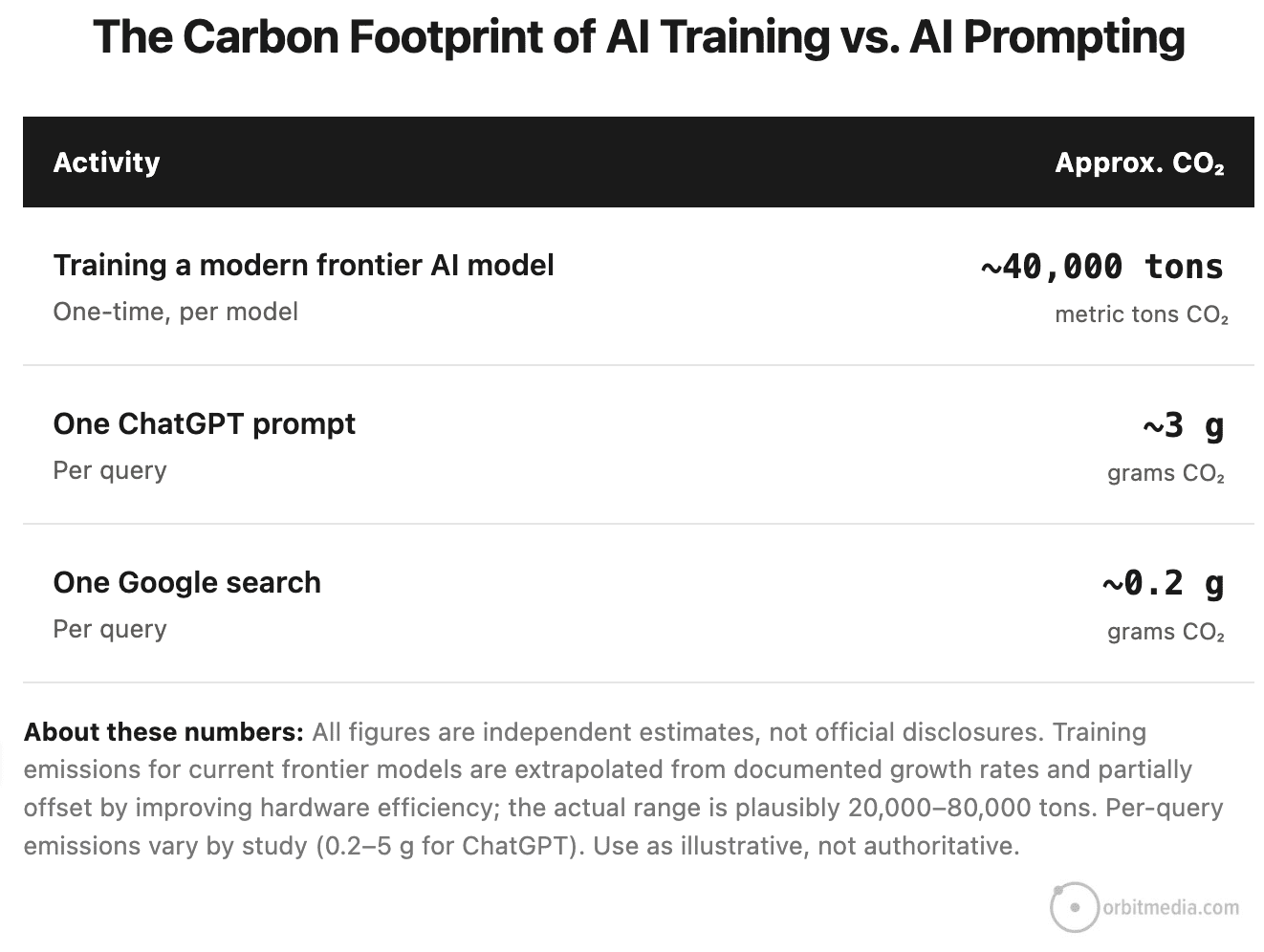
Prompting isn’t the biggest cost of AI. It’s training the models. Building a model and keeping it trained requires huge amounts of energy. Every big tech firm with a frontier AI model spends at least $100M per year on training, emitting tens of thousands of tons of carbon (and methane, nitrous oxide, etc.) not to mention water (evaporative cooling to keep servers from overheating).
This is not something users like you and I can control. No matter how much or little you use AI, these companies will continue to invest, incurring financial costs for themselves and environmental costs for us all. Compare the cost for AI model training and user AI prompting:
When asked about this, Sam Altman recently brushed off concerns about AI’s energy use, comparing it to the food humans eat.
“People talk about how much energy it takes to train an AI model, but it also takes a lot of energy to train a human. It takes about 20 years of life, and all the food you consume during that time, before you become smart.”
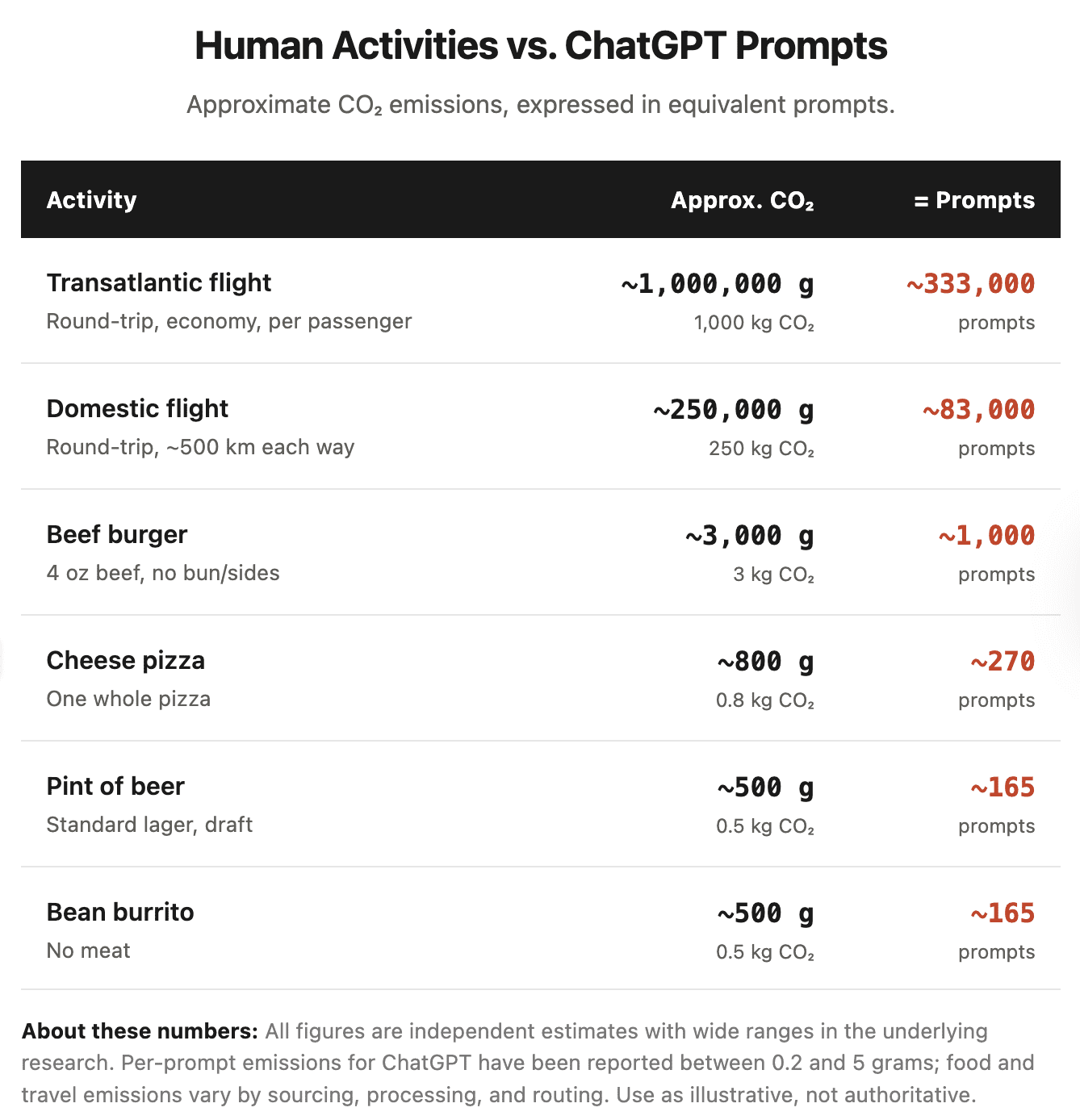
Sounds dismissive. But he has a point about the high carbon cost for human consumption. So let’s look at that…
If you’re really concerned about your carbon footprint…
There are two main inputs that drive the carbon footprint for you, me and everyone else on the planet: air travel and meat eating. AI aside, any of us can reduce our carbon footprint by cutting back a bit on these activities. This puts AI use in the proper context of each of our true individual impacts.
Shrink your AI carbon footprint
My friends who are the most proficient with AI talk about “token efficiency.” They work hard to reduce credit expenditures. They run the cheapest model possible for each specific job. They put data in tables to avoid prompting completely when possible. They even install AIs locally on their laptops for simpler tasks. The best AI users obsess over efficiency.
But you don’t need to be an AI pro to be efficient. Smart decisions about file formats saves processing power, carbon emissions, water use and yes, money.
Minimizing the impact of AI on the planet is all of our jobs.