Data Privacy Compliance Support

We support compliance. You lead the legal process.

We can help you implement the necessary tools and practices to comply with major data privacy laws, including GDPR, CCPA/CPRA, and others.

Our work includes:

  • Configuring consent management solutions to align with your marketing tools
  • Setting up region-specific consent rules for California, the rest of the US, and international visitors
  • Following your legal team’s guidance to ensure your site respects user data while maintaining performance and UX
A man sits at a desk with a laptop, smartphone, and webcam. He is smiling and wearing a long-sleeve shirt. A large window and indoor plant are in the background.

Key regulations that may apply to your website

White outline of the United States on a turquoise circular background.

United States

This site tracks comprehensive US state privacy bills such as CCPA/CPRA, VCDPA, etc. U.S. State Privacy Tracker


Do you have to comply in the US?

A ‘yes’ answer to any question means you will likely need to comply.

  • Do you collect or process personal data (e.g., names, emails, IP addresses, cookie IDs) from individuals located in California, Colorado, or Virginia?
  • Do you offer goods or services (even for free) to people in California, Colorado, or Virginia — such as an online storefront, app download, newsletter signup, or targeted advertising?
  • Do you monitor or track behavior of individuals in California, Colorado, or Virginia — e.g., via analytics, cookies, location data, or profiling?
A blue circle with a dotted border and the letters "EU" in the center, representing the European Union.

European Union

This site helps you understand GDPR and determine what parts of it apply to you. What is GDPR?


Does GDPR apply to your business?

A ‘yes’ answer to any question means you will likely need to comply.

  • Do you collect or process personal data (e.g., names, emails, IP addresses, cookie IDs) from individuals located in the EU?
  • Do you offer goods or services (even for free) to people in the EU — such as an online storefront, app download, newsletter signup, or targeted advertising?
  • Do you monitor or track behavior of EU-based individuals — e.g., via analytics, cookies, location data, or profiling?

As of 2026…

A look at compliance requirements and enforcement

Regulation Applies when Consent method Banner requirement Enforcement & penalties
GDPR (EU) Any business processing the personal data of EU, UK, EEA (European Economic Area) residents, regardless of company size or revenue. Opt-in Yes — banner blocks non-essential cookies until the user chooses. Must offer “Accept All,” “Reject All,” and access to category controls, all with equal visual prominence. After consent, a floating button remains available so users can change their preferences at any time. Enforced by Data Protection Authorities (DPAs) in EU member states. Tiered fines: up to €10M or 2% of global turnover for procedural violations; up to €20M or 4% for substantive violations.
CCPA & CPRA (CA) Gross annual revenue of $25M (adjusted to $26.625M for inflation) OR 100K+ CA consumers OR 50%+ revenue from selling/sharing Opt-out No banner required. A floating button on every page, paired with a “Do Not Sell or Share My Personal Information” link in the footer, is sufficient. Global Privacy Control (GPC) signals must be honored automatically. Enforced by the California Attorney General and the California Privacy Protection Agency (CPPA). $2,500 per violation / $7,500 per intentional violation. Private right of action for data breaches: $100–$750 per consumer.
CIPA (CA) Any website accessible to California visitors. No revenue or volume thresholds — applies universally. Opt-In Mandatory (per recent court interpretations). Must block tracking until consent is given, provide “accept” and “decline” options of equal prominence, and allow users to withdraw consent. Private right of action allowing consumers to sue businesses directly. Statutory damages of up to $5,000 per violation.
VCDPA (VA) Businesses processing personal data of 100,000+ Virginia consumers in a calendar year, OR processing data of 25,000+ consumers AND deriving more than 50% of gross revenue from the sale of personal data. Opt-out No banner required. A floating button with access to preferences is sufficient. Opt-in consent required for sensitive personal data categories. Enforced by the Virginia Attorney General. Up to $7,500 per violation, with a 30-day cure period. No private right of action.
CPA (CO) Businesses processing personal data of 100,000+ Colorado consumers in a calendar year, OR processing data of 25,000+ consumers AND deriving any revenue or discount from the sale of personal data. Opt-out No banner required. A floating button with access to preferences is sufficient. Universal opt-out signals (GPC) must be recognized. Enforced by the Colorado Attorney General and district attorneys. $2,000–$20,000 per violation, up to $50,000 for violations involving minors.
16 other US state laws
Thresholds vary by state. As of 2026, 19 US states have comprehensive privacy laws in effect. Opt-out Not required. Most follow Virginia’s model. 12 states now require GPC signal recognition. Enforced by state attorneys general. Typical penalties range $2,500–$7,500 per violation. Most states have cure periods of 30–60 days.

Have you heard of CIPA?

Data privacy regulations evolve rapidly. We are currently seeing an increase in demand letters related to the California Invasion of Privacy Act (CIPA). Unlike standard Cookie Consent, which governs data storage, CIPA focuses on data interception and generally requires explicit consent before a website records or shares a user’s interaction. As a result, these claims often target how websites handle search data, form data, track pixels, and user consent. For these reasons, every site we work on now adheres to these standards:

  • All forms must contain text or a checkbox above the Submit button that says, “I agree to the terms of the privacy policy” and links to the website’s privacy policy page.
  • Site search tools do not record or store the search terms in the CMS, Google Analytics, or the page URL query parameters. This prevents search queries from being transmitted to third parties, which is where CIPA wiretapping claims typically apply.
  • Third-party tracking scripts (analytics, pixels, session replay, chat widgets) are configured to block until the user provides consent via the cookie banner. This includes third-party embedded content.

To help mitigate the potential of a CIPA lawsuit, we recommend that you also do the following:

  • Consult your attorney to assess your level of risk and compliance.
  • Make sure your privacy policy and user consent policies are reviewed and updated annually to include all 3rd party tracking scripts and/or 3rd party embedded features.
  • Make sure that your website content managers know and understand how to add or update forms on your website and ensure they include a mention of your privacy policies.

Example websites

Orbitmedia.com (Orbit standard configuration: CCPA/CPRA for US visitors, GDPR for all other visitors. Form including privacy policy link.)

Offthestreetclub.com (GDPR for all visitors.)

Cookies and consent

What types of cookies require consent?

White checkmark inside a white circle, centered on a solid reddish-brown background.

Strictly necessary

Essential for site function (e.g., forms, shopping cart)

White line graph with an upward arrow displayed on a red circular background.

Analytics

Behavior tracking (e.g., Google Analytics and other tracking scripts)

Advertising / marketing

Personalized ads (e.g., Facebook Pixel, Google Ads, etc.)

White gear icon outlined in the center of a solid red-orange circle.

Functionality / preference

Language, region settings

White speech bubble icons with three dots inside appear on a solid orange-red circular background.

Social media

Embedded videos, logins (e.g., YouTube, Vimeo, etc.)

How to install the cookie manager and meet compliance requirements

Your responsibilities

  • Consult legal counsel
  • Create a compliant privacy policy
  • Conduct website and tool data inventory
  • Add consent text and privacy policy link to all embedded forms on the site
  • Choose a cookie manager: We recommend Cookiebot –  here’s how to set it up
  • After deployment, conduct regular checks to maintain compliance

Orbit responsibilities

  • Add consent text and privacy policy link to all non-embedded forms on the site
  • Install and configure the cookie manager (e.g., Cookiebot)
  • (Optional) Eliminate unnecessary data storage

Set up your Cookiebot account in 3 simple steps

Cookiebot powers cookie management on orbitmedia.com and hundreds of our clients’ sites.

To get started, please follow these steps:

  1. Email your Project Manager with the contact information for the person or team who will manage Cookiebot on your end.
  2. Orbit will send an email to this contact from Cookiebot. They will then need to accept the Cookiebot invitation in their inbox and follow the link to complete the initial setup.
  3. Within 14 days, log in to your Cookiebot dashboard to complete the setup, finish configuration, and add payment details.

Important: A paid Cookiebot account is required. Pricing is based on the number of pages on your site and will automatically adjust if your page count changes. Regional configurations do not affect your Cookiebot pricing.

Blue background with Usercentrics and Cookiebot logos. Illustration of a person interacting with a computer displaying a menu, on the right side.

The default Cookiebot configuration

When implementing Cookiebot, Orbit will configure three regions. California visitors will receive an opt-in configuration (to support CIPA defense), all other US states will receive the CCPA/CPRA opt-out configuration, and everyone else will receive the GDPR opt-in configuration. Cookiebot honors Global Privacy Control (GPC) signals by default, so visitors from states that require GPC recognition are automatically opted out. Please communicate any additional requirements from your legal team for more specific settings.

White outline of the United States on a turquoise circular background.

United States (CCPA & CPRA)

Note: A banner will not appear by default in this configuration. Cookies are accepted by default. There is a floating button in the lower left corner of the site that allows users to see and change their consent settings. Users can also view and change their preferences by clicking the Cookie Policy link in the footer.

Floating consent button:Icon allowing users to change Cookie Consent Preferences

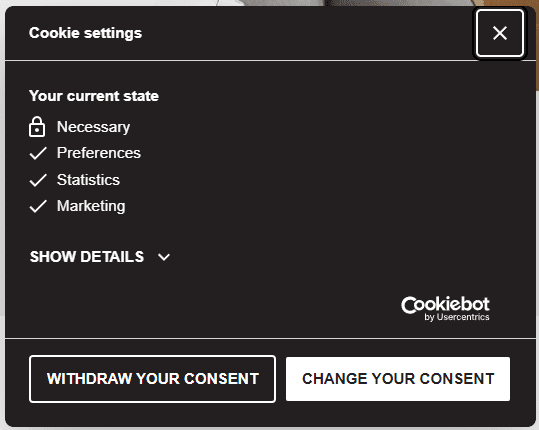
Current settings:An example of a Cookiebot banner where a user can change their consent

CCPA opt-out consent banner:Cookiebot Banner CCPA/CPRA Configuration

  • Opt-Out
  • Cookies are accepted by default
  • Banner not shown by default
  • Users can change their consent and will see a banner that includes options like “OK” and “Do Not Sell or Share My Personal Information”
White outline of the United States on a turquoise circular background.

California (CIPA)

Note: A banner appears until a choice is made by the user. Cookies are not accepted until a user chooses Accept or Decline. After making a choice there is a floating button for the user to change their choice.

Floating consent button:Icon allowing users to change Cookie Consent Preferences

Current settings:An example of a Cookiebot banner where a user can change their consent

Accept/decline banner:A website cookie consent banner with options to "Allow all" or "Deny" and a brief explanation about the use of cookies for personalisation and analytics.

  • Accept/Decline
  • Cookies are blocked by default
  • Banner requires users to accept cookies before any non-essential cookies are set
  • Users can change their consent and will see a banner that includes options like “Allow all” and “Deny”
A blue circle with a dotted border and the letters "EU" in the center, representing the European Union.

European Union (GDPR)

Note: A banner appears until a choice is made by the user. Cookies are not accepted until a category is enabled and the user chooses to allow that category. After making a choice there is a floating button for the user to change their choice.

Floating consent button:Icon allowing users to change Cookie Consent Preferences

Current settings:An example of a Cookiebot banner where a user can change their consent

GDPR consent banner:An example cookie consent banner checkboxes for necessary, preferences, statistics, and marketing cookies.

  • Opt-In
  • Banner requires users to accept cookies before any non-essential cookies are set
  • Cookie categories are not pre-selected
  • User must actively consent

The impact

What happens after a cookie manager is installed?

White rocket icon inside a solid teal circle, depicted in a simple line art style.

Post-deployment

  • A cookie banner may appear when the site loads
  • There will likely be a reduction in recorded traffic reporting in Google Analytics
  • Third-party content (e.g., embedded videos, maps, or other embedded scripts) may be blocked until consent is given

These are the common data privacy interactions across almost all websites these days.

Ongoing maintenance

After the Consent Management Platform (CMP) is deployed, you are responsible for reviewing the issues documented in the scan reports and taking action on changes. Here are the instructions

Orbit Support is available to assist. We can:

  • Help assess and implement the suggestions from the CMP scan report
  • Install new plugins and scripts in GTM with proper CMP configuration
  • Update existing GTM tags and triggers that we are responsible for

Create a support ticket by forwarding the scan email to [email protected], and we’ll get it in our queue.

We’re here to help

Our recommendation is to use Cookiebot for cookie consent. However, if you already use another platform or choose to forgo implementation, we can accommodate that as well. Just let your PM know.

And remember, we are not legal experts. We’re website professionals, and we will follow your legal team’s guidance to implement a cookie manager.

One more thing…

If your site doesn’t currently have a cookie manager, we typically hold off on installing one for a month after launch. We do this for a couple of reasons:

  • Installing a cookie manager will result in less traffic being reported in Google Analytics – this is completely normal and expected.
  • If we wait a month to install it, we can obtain data that is clean and unrestricted from the cookie manager for pre- and post-launch comparison.

Frequently asked questions

Most do. If your site uses analytics, marketing pixels, chat tools, or session replay — which most modern sites do — the three-region default provides the strongest compliance posture. For static marketing sites with only essential cookies, or sites that serve only a specific regional audience, your legal team may recommend a simpler setup. We’ll follow their direction.

If you have an open Project, SOW, or Service Agreement with Orbit contact your project manager. If you do not have any open agreements, contact our Support Team by submitting a ticket at support.orbitmedia.com or emailing [email protected]. Any updates would be billable work.

If your site uses any of these, you likely do: Google Analytics, Meta Pixel, LinkedIn Insight Tag, HotJar, FullStory, Intercom, Drift, or any session replay tool. These are the categories of scripts that plaintiff’s firms typically target. If you’re not sure what’s running on your site, your Project Manager or Orbit Support can help you inventory it.

Consult with your attorney ASAP.

And, if you have an open Project, SOW, or Service Agreement with Orbit contact your project manager. If you do not have any open agreements, contact our Support Team by submitting a ticket at support.orbitmedia.com or emailing [email protected].

Monitoring changes in data privacy law related to your business and marketing activity is your responsibility — your legal counsel should be tracking new regulations as they apply to your business. When you identify a change that affects your site, contact your Project Manager or Orbit Support and we’ll update your Cookiebot configuration. Cookiebot handles its own platform-level updates automatically, but anything specific to your site needs to be initiated by you.

While Orbit does not provide legal advice, we monitor developments related to website data privacy best practices and share relevant updates with clients when changes may affect website compliance considerations. As new regulations emerge or best practices evolve, we aim to communicate noteworthy developments and, when appropriate, recommend clients consult legal counsel to evaluate whether any action is needed for their specific situation.