How Can We Help? Let’s Talk!
Buy directly from the WPML website
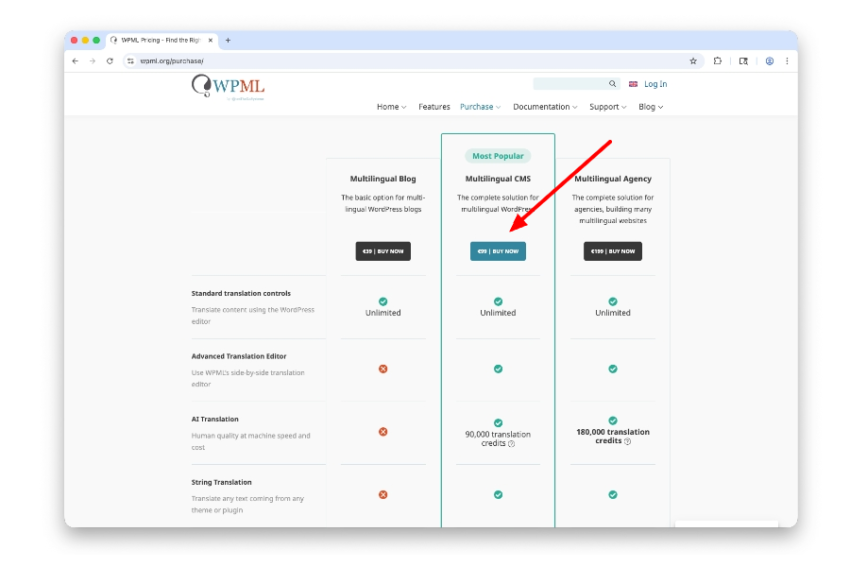
- Go to: https://wpml.org/purchase/
- Choose a plan
- Multilingual CMS – the default option for Orbit-built sites at only $99/year for the license
- Multilingual Agency – only choose this if you’re using WPML on more than 3 live sites
- Create an account and purchase
- Complete checkout with your name, email, and billing info
- NOTES: For the email address, we recommend using a shared or company email in case someone else needs access to your account within your company
- WPML subscriptions auto-renew annually unless canceled.
- Complete checkout with your name, email, and billing info
After the account is created, get your site key
- You’ll also get a confirmation email with login credentials and instructions
- Go to your WPML account dashboard
- Go to “Sites” > “Add New Site” and enter your domain to generate a site key
- Copy the site key and share it with your project manager
- NOTE: You’ll get instructions to download the plugin, but we don’t need that as we’ll likely already have the plugin installed.
Want automatic translations in WordPress?
For automatic translation services from WPML, we recommend the pay-as-you-go subscription.
Next steps
Once you give us the site key, we’ll add the key to the WordPress Plugin we’ve installed on the new website. We’ll reach out to you if we need more information.
Next, we’ll train you on how to translate content and pages.
You’ll soon be on your way to managing multiple languages on your new website.
Prepare for multilingual content entry by watching some of our videos
How to update a translation in the WPML translator
Are you really optimizing?
Get the plan. Get the team that understands. Monitor the response and report real results.