As you read this sentence, someone somewhere is looking for the services you offer, the products you sell or the knowledge in your head.
They are typing a keyphrase into Google…
They’re looking at search results…
They just clicked on a search listing…
And they’ve landed on someone else’s website. Bummer.
To get that visitor to land on your site next time, you need to choose keyphrases carefully and then align your content and pages with those phrases.
Ranking in search results is not as complicated or mysterious as you’d think. In order to rank, a page must indicate its relevance and the website itself must be authoritative in the eyes of search engines.
And it all begins with the keyword. Keyword research is the first step on the road to rankings.
And it’s fun. Keyword research is like reading the minds of millions of people. It’s truly amazing the things you can learn within minutes:
- What do people really call your product or service?
Avoid using jargon and start using top-of-mind phrases. - What answers and information does your audience look for?
Align your content marketing with relevant topics and phrases.
Over the last 20 years, we’ve researched thousands of phrases for hundreds of clients. Here, we’ve put our best advice into this single guide to help you learn how to research keywords for your digital marketing.
The basic criteria for choosing a keyphrase
The ideal keyphrase checks three boxes: People are searching for it (search volume). Your website has a realistic chance of ranking relative to other sites (competition). And finally, the phrase describes with what you sell or aligns with your content mission statement.
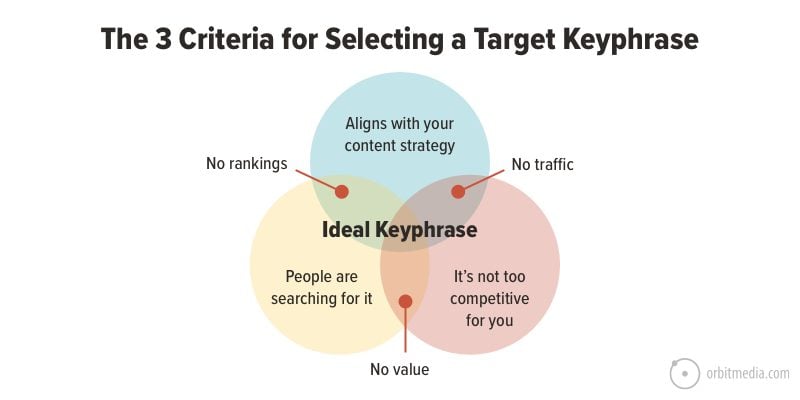
Assuming we know what topics and keywords align with the business, let’s focus on the first two criteria:
- Search volume:
This is the popularity of the keyword. Are people searching for it? A lot or a little? Is it trending up or down? It’s useless to target a phrase if no one is searching for it. - Difficulty:
How likely is your page to rank for the phrase? Are the other pages that rank for the phrase much more authoritative than yours? It’s useless to target a phrase if you have no chance of ranking for it.
The goal is to disqualify the phrases with few or no searches (the invisible) or too much competition (the impossible).
Search intent and types of pages
Before getting into the details of keyword research, let’s first break down the types of searcher intent. We need to understand intent to find and target the right keyword.
Keyword research principal #1
Every keyword indicates intent.
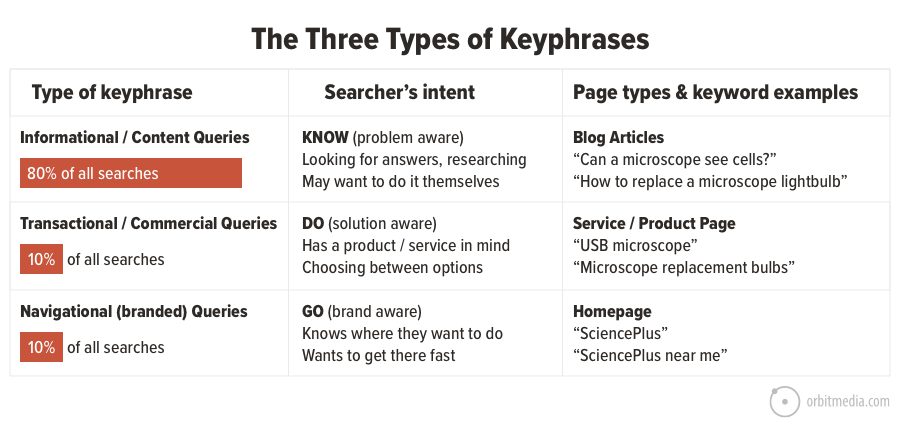
There are three main types of intent:
1. KNOW (informational queries)
These potential visitors are doing research and looking for answers. They have a question or a problem. These are the question mark keyphrases.
Examples: “can a microscope see cells” and “how to replace a microscope lightbulb.”
- Page type: Content marketing programs target these phrases with search optimized blog posts. This is pure TOFU (top of funnel). These pages usually have ultra-high bounce rates.
- Conversion: They’re not looking to spend money. If they convert at all, it’s probably an email subscriber. These are the pages that grow your email list. They also attract the most links.
2. DO (transactional queries)
These potential visitors are both problem and solution-aware. They’re looking for help. These keyphrases are service-related, a product type or the name of a business category. These are the dollar sign keyphrases.
Examples: “USB microscope” and “microscope replacement bulbs”
- Page type: Service pages and ecommerce product catalogs may target these phrases. These pages aren’t just written to rank, they’re built to convert.
- Conversion: If they take action, you have a new lead or a customer. These are the bottom of funnel conversions.
3. GO (navigational queries)
These visitors are basically just trying to get to a website. If they’d remembered the web address, they would have typed that into the address bar rather than searching for the brand.
Example: “SciencePlus Lab Supplies”
These phrases are often ignored by SEOs. In fact, some search optimization pros will tell you that the point of SEO is to attract visitors for non-branded keyphrases. But keyword research for branded queries is often a goldmine of insights. And the Google search results page for your brand is really your “other homepage.”
Research suggests that 80% of all internet searches are informational, 10% are transactional and the remaining 10% are navigational. Note, this isn’t recent research. Please let us know if you have better data.
Let’s put these three types of keyphrases, visitor intent and page types on a chart. Looks nice all in one place, doesn’t it?
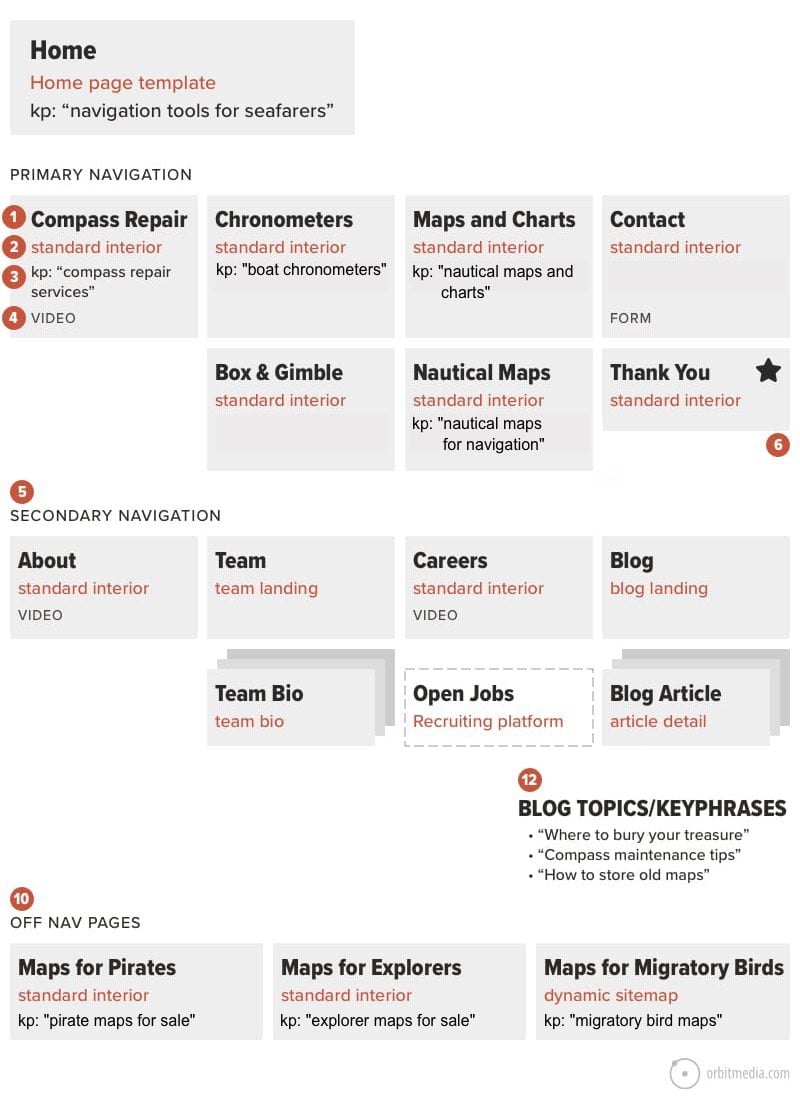
Now that we know how keyphrases align with visitors, pages and conversions, take a minute to consider the structure of the site and how your sitemap fits with a keyword strategy.
A well-planned website has many pages targeting many phrases. The keyword researcher understands that it’s all about pages and phrases.
Keyword research principal #2
Every keyphrase is a competition. Every page is a potential competitor.
If you don’t have a page (a specific URL) that aligns with the keyphrase, you have not entered that competition. And if the page is not a detailed, highly informative page, you don’t have a strong competitor.
Source: How to Make a Sitemap
Notice that not all of the pages have keyword opportunities. And that different types of pages target different types of phrases.
- The homepage targets the most competitive keyphrase, usually the general business category
- Top-level pages target more general keyphrases
- Deeper interior pages target more specific phrases
- About and Contact, along with many other pages don’t target a keyphrase
- The blog gets all the information intent queries
Now that we have a sense of the alignment between intent, keyphrases and pages, let’s look at the details of how to research keyphrases by considering the most important keyword data: the popularity and difficulty of each potential phrase.
Step 1. Check search volume (Popularity)
If no one is searching for it, what’s the point?
How many people are searching for the phrase each month? This is known as “search volume” and it’s a key criteria in keyphrase research.
It is the size of the prize.
The more demand for a keyphrase, the more potential traffic. You can see an estimate of monthly searches for any phrase in your SEO software. Here’s what the report looks like in MOZ and SEMrush for the phrase “neuromarketing web design.”
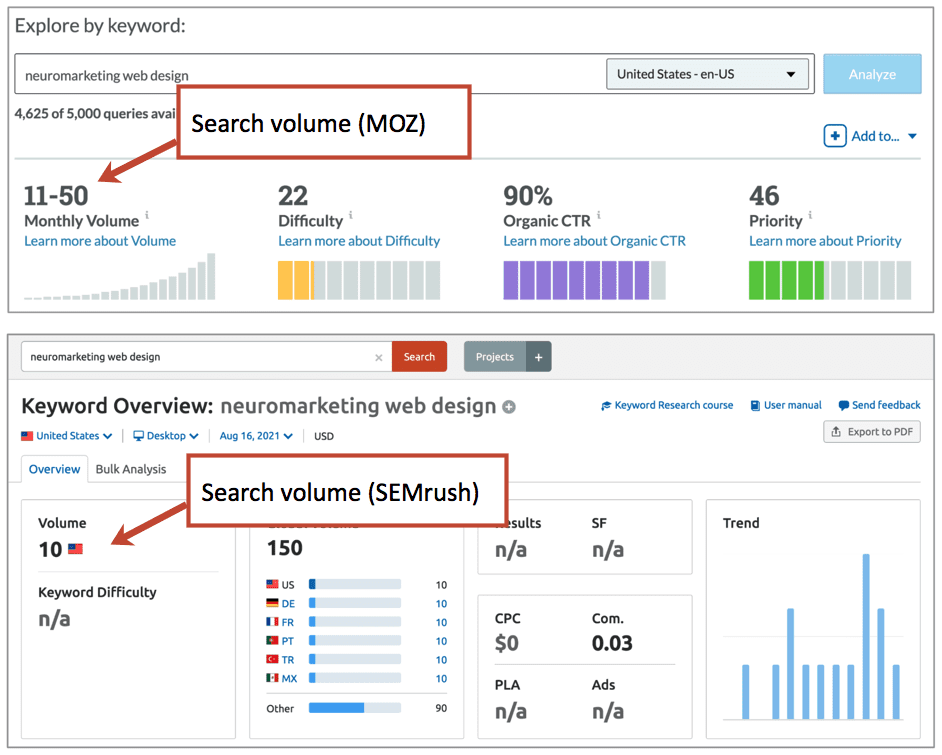
If you don’t have a subscription to a paid keyword research tool, you can use Google Ads Keyword Planner to check search volume. You will need to set up an account first.
It’s time to start capturing the potential phrases.
When writing articles, we capture keyword ideas and their search volume in the content marketing template. For website redesigns, they’re recorded in a big content strategy workbook.
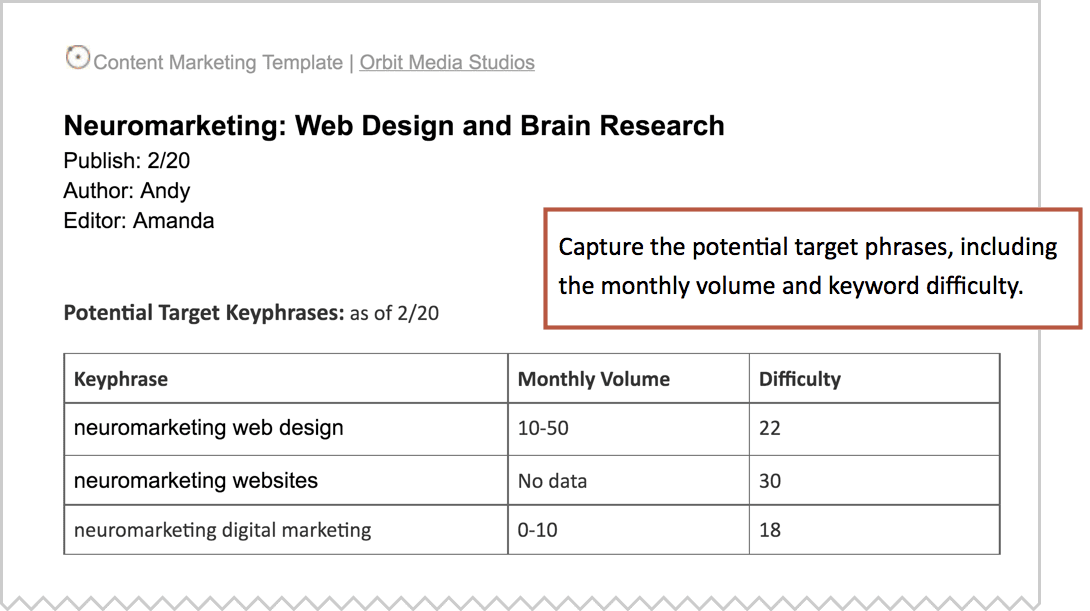
The estimates in the example above ranged from 10 to 100 searches per month. Assuming a 30% click through rate for a top ranking, this page could attract maybe a dozen visitors per month. Sounds low.
Does it make sense to target low volume keyphrases? How low is too low? Should you target an “unpopular phrase?”
The case for ultra-low search volume keyphrases
This report shows the traffic to the page that ranks number one for that same phrase, “neuromarketing web design. ”
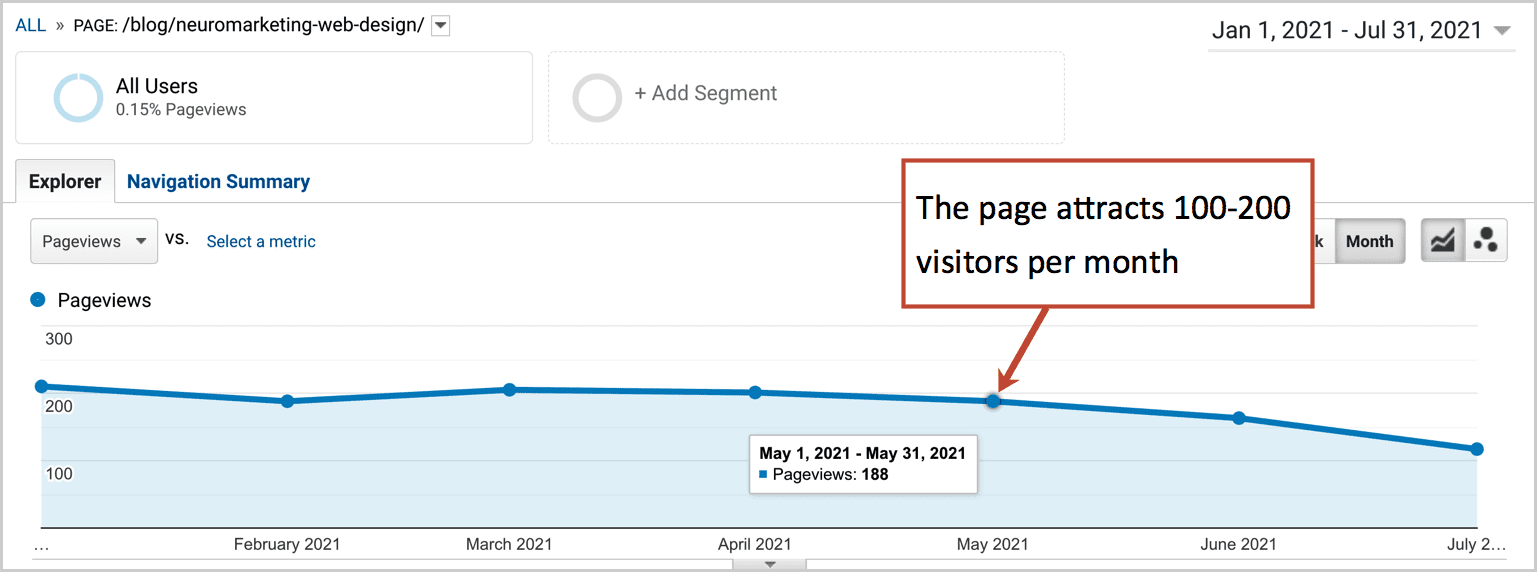
You can see that the page actually attracts between 100 and 200 visitors per month. Which is ten times the amount of demand estimated by the keyword research tool.
How is that possible?
SEO tools drastically underestimate the potential traffic to a page because they show the demand for just one specific phrase. In reality, any page that ranks high for one phrase also ranks for many closely related phrases.
Here is the Google Search Console data for that page, showing the number of keyphrases for which that page ranks.
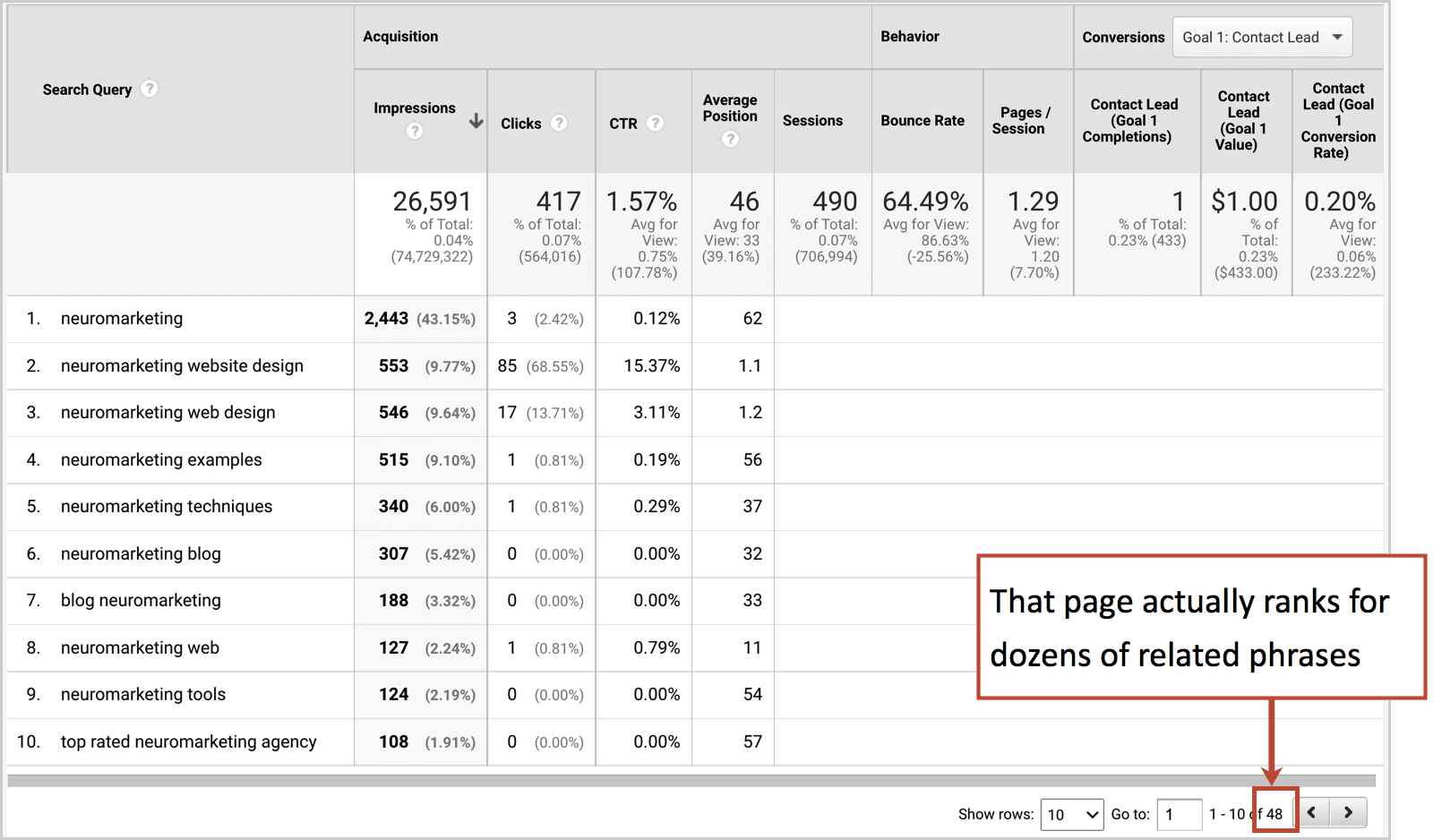
So how to estimate the true potential traffic for a given phrase?
Keyword research principal #3
Search volume estimates underestimate potential traffic.
Multiply the search volume estimates by 10x.
This will help reflect the true potential traffic, taking into account the likely rankings for the dozens of adjacent phrases if the page successfully ranks.
What if the tool shows no search volume at all?
For a lot of niche phrases, the tools won’t show any search volume data. Here’s what that will look like in Moz and SEMrush.
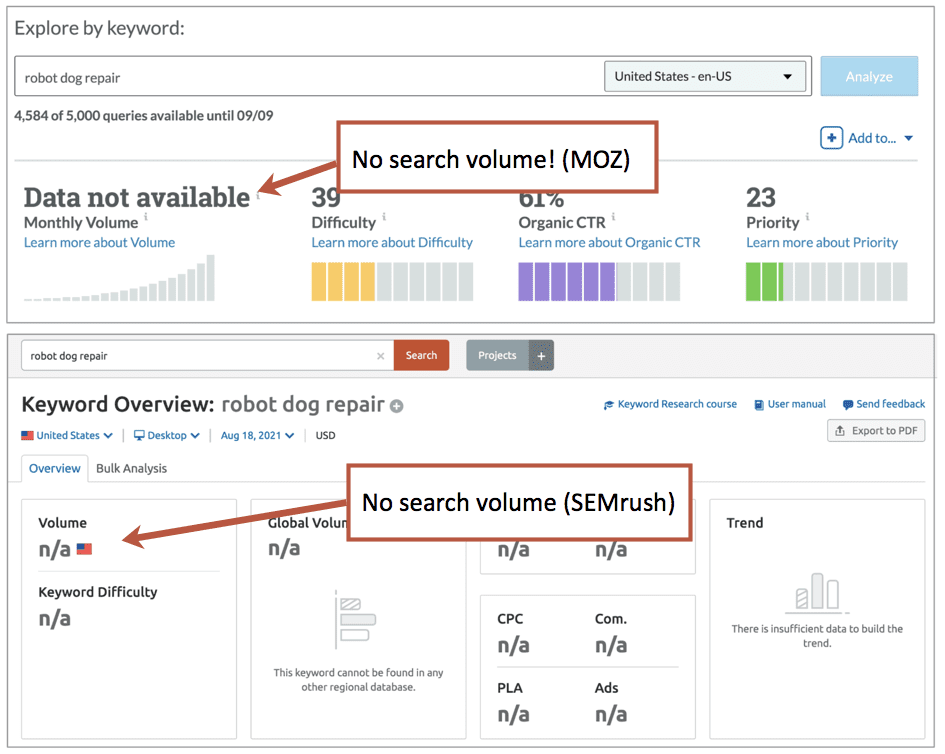
But this does not mean that no one is searching for the phrase. It’s likely that even if the tools show no data, that there is still someone somewhere looking for that topic. And there are other places to look for evidence of that demand.
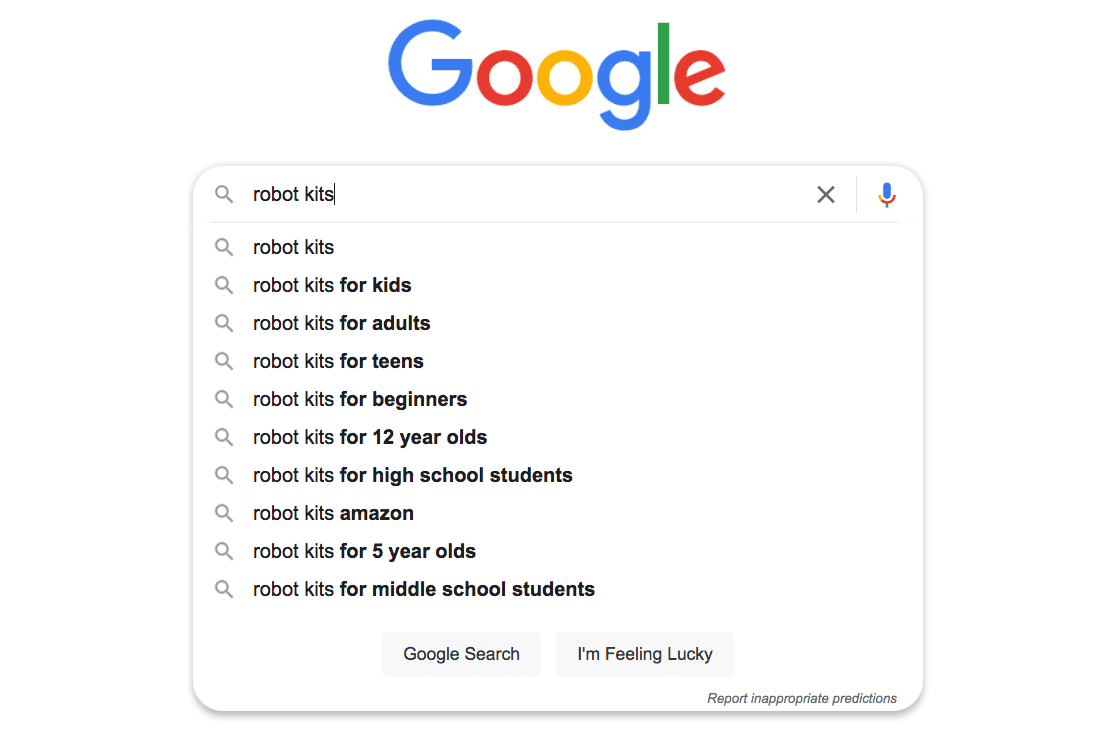
Google Search itself is a great way to check. Just type the phrase you’re considering, then hold off hitting the return key. See the keyword suggestions? If it’s suggested by Google, people are searching for it.
Enter a letter of the alphabet to see more suggested keyphrases.
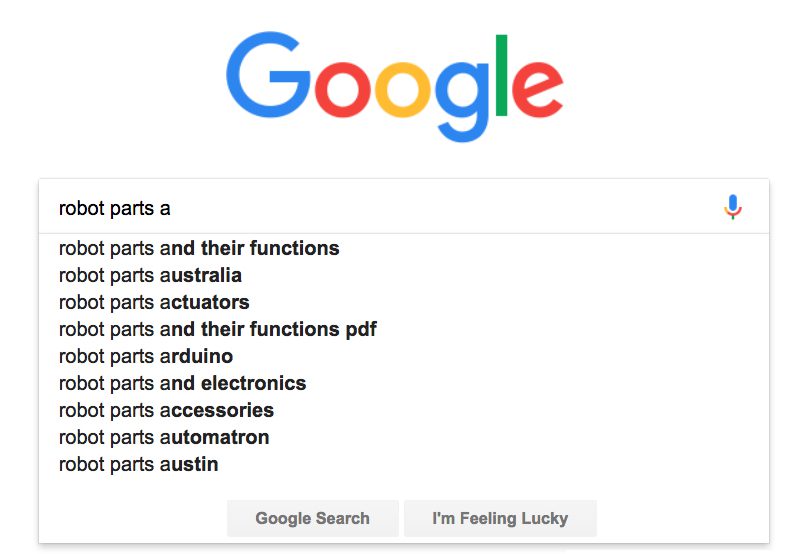
Getting ideas for phrases to target? Rather than type every letter of the alphabet, you can enter your keyword idea into this Keyword Tool to see hundreds of suggested phrases, as if you typed the next letter of the alphabet 26 times. You can also see the phrases suggested by YouTube, Bing, Amazon and eBay.
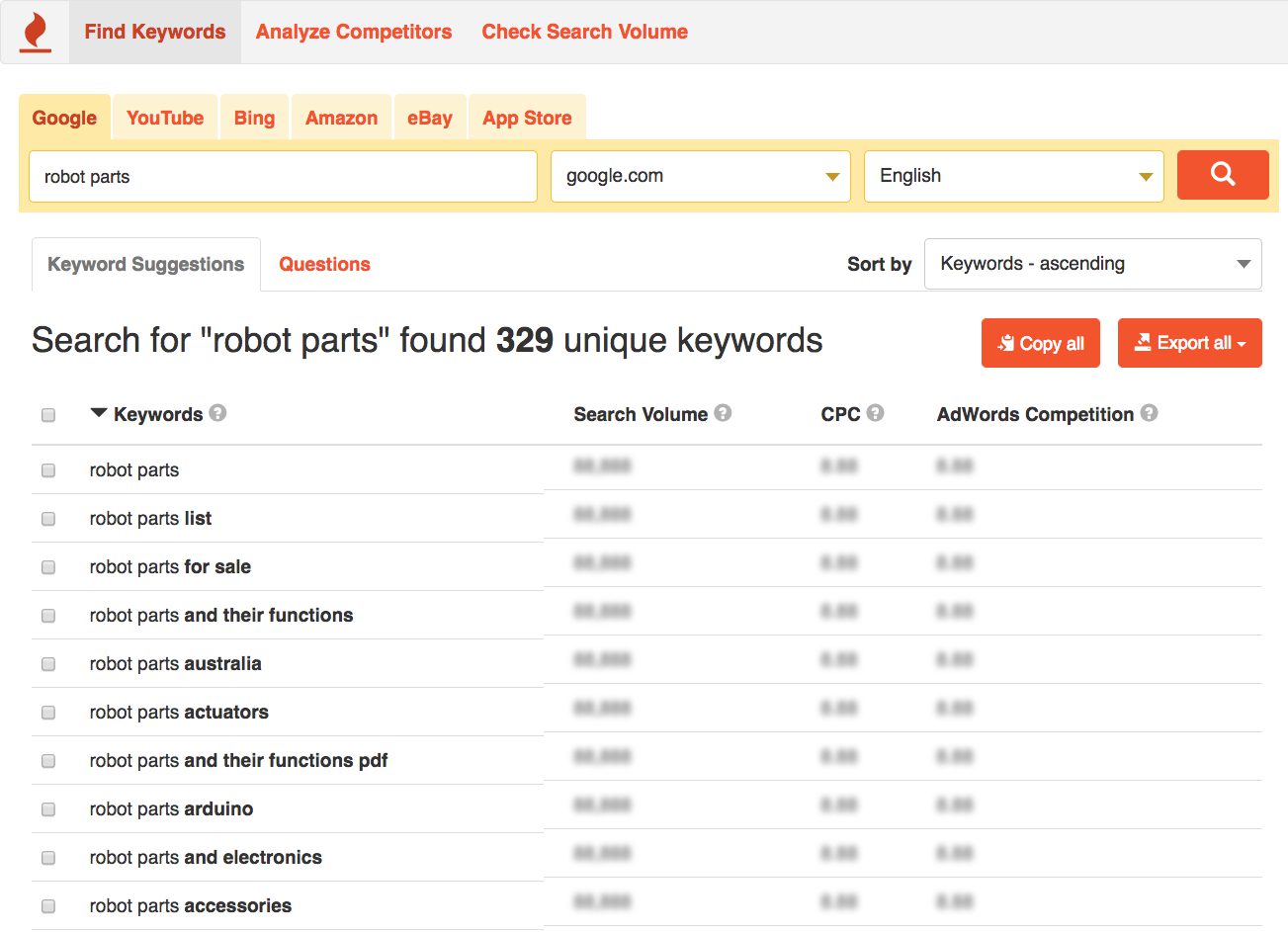
This tool is also great for finding interesting blog topic ideas. And for the blog posts targeting the informational keyphrases, we aren’t necessarily looking for huge demand. Any visibility in search can make a big difference in the performance of a post.
Keyword research principal #4
If you can find ANY evidence that people are searching for it, it’s likely a phrase worth targeting.
A “long tail keyword” is a tarket keyphrase of five or more words. These phrases almost always have fewer monthly searches than short keyphrases. Longer keyphrases have lower search volume.
But this person is likely deep into their research. They may be getting closer to making a decision. As we know, every keyphrase indicates the searcher’s intent. Longer keyphrases indicate stronger intent.
The visitor who searches for a very specific phrase is more likely to take action after landing on a website. They may be thrilled to have found you. Longer keyphrases have higher conversion rates.
This chart shows the relationship between search volume, competition, intent and conversion rates.
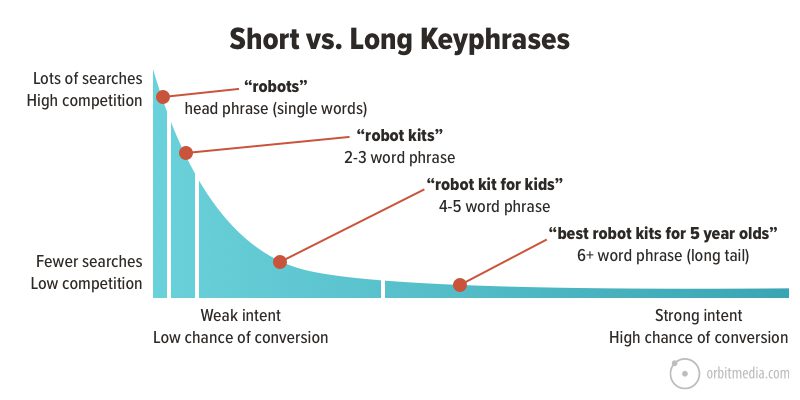
Some very long tail keyphrases have very little competition. If you target a phrase of six or seven words, such as a complete question, it’s possible that you’ll have the one of the few pages on the internet with that combination of words together in that order. A big advantage.
The short phrase (known as a “head phrase” when it’s a single word) is both impossible and useless to rank for. Even if you did somehow rank for one of these super competitive phrases, the visitors who land on your site would have such vague and general needs, they wouldn’t stay long.
The smart SEO looks for opportunities to target longer, easier to rank for, higher conversion rate phrases, even when search volume seems to be low.
Keyword research principal #5
Low search volume keyphrases are easier to rank for and attract more qualified visitors.
A steady trickle of highly interested visitors may lead to a handful of qualified traffic and leads year after year for many years.
Trends, seasonality and keyphrase comparisons
The tools mentioned above show only a snapshot of demand, estimated monthly search volume based on the last twelve months. They do not show the ebb and flow of search volume over time. And demands for topics and keywords are constantly changing.
But Google Trends shows search demand on a chart:
- Trends over time
- Seasonality
- Comparisons of up to five phrases
- Geographic preferences
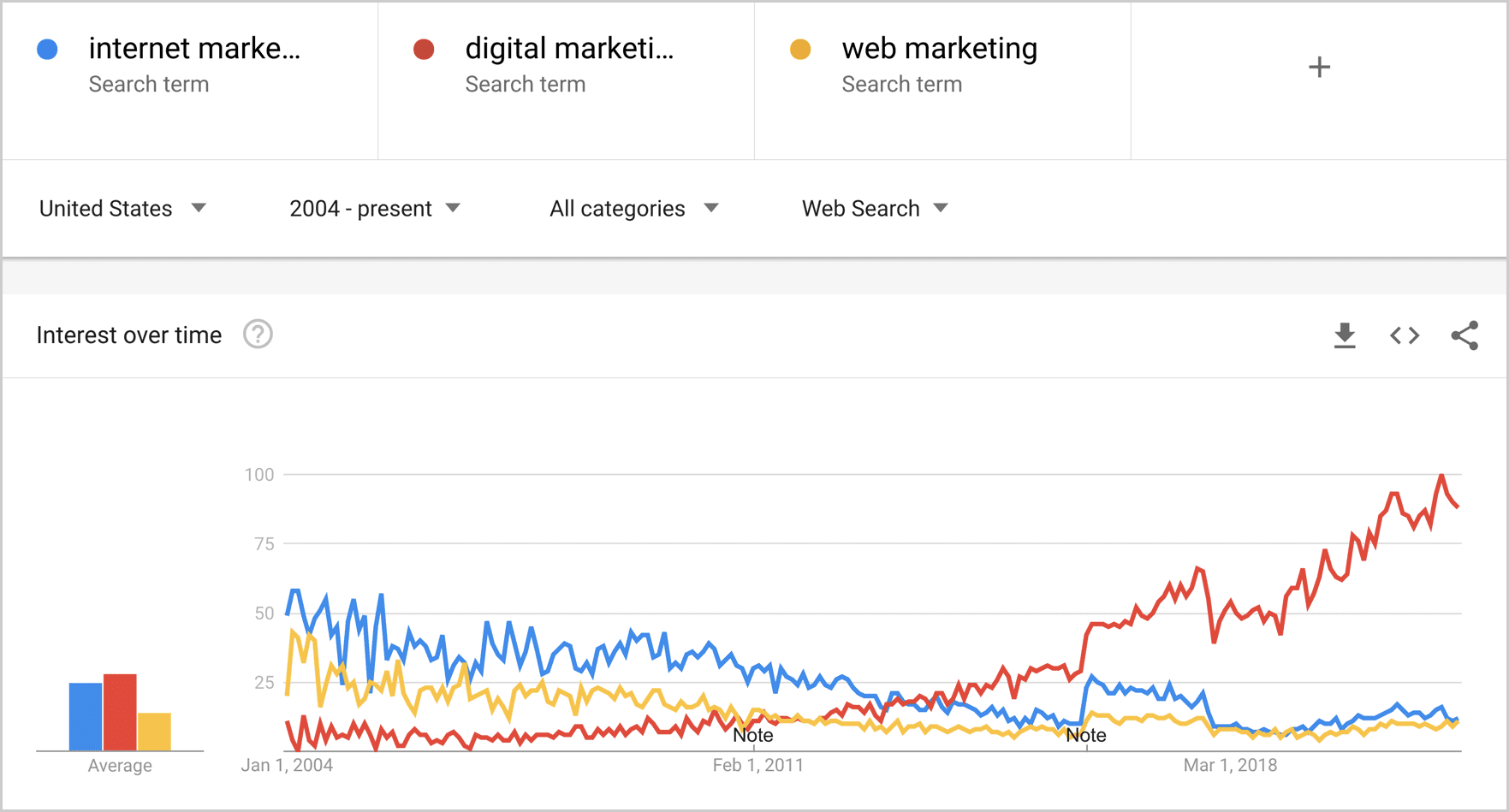
Let’s put three phrases into Google Trends: internet marketing, digital marketing and web marketing. We’ll set the date range all the way back to 2004 (as far back as it goes) to see the change in relative popularity over time.
It looks like “digital marketing” wasn’t really a thing back in 2004, but over the years has become the dominant term for the industry. Today it has roughly 8x the search volume of the other two phrases.
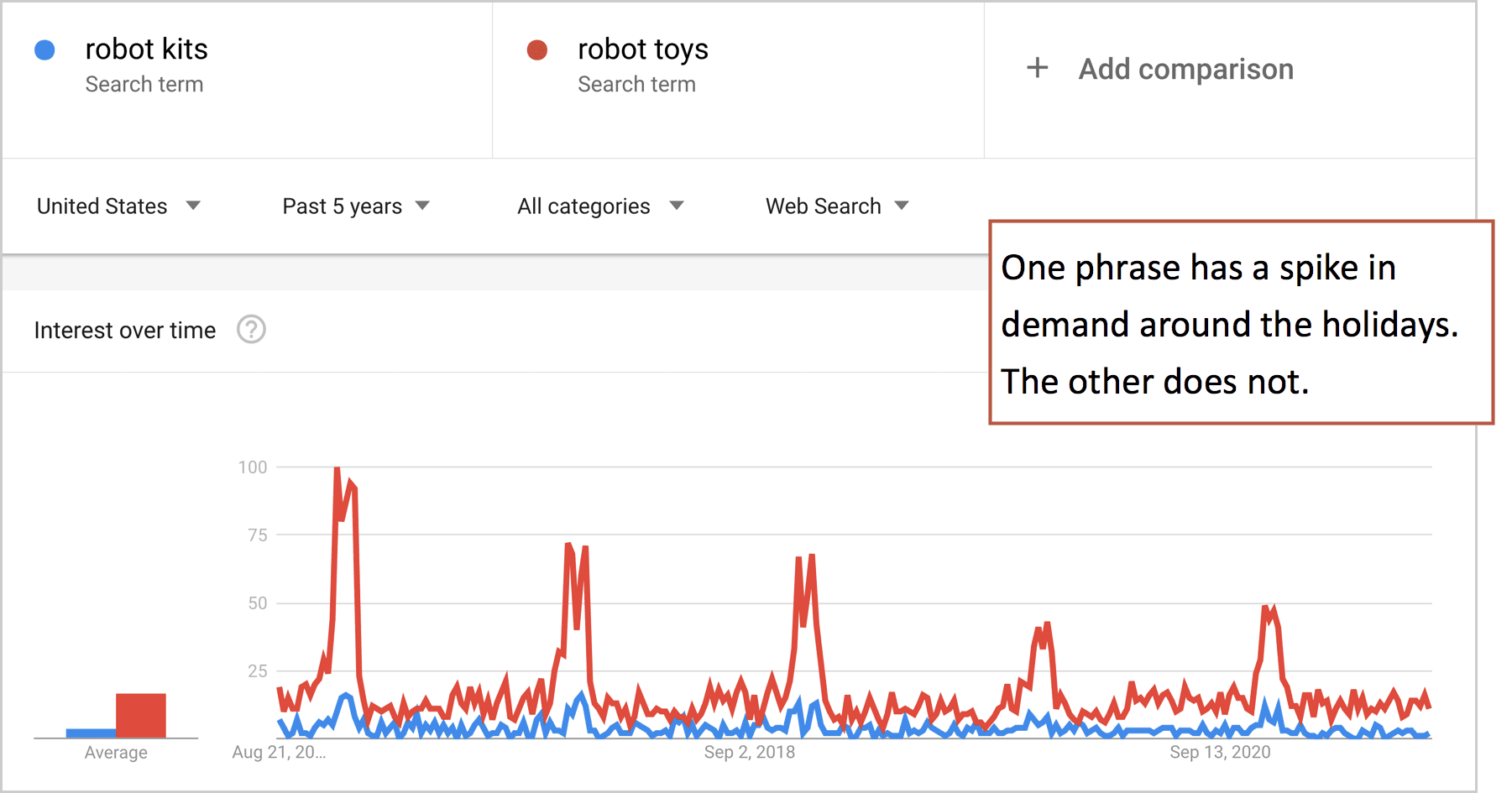
Google trends also clearly shows seasonal interest in keyphrases. Here you can easily see how one phrase spikes in demand in the holiday season, while the other does not. Targeting seasonal phrases requires forethought and planning!
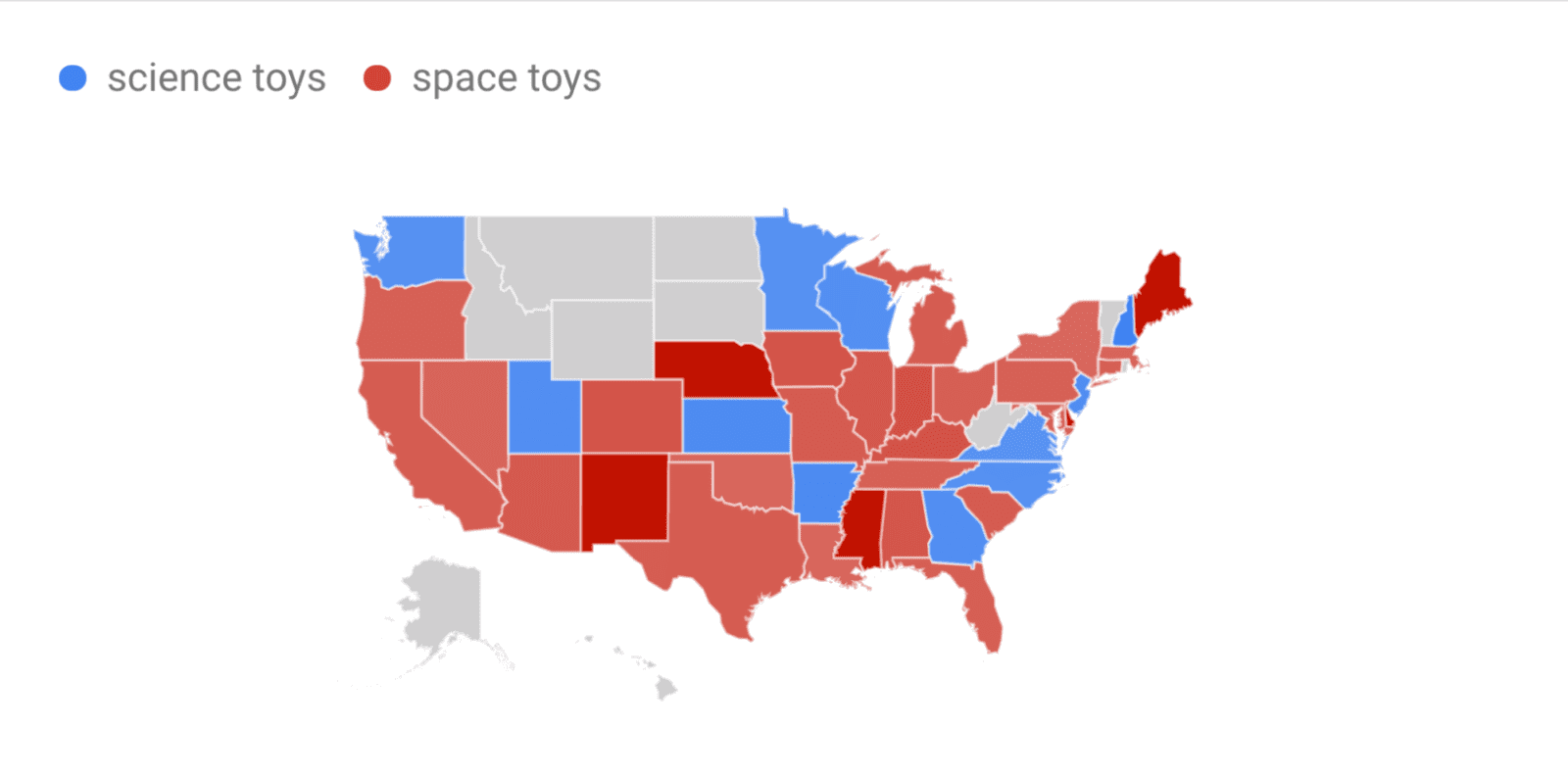
Geographic preferences
Google Trends also shows geographic differences, which can be fun and useful if you’re targeting a local audience. By default it shows subregion (that’s the state level for US). If the phrase is popular enough, you can drill down and see demand for metro areas and cities.
It may not be practical or useful to check every phrase in Google Trends. Should you check the trending of every keyphrase for every blog post? Maybe not. But check the main keyphrases for your homepage, service pages or product pages? Absolutely.
Step 2. Search for the phrases you’re considering
To evaluate a potential phrase, you need to search for it.
Keyword research principal #6
If you don’t actually search for each phrase (and look closely at the search results pages), you didn’t finish researching the phrase.
Watch an SEO pro do keyword research and you’ll see them quickly jump back and forth between tools and the search engine, carefully looking at the SERPs (search engine results page) as they consider options.
Find a potential phrase…
Search for it…
Scan through the search results page…
Find another potential phrase…
Beware of personalized search results.
Your search results are always slightly personalized for you. In other words, your target audience may not see exactly the same rankings. Here are three tips for seeing more “typical” search results:
- Use a browser that isn’t logged into any Google products
- Use private browsing or incognito mode
- Use the Google Ad Preview tool, by searching from www.google.com/adpreview
There will still be implicit search signals, specific to you and your computer that will affect your search results, so don’t spend a ton of time trying to see perfectly neutral results. There is no such thing.
As you scan through the search results for a potential phrase, you’re looking for clues, asking yourself questions.
Am I in the right neighborhood?
If the searcher who is looking for your topic landed on these same search results, what would they do? Would they immediately try again and search for something else?
In other words, are the high ranking pages relevant to your brand and your content? If not, you’re in the wrong neighborhood. Go back and consider different phrases.
Is Google suggesting different or more specific phrases?
Google search results are another source of related keywords. Even before you finished typing in the phrase, Google may suggest others. Look at those suggested phrases and the “Related Searches” links at the bottom of the page. Look for question and answer boxes. Getting any ideas?
Are there a lot of SERP features pushing down the organic rankings?
Some search results pages are crowded with ads, images, answer boxes and other features. These push down the high ranking pages, reducing the likelihood that a searcher will click on your page even if you do rank. This is actually the biggest trend in SEO.
Each SERP feature reduces click through rates for organic search rankings, thereby reducing the traffic potential of a given phrase. If you see a lot of them, you’ve discovered that Google itself is your competitor and the size of the prize is smaller.
What formats for content are ranking?
Are the search results filled with products? Images? News? Videos?
The SERP features are clues into the content formats that Google has decided are best suited to meet the information needs of the searcher. They can guide decisions about target keyphrases and content formats.
If you see videos in search results, you should create a video, along with a regular webpage, to target this keyphrase.
Do you see a map?
If you see a map with a list of businesses below it (known as the “local 3-pack”) you are considering a geographically-specific keyphrase. You’ll need to focus on local SEO to compete for this phrase. Local SEO is very different from organic SEO. Those aren’t websites that rank under the map, they are local listings.
To improve the ranking of this listing in the local search results, make sure that your business information is up to date in Google My Business, within all of the Internet Yellow Pages websites (IYPs) and anywhere else where your business name, address and phone number (NAP) appears. An instance of your NAP is called a “citation.”
When a business has many citations with few inconsistencies, Google has more evidence that there is a relevant business in that location. Therefore, Google is more likely to show that business listing when visitors in that area search for a related phrase. To quickly improve the number and consistency of your citations and improve your local SEO, consider using a service such as Moz Local or Whitespark.
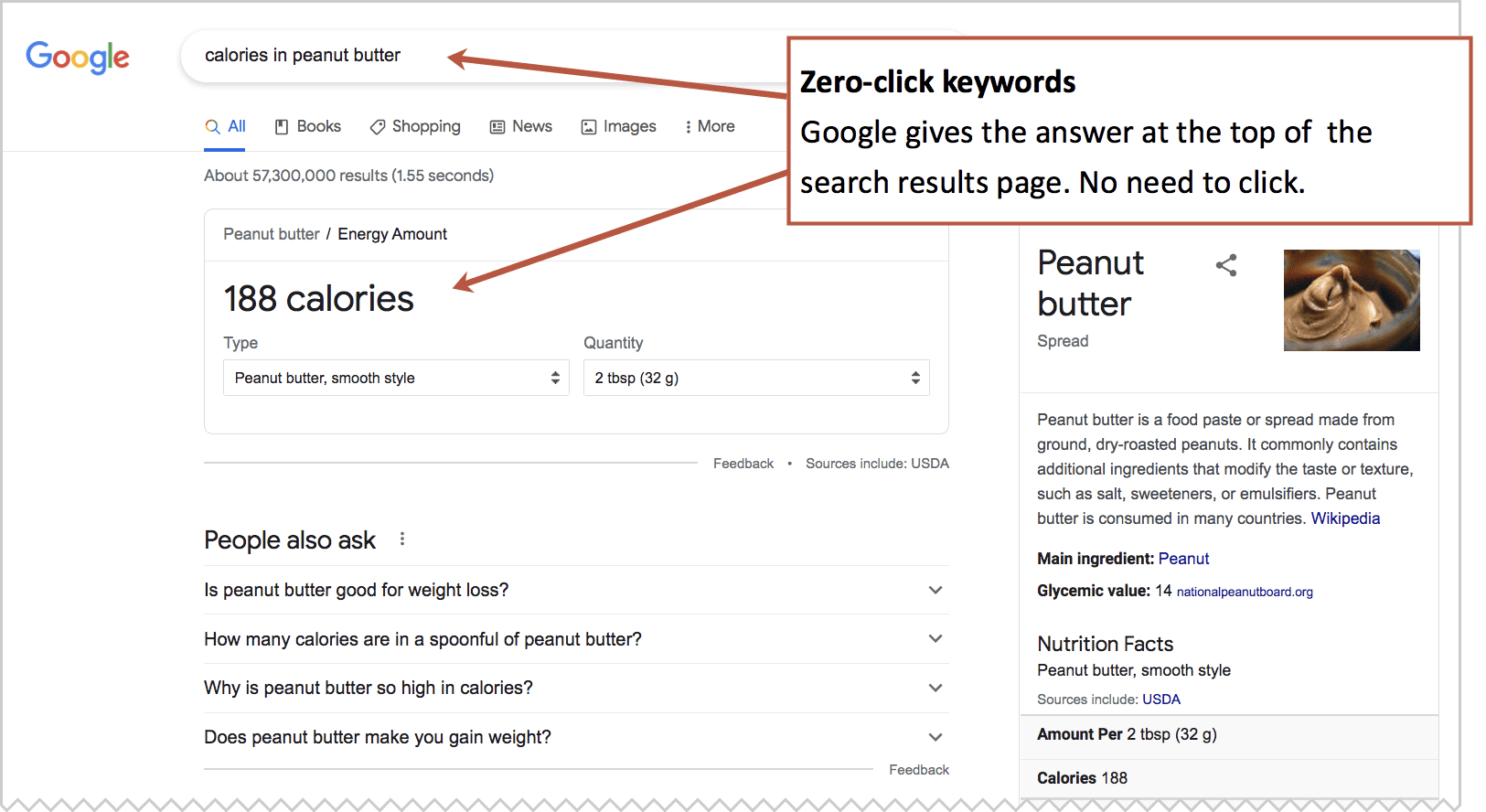
Do the search results themselves provide the answer?
If so, your potential keyphrase has “fact intent” which is short-answer information intent. Google does everything it can to satisfy the searcher’s information quickly, even before they click. These “zero-click” keyphrases don’t send traffic to anyone. Avoid them.
Step 3. Estimate the competition
You’ve validated that someone is looking for the phrase. You’ve looked closely at what is currently winning for the phrase. Next we’ll evaluate our likelihood of ranking. It’s time to check competition and keyword difficulty.
This is one of the more challenging digital marketing skills. It’s a tricky and inexact science. In a moment, we’ll show how SEO software can be used to quickly check the difficulty for any phrase.
But we’ll start with common sense.
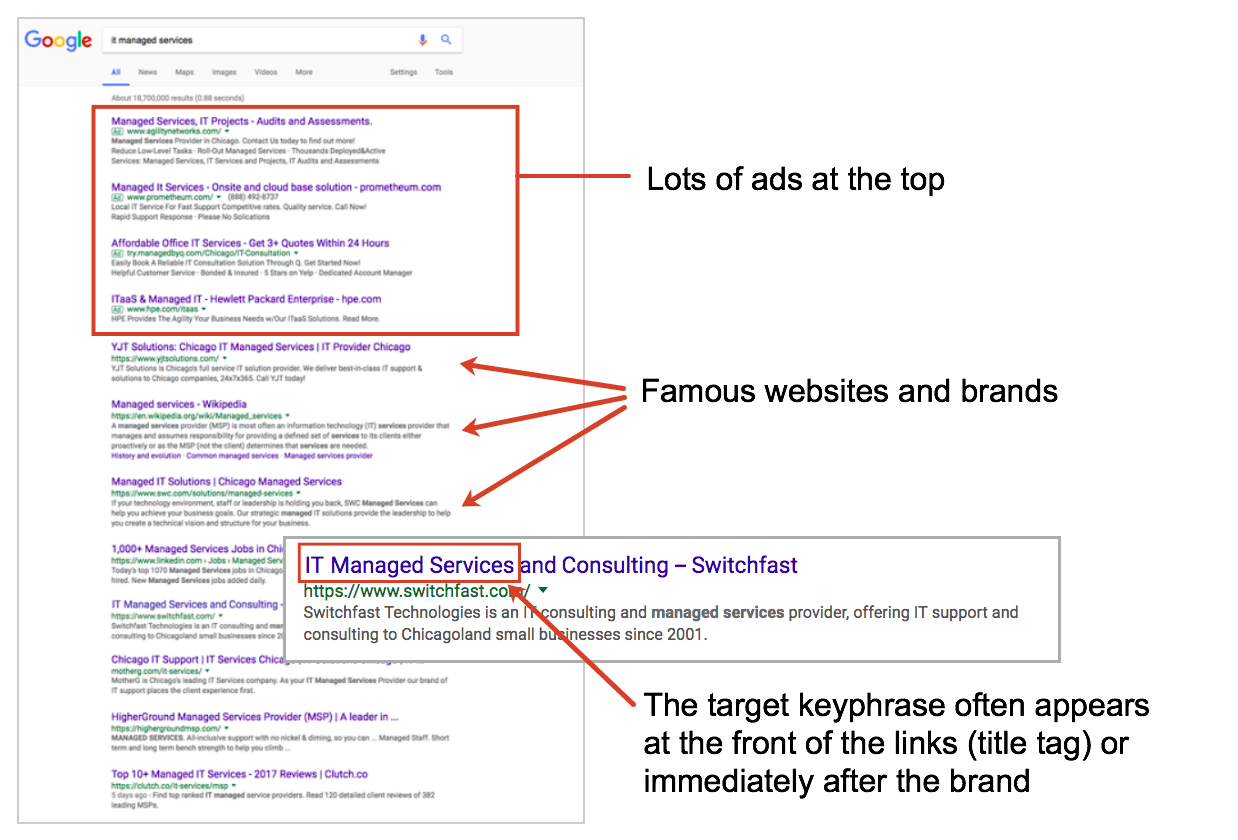
Just search for the phrase and take a look at the search engine results page. The phrase is likely competitive if you see any of these three things:
- Lots of ads
If there are four pay-per-click (PPC) ads at the top of the page and three at the bottom, this means others have already determined the keyphrase is valuable. - Famous brands ranking high
If the top-ranking sites are popular, well-known sites, it’s going to be tough. Unless you invent a time machine, you’re not going to outrank Wikipedia or Amazon. If the top three or five sites are trusted, reputable websites, they’ll have loads of link popularity and therefore powerful domains. You’re not likely to compete without focusing serious time and resources. - The phrase you searched for is in the links
If the top-ranking sites have the target keyphrase at the beginning of the link, then it’s likely that those sites have the keyphrases at the beginning of their page titles, which indicates the owners of these sites understand SEO. Your keyphrase will likely be more difficult, but not necessarily impossible.
Here is the anatomy of a highly competitive keyphrase
A quick review of search ranking factors
There are fundamentally two reasons why a page ranks or doesn’t rank. These are the two main search ranking factors.
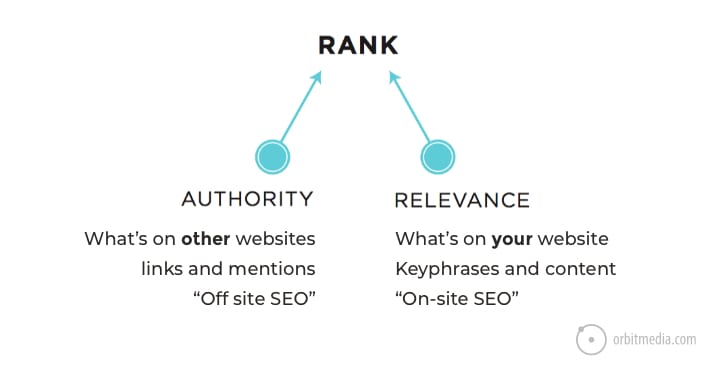
- Relevance
Your page won’t rank unless it’s a detailed page on the topic. It needs to use the keyword and the related phrases in a detailed way. It’s about content quality, depth and keyword usage. You need a page that is sufficiently detailed, relative to the other pages that rank for the phrase. - Authority
Your page won’t rank unless it’s viewed as sufficiently credible by the search engine. Credibility is passed to your website from other websites through links. Authority (sometimes called “link popularity”) is determined by the quantity and quality of links from other sites to your domain in general and to your pages specifically.
Relevance is about the writing, which will come later. But we need to understand authority now, to properly do keyword research and pick a phrase we have a chance of writing for.
Keyword Research Principal #7
You will never rank for a keyphrase if you lack sufficient authority.
You need to know your level of authority and compare it to the range of authority of the other high ranking pages.
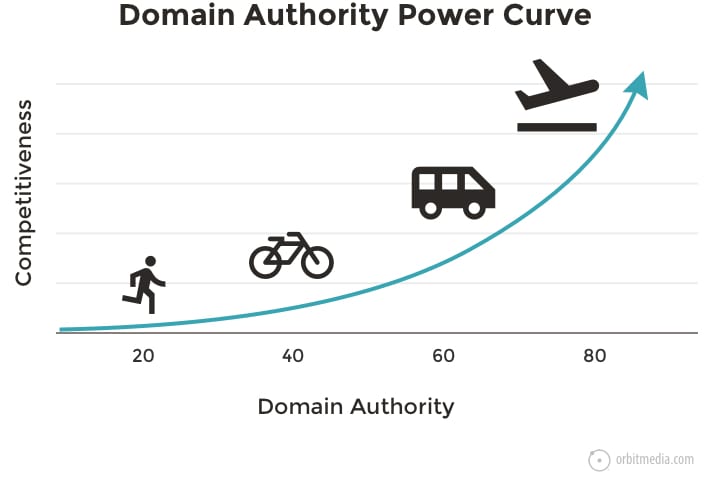
Websites with higher Domain Authority have exponentially greater ranking potential. Authority is plotted on a curve, not a line. Higher DA sites can target far more competitive phrases.
Typically, this is how it is distributed across types of websites:
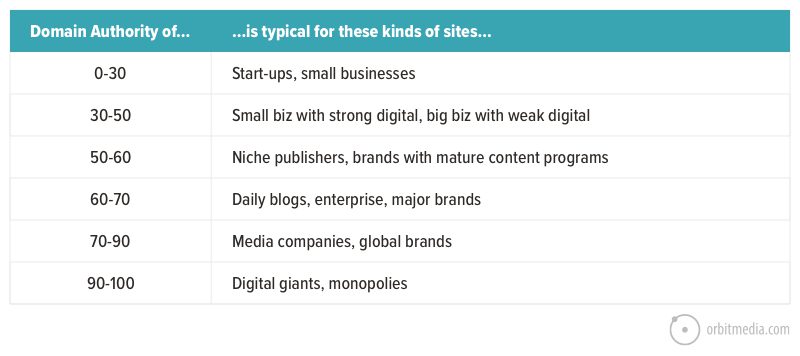
This explains why the little blogs rarely rank for the very popular and valuable keyphrases. Search for a general topic or common question, you’ll see the heavyweights at the top.
Keyword research principal #8
SEO was never a fair fight.
The key to successfully choosing a keyphrase is to compete at or below your own level. Think of SEO as a race. You can’t win the Tour de France on foot. But if you’re on a bike, you’re going to win every marathon you enter.
How Authority is measured
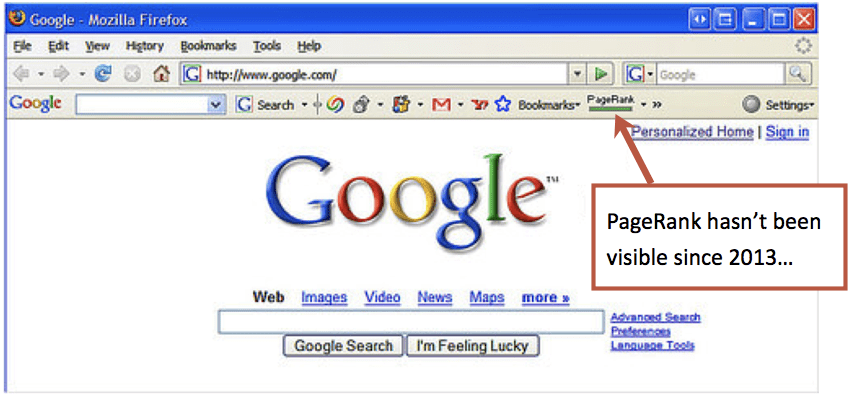
Google’s authority metric is called PageRank, named after Google founder Larry Page. It’s a one-to-ten scale of credibility, link popularity and ranking potential. Until 2013, you could check the PageRank for any website using a Google toolbar that many of us added to our browsers. It’s long gone.
Today search optimizers use proxy metrics created by SEO software companies. These companies estimate Google PageRank using their own formulas. They all use a scale of 1-100.
Here are some of the more popular tools:
- Moz: Domain Authority (available in the Link Explorer report)
- SEMrush: Authority Score (available in the Domain Overview report)
- Alexa: Competitive Power
- Ahrefs: Domain Rating
The cost of these paid tools starts at about $100 per month. They all have free trials. Beyond their keyword research tools, they each have tons of other useful features for search engine optimization: rank tracking, page recommendations, brand mention alerts, etc.
To properly research a keyphrase (and evaluate your site’s potential to rank) you need to know two things: your own level of authority and the authority of the other sites that rank for the phrase you’re considering.
How to check your own authority
Just enter your domain into any of the tools listed above. Here’s what the report look like in Moz and SEMrush.
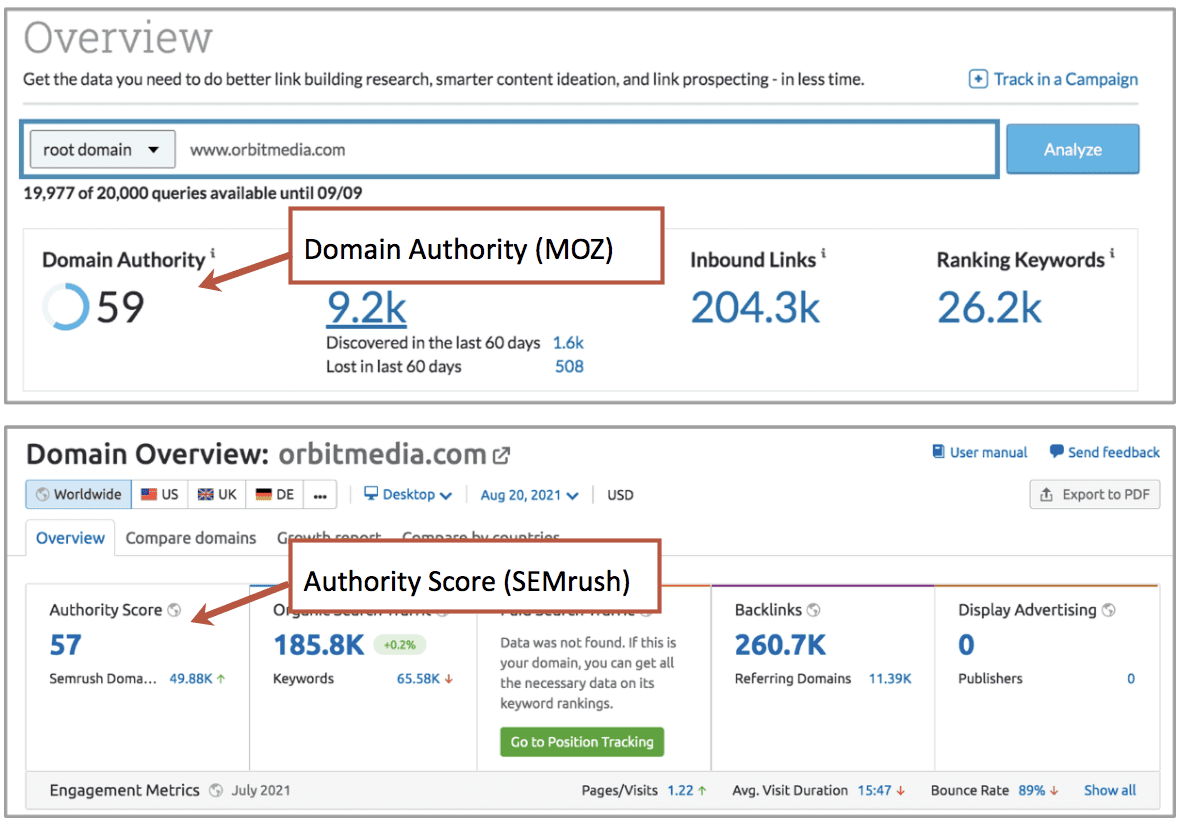
Increasing your Domain Authority is a common goal for content marketers. Higher authority leads to a much greater chance of ranking and the opportunity to target evermore valuable keyphrases.
What’s a good level of authority? How much authority do you need? It all depends on the competition for the target keyphrase.
Check the keyword difficulty
The SEO tools make it easy by combining the authority levels of the other high ranking pages into one easy-to-check metric called keyword difficulty.
Keyword difficulty is basically the average authority of all of the high ranking pages for a given phrase. You can find it in these reports:
- Moz: Keyword Explorer
- SEMrush: Keyword Overview
Don’t have a paid tool? No budget? Free trial expired? There’s a no-cost way to do this manually. Skip down to the next section below.
These same reports that show search volume also shows difficulty. So in one view, you have a lot of the necessary information to consider a phrase. Here’s what the reports look like:
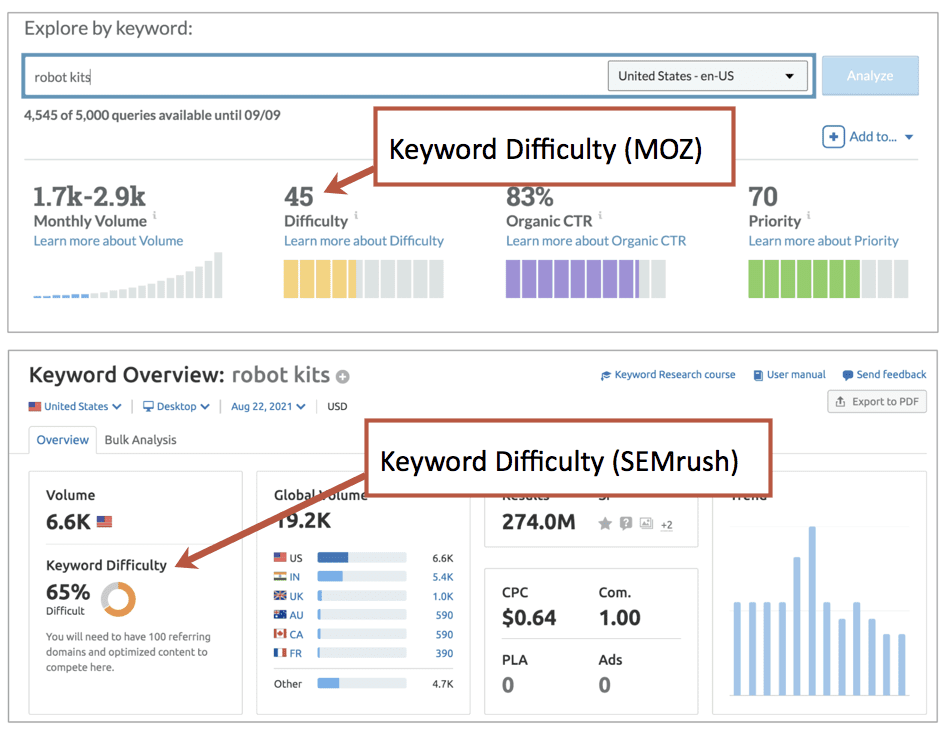
Now that you know your website’s Domain Authority and the keyword’s difficulty, you’re ready to apply the general rule.
Keyword research principal #9
If your Domain Authority is greater than the Keyword Difficulty, you should have a chance of ranking for the phrase.
If your authority is at or below the keyword difficulty, go back and look for a less competitive phrase. In other words, target a longer, more specific, less popular keyphrase.
As you consider possible primary and secondary keyphrases, capture them on your content template. For bigger projects, you may track many potential keywords in a spreadsheet as part of a larger keyword plan.
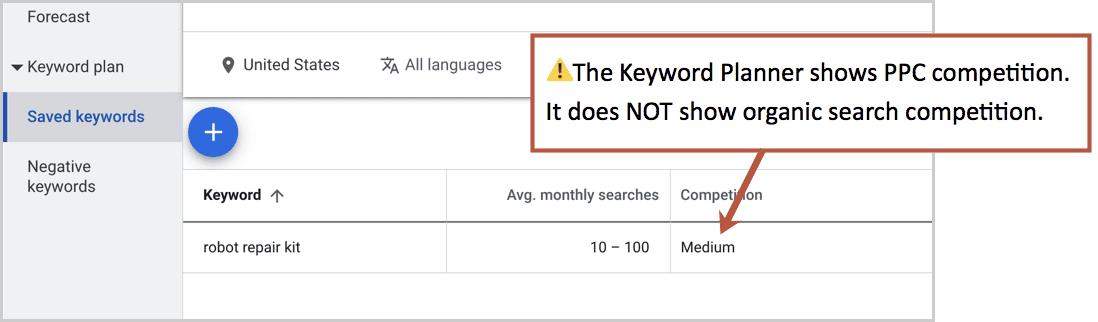
Can I check the competition in the Google Ads Keyword Planner?
No.
The Keyword Planner shows competition in pay per click (PPC) to give you an idea for the cost of advertising. It has nothing to do with SEO. Ignore it.
Can I check difficulty without a paid SEO tool?
Yes.
For this more manual approach, I’ll use Moz because they have a free SEO tool that makes it easy. It’s called MozBar.
MozBar is an extension for the Chrome browser. Add it to Chrome and search for any phrase and you’ll see the authority metrics data for each of the high ranking pages right below each search listing.
Here are search results with MozBar turned on. This is another type of “SERP analysis” (analysis of search engine results pages).
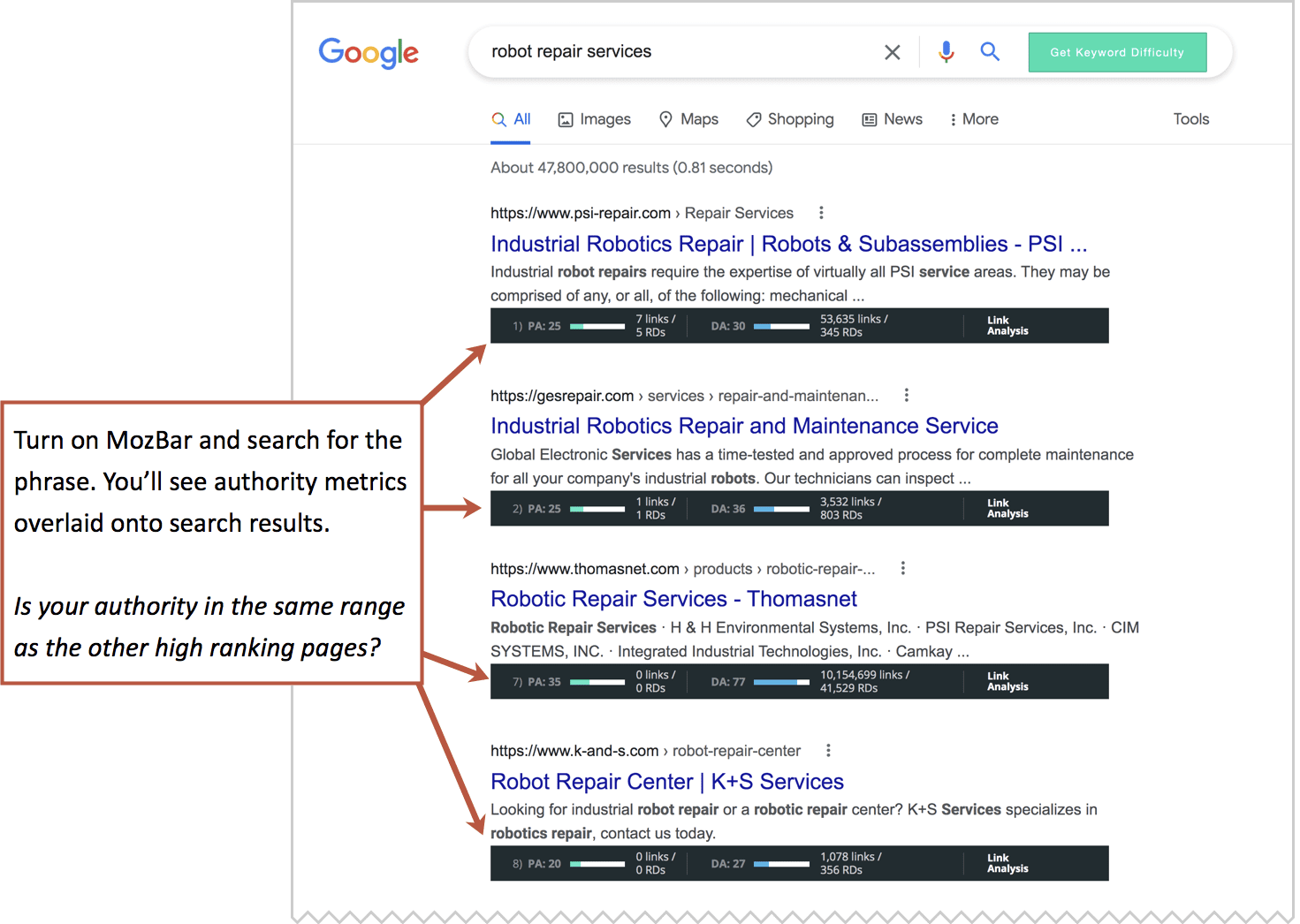
You can see how MozBar shows several metrics under each search listing: the Domain Authority (DA) of the overall website and the Page Authority (PA) of the specific page. If you have a paid account, you’ll see the number of linking websites/root domains (RD) to both the overall website and the specific page.
Note: It’s common for pages with lower authority to outrank pages with higher authority. Usually, it’s because the page (or that entire website) is overcoming it’s lower authority with better quality and relevance. It is likely more focused on the specific topic.
Now that you know both your authority and the range of authority for the competitors. You can look for keyphrases for which your authority is in that same range. And again, if your authority is below the range of the other sites that rank, go back and look for a less competitive phrase. Target a longer, more specific, less popular keyphrase.
Page Authority: The next level of detail in keyword research
Ultimately, the battle for rankings is fought page-against-page, not website-against-website. It’s the authority of our specific page versus the authority of their specific page. So Page Authority, not Domain Authority is the real test.
Here’s a better, more specific rule:
Keyword research principal #10
If your Page Authority is within the same range as the other high-ranking pages, you should have a chance of ranking for the phrase.
This is a more detailed, accurate way to evaluate your ranking potential. But there’s a problem. When creating a new page and targeting a new phrase, you don’t have a page authority to compare to, because your page doesn’t exist yet.
So there’s a time and place for each approach.
- Use Domain Authority when creating new content (i.e. writing new articles)
- Use Page Authority when optimizing existing content (i.e. during an SEO audit)
Actually, there is one way to estimate the likely Page Authority of a new page that has yet to be published. In Moz, go to the Top Pages report and keep clicking “next” until you see pages that have just one linking domain.
These pages will all have the same, low Page Authority. The only authority they have is the authority they inherit from the overall domain. This is the baseline amount of ranking potential of pages on this website.
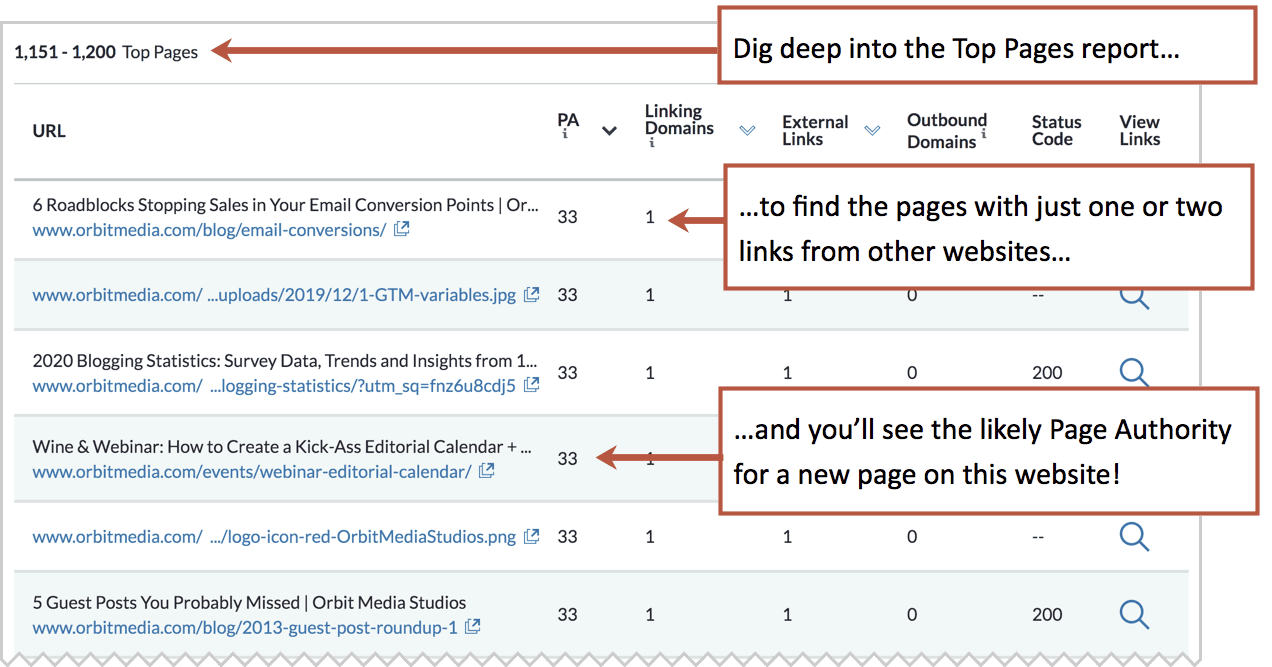
When creating a new page, assume its Page Authority will be the same as the least authoritative pages on that domain. Choose a keyphrase with the same or lower keyword difficulty scores as the lowest Page Authority on the website.
Shortcut!
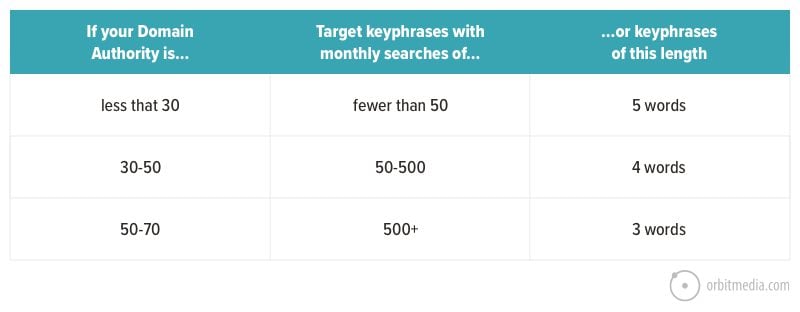
After researching thousands of phrases for hundreds of clients, we’ve seen patterns and benchmarks. Here’s one that you can use as a rule of thumb to speed things up.
Estimate your potential to rank using your Domain Authority and the keyword search volume or the number of words in the phrase. This is oversimplified for sure, but it may help give you an idea for what general range you should be in.
What if I really want to target a phrase that’s is too difficult to rank for?
Common question!
Often, the outcome of keyword research is a simple conclusion: there is no SEO opportunity for this page. When that’s the case, you have a few options.
- Choose a different topic
If rankings and organic traffic are that important to you, tweak the topic or abandon it completely. - Write for another website
If you’re writing an article and your site’s domain isn’t authoritative enough, you can still rank for it …just not on your website. Write a beautifully search optimized piece and submit it as a guest post to a blog with a more authoritative domain. You won’t win the traffic, but you’ll win some brand awareness. - Target the keyphrase anyway
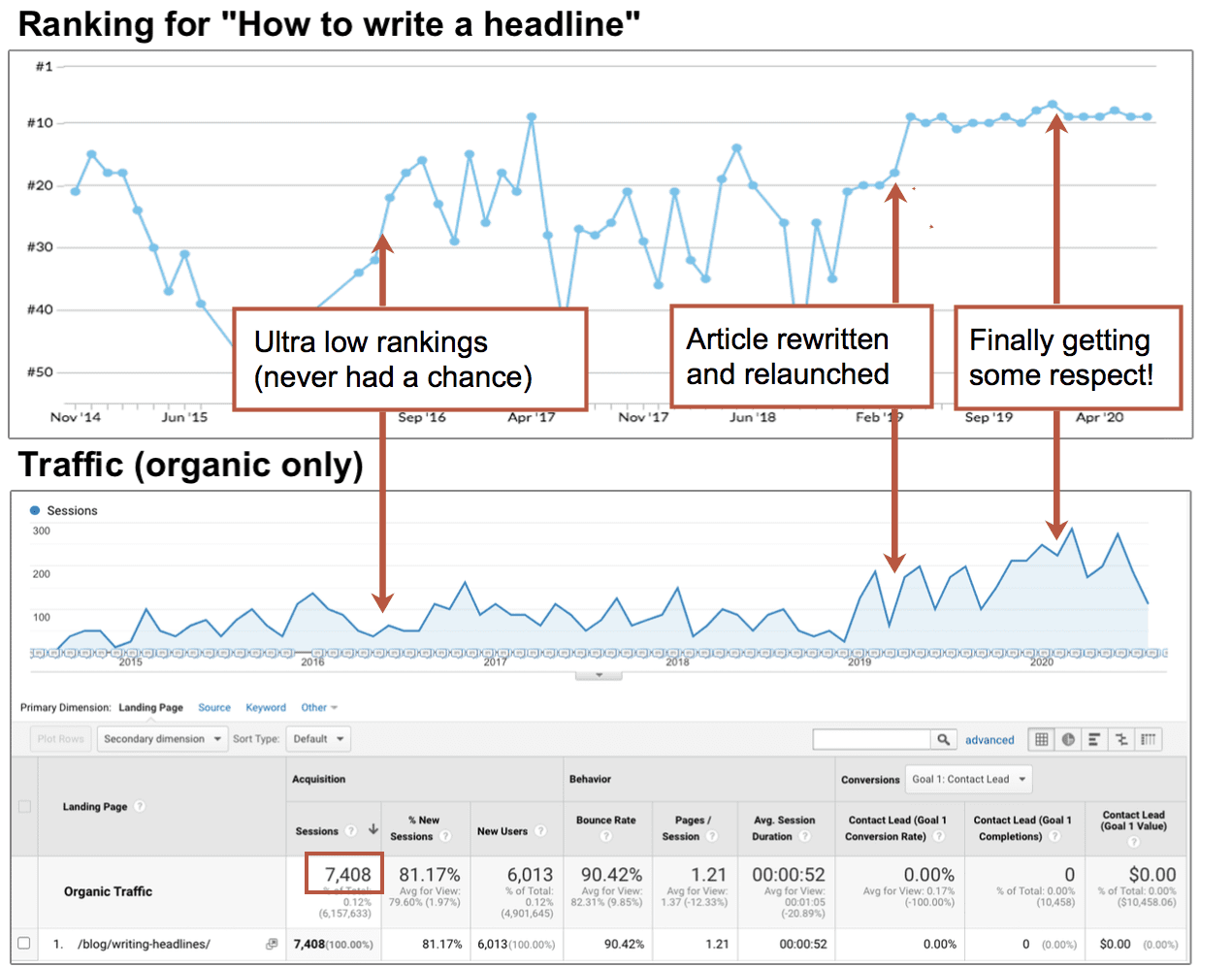
Organic search is not the only source of traffic. It’s just one of at least 76 ways to promote your content. Write a great page knowing that you won’t likely rank now, but that you may revisit the URL later. It may rank months or years from now after you’ve built links to it (better authority) and rewritten it several times (better relevance)
Here you can see the rankings and traffic to an article that we wrote and ketp re-writing, targeting an out of reach phrase. It took years, but it eventually climbed up to page one of search results.
Source: How to Update Content for SEO
What should I do with the rejected keyphrases?
During the keyword research process, you may consider a dozen or more phrases. Many you’ll dismiss, but the experienced SEO doesn’t completely abandon them. They are an opportunity.
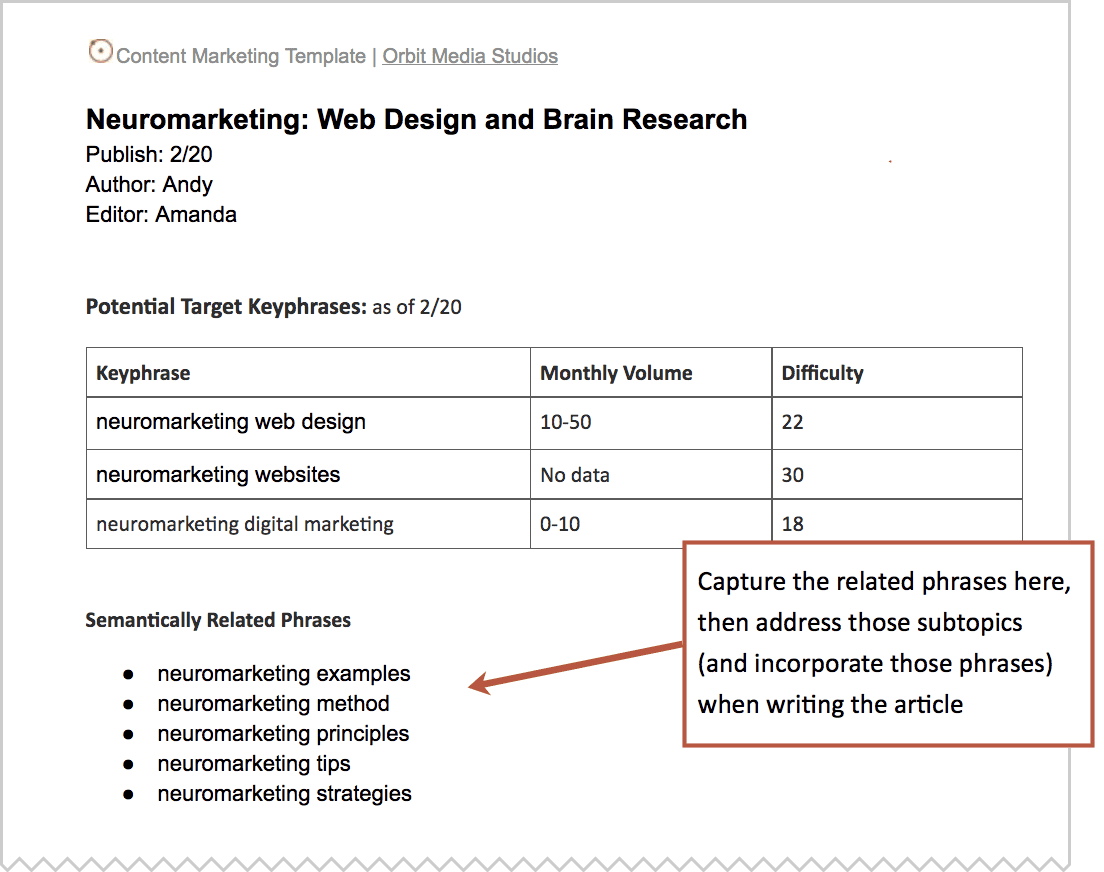
Capture them. You can use them to create better content.
Google doesn’t simply match words from searches with words on pages. It’s doing natural language processing to understand the intent of the visitor and the content of pages. So we need to do semantic SEO. It’s basically a ridiculously simple two-step process.
- During keyphrase research, jot down all of the related phrases you find, even if they don’t end up being your primary keyphrase.
- While writing, work those phrases into your content. But don’t be tempted to do keyword stuffing. Think about the visitor. Find ways to cover those subtopics and answer the related questions. The idea is to let the semantically related phrases pull you deeper into the topic, making it a more detailed page.
Keyword research principal #11
Target the topic, not just the keyphrase.
Again, if you’re using our content marketing template, it will look something like this:
Here again, SEO software can help.
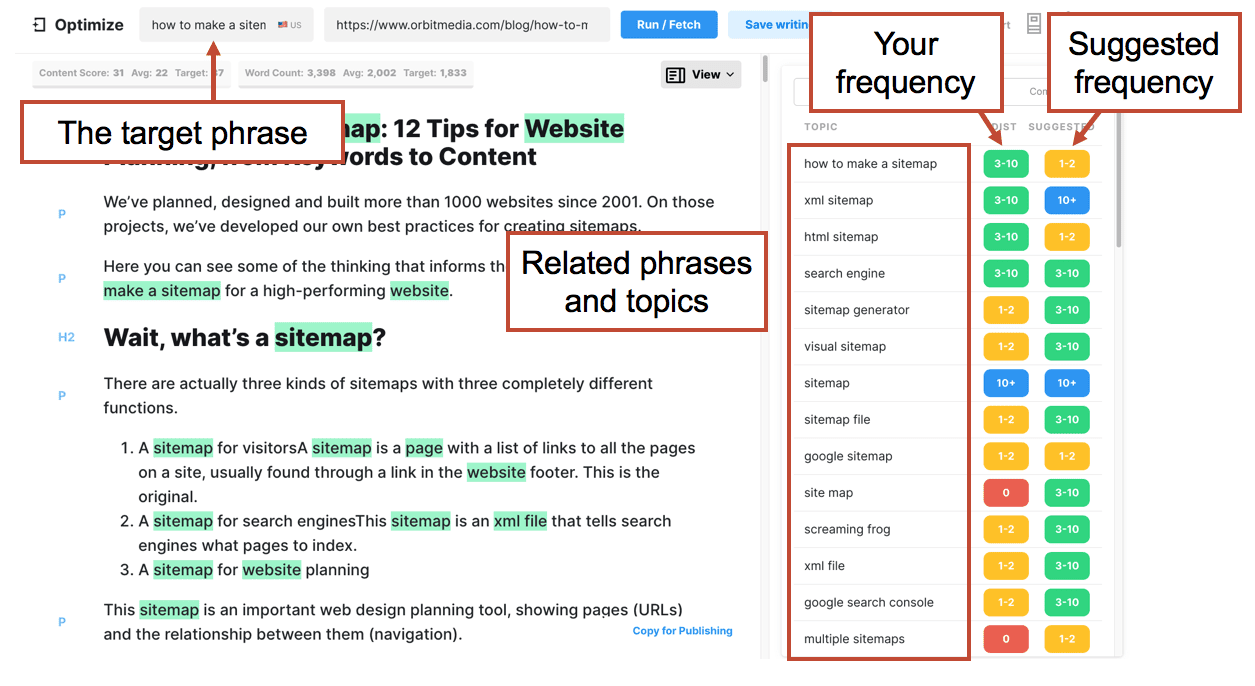
- SEMrush has a Google Doc add-on called the SEO writing assistant. It provides recommendations and tracks keyword inclusion as you write. It’s excellent.
- MarketMuse has a tool called Optimize that also makes recommendations and tracks keyword usage as you write. It shows the keyword frequency for your content and compares it to the other pages that rank for the target keyphrase. It looks like this:
Next steps: Go make something
You did it. You’ve picked out a target search term. Let’s review what we’ve done and think about what we’ll do next:
- You’ve carefully considered the intent of the phrase
- You’ve looked at search volume and found some evidence of demand
- You’ve researched the competition and the difficulty of the phrase
- You’ve examined the current search results page for the phrase
- You’ve collected the closely related phrases
- You’re planning to create a single URL that fits on your sitemap or in your content strategy
You’re ready to write. This brings us to the final principal…
Keyword research principal #12
If you expect to rank, you should make one of the best pages on the web for your topic and target keyphrase.
Of course, you need to follow SEO best practices and indicate relevance in the most visible places. But beyond all of the tricks and tips, you’re really just trying to make something excellent. If you do not create one of the best pages on the web for the topic, you have no right to rank.